Personal note:
It has been some time since the initial release of my AV exclusion script (v1.0). The community response has been overwhelmingly positive, and I also received several valuable suggestions around optimization and overall design.
Based on this feedback, I’ve revised a number of parameters and performed a general refactoring of the script. A key focus was security: to avoid unnecessarily exposing the system, I carefully reviewed and revalidated every exclusion defined by the script, ensuring that no superfluous ports are opened.
Given the large number of executables introduced by both Veeam and PostgreSQL, I decided to retain the dynamic folder-scanning approach for identifying executables that need to be added as antivirus exclusions. This mechanism also ensures that newly introduced components are handled automatically.
Please note that testing was performed exclusively with Veeam Backup & Replication v12.3.2 and v13.0.1, along with the latest available versions of all related products (including Veeam ONE, Veeam Recovery Orchestrator, and Veeam Backup for Microsoft 365). Compatibility with earlier versions of Veeam software cannot be guaranteed.
Development of this script is ongoing, and I plan to continue refining it as new Windows-based versions of Veeam software are released.
Disclaimer:
Important: I do not provide any guarantee that the script, which has been successfully tested by me, will run without errors in every environment. The script is intended solely to simplify and standardize procedures, which may not be suitable for every environment! Additionally, I do not guarantee the completeness of the tests!
This script does not cover antivirus exclusions for hypervisors or guest operating systems. Always configure these exclusions manually and strictly follow the most recent Veeam Knowledge Base recommendations. Happy to tailor it further (e.g., more formal, more conversational, or with direct KB links).
Requirements and procedure:
The script is designed for new and existing installations (add-on character)!
- The server should not be a domain member, but it works with domain-joined systems
- OS: Windows Server 2022 or 2025 Standard or Datacenter
Procedure for new installations:
- Install Windows Server (as required).
- Install drivers (VMware Tools or vendor-specific drivers).
- Set IP configurations (assign IP address, etc.).
- Set server name and workgroup, then restart the server.
- Create a folder named “Install” on drive C:.
- Perform Windows OS hardening (e.g. by script)
- Allow the server to restart (if required) and install Veeam software.
- Apply / implement the Veeam Security & Compliance script.
- Copy the AV script into the Install folder.
- Execute the script with administrative privileges (PowerShell).
- Run the script by selecting the appropriate components (multipe component selections - one after the other - are possible!)
Important: I recommend familiarizing yourself with the content listed below, as it introduces changes that may affect the operation of the system!
The script can be run multiple times, the script checks the presence of the rules and applies only the not existing rules and exclusions!
The script can also be run when an external antivirus software is installed but I cannot guarantee that the exclusions will be set correctly. Ofter the external solutions require to set exclusions and policies separately on a management console (meanwhile often cloud consoles).
Script architecture:
I'm still working with a dynamic directory scan for all of the components except Veeam ONE and Veeam for M365 to find Veeam executables that have to be added as Defender exclusion. This has several reasons:
Maintainability:
If I listed each .exe one by one, any minor update (e.g. Veeam adds a new helper EXE in the next patch) would require manually updating the script. With a folder scan, you get immediate coverage for all executables.
Coverage:
With a dynamic scan I ensure the completeness of the script regarding .exe exclusions. A typo could lead to issues and a not existing exclusion for a specific executable.
Veeam ONE and Veeam M365 specify the exact executables and from my experience these two components are a bit more static than e.g. VBR so I followed the KB article straight.
Folder creation:
I decided to check if a specific folder exists and in case not, to let the script create it. This avoids future issues with missing rules.
Example: A newly created VBR environment has never performed a FLR so the appropriate folders may not be present at all, that would cause the script to fail and the rules to be missing. The impact may be present the second a FLR is performed so I decided to avoid this by pre-creating the folders before there are needed.
Sources:
I used the Veeam KB articles as data source for the script and let some personal best practices and experiences in as well. With this version I reviewed every list I had in the script to re-apply the Veeam KB articles:
KB1999: Antivirus Exclusions for Veeam Backup & Replication
Ports - User Guide for VMware vSphere (and other hypervisor KB articles)
KB2046: Antivirus Exclusions for Veeam ONE
Ports - Veeam ONE Deployment Guide
KB3074: Antivirus Exclusions for Veeam Backup for Microsoft 365
Ports - Veeam Backup for Microsoft 365 Guide
KB2763: Antivirus Exclusions for Veeam Recovery Orchestrator
Ports - Veeam Recovery Orchestrator User Guide
Ports - Veeam Service Provider Console 9.1
Ports - Veeam Cloud Connect Guide
Ports - Veeam Agent for Microsoft Windows 13
Running & Installing PostgreSQL On Native Windows
Downloading the script:
Here is the corresponding GitHub link:
lukas-kl/veeam-win-av-script: Veeam AV Exclusion Script for Windows)
Domain joined vs. Workgroup:
Some Veeam systems might be located within a dedicated domain. I always recommend my customers to avoid joining Veeam systems to a domain to avoid performing any kind of hardening to that backup or DR domain.
This script is basically able to run on both domain-joined and standalone (Workgroup) systems but please keep in mind that existing GPOs might overwrite the rules and policies set by the script!
Change Log v1.1 (as of 02/12/2026):
- Redefinition of the implementation functions / routines (declarations)
- Adding the PostgreSQL exclusions (folder as well as executables) to each required component
- Removing several typos and editing comments
Execution & script contents (ReadMe):
- Check, if Windows Defender Antivirus is enabled (if not, enable it)
- Check, if Windows Defender Antivirus real-time protection is enabled (if not, enable it)
- Check, if Windows Defender Firewall is enabled (if not, enable it)
- Declaration of function for Defender folder exclusions
- Declaration of function for Defender process exclusion (dynamically by finding processes within the Veeam folders)
- Declaration of function for Defender extension exclusion (dynamically by finding executables within the Veeam folders)
- Declaration of function for Defender firewall rule
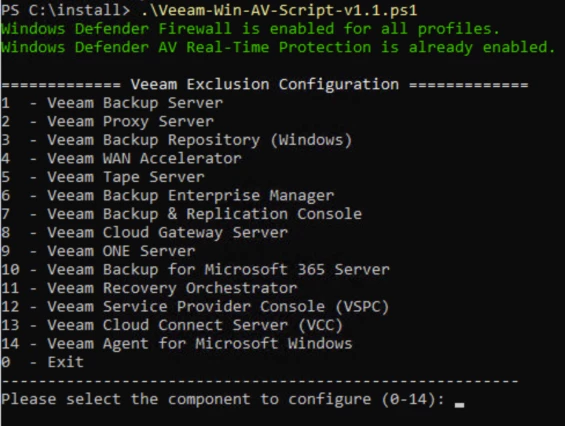
- Adding a main menu to select one of the following components:
- Veeam Backup Server
- Veeam Proxy Server
- Veeam Backup Repository (Windows)
- Veeam WAN Accelerator
- Veeam Tape Server
- Veeam Backup Enterprise Manager
- Veeam Backup & Replication Console
- Veeam Cloud Gateway Server
- Veeam ONE Server
- Veeam Backup for Microsoft 365 Server
- Veeam Recovery Orchestrator
- Output log file to C:\Install