


I'm currently studying to become a Cybersecurity Architect, and I wanted to share my learning journey with the community. In this series of posts, I'll be exploring security posture in cloud and hybrid environments, focusing on both infrastructure and application security. My goal is to break down complex concepts and make them accessible to anyone interested in cybersecurity.
Classifying Applications
Organizations must classify applications by priority because resources (time, funds, personnel) to implement security controls are limited.
Critical/high-priority applications are those that, if compromised, would cause significant impacts. The main criteria are:
- Impact on business mission: Compromise blocks operations, revenue, or damages reputation
- Handling sensitive/regulated data: HR systems, confidential information, personal data
- Broad access to IT environment: Systems like identity stores that, if breached, expose large portions of the infrastructure
- High attack exposure: Typically Internet-facing applications
Context is crucial: a critical application for one organization may be low priority for another. The example provided compares an e-commerce website (sole revenue source = critical) with a dog trainer's website (useful but not essential for operations = not critical).
Classification determines which applications require priority in threat modeling and security control implementation.
Setting Priorities for Application Threat Mitigation & Classifying Applications by Priority
Most organizations manage numerous applications with varying levels of importance. Since no organization has unlimited resources, it's crucial to identify which applications are critical and should be prioritized for threat modeling and security controls.
Understanding Business Impact
Context is everything when classifying applications. An e-commerce website generating all company revenue is business-critical—any breach or downtime directly stops operations. In contrast, a local service provider's website, while valuable, isn't essential to daily operations.
Criteria for Critical/High-Priority Applications
Applications should be prioritized when they have:
- Significant mission impact: Compromise would severely affect operations, revenue, or reputation
- Sensitive or regulated data: Systems handling personal information, financial data, or classified content
- Broad IT access: Applications like identity stores that, if compromised, could damage the entire infrastructure
- High attack exposure: Internet-facing applications with increased vulnerability to threats
The classification must reflect your organization's specific context—what's critical for one business may be low priority for another.
Microsoft Security Development Lifecycle (SDL)
SDL’s five major threat-modeling steps
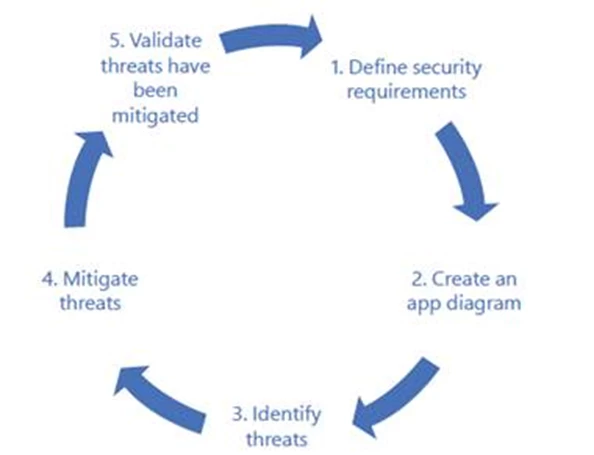
Microsoft has refined the SDL over 20+ years. While threats evolve, the core methodology remains effective. Here are the five essential steps:
1. Define Security Requirements
Establish security standards the application must meet, whether organization-wide policies or app-specific requirements.
2. Create Application Diagrams
Map all components, connections, and relationships within your IT environment. Accuracy here is critical for effective threat modeling.
3. Identify Threats
List potential threats—external, internal, app-specific, or organizational. Use threat intelligence and categorize by severity (critical, high, medium, low).
4. Mitigate Threats
Implement countermeasures for identified threats. If risks are accepted instead of mitigated, document this with appropriate management approval.
5. Validate Mitigations
Test all implemented security controls to ensure they work as intended.
Like every component of IT infrastructure, applications are exposed to threats that require a comprehensive security strategy. However, it's not always possible to mitigate all risks.
Why Not All Threats Are Mitigated
There are several reasons:
- Limited budget
- Lack of specific expertise
- Unfavorable cost-benefit assessment
- Operational impact too high relative to the risk
The Recommended Approach
To understand application threats in a business context, it's essential to conduct an analysis that identifies:
- Threats potential to the application
- Attacks that are possible
- Vulnerabilities present in the system
- Mitigations and countermeasures necessary to protect the application
This assessment enables informed priority-setting and resource allocation where truly needed, balancing security with operational requirements.
Microsoft Threat Modeling Tool (and download it) at
https://www.microsoft.com/en-us/securityengineering/sdl/threatmodeling
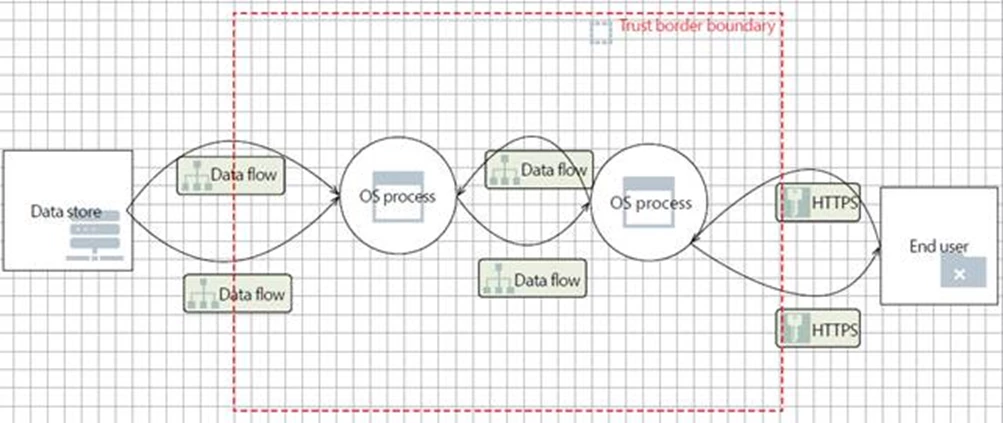
STRIDE and Threat Mitigation Summary
STRIDE Methodology (used in Microsoft SDL):
- Spoofing: Impersonation through compromised credentials
- Tampering: Unauthorized modification of system data
- Repudiation: Inability to track user actions
- Information disclosure: Exposure of confidential information to unauthorized users
- Denial of Service: (not mentioned in the excerpt but part of STRIDE)
- Elevation of privilege: (not mentioned in the excerpt but part of STRIDE)
Threat Mitigation:
Once threats are identified, security controls are implemented following the defense-in-depth principle: if one control fails, others can still protect the system.
The number of controls to implement depends on:
- Organization's security posture
- Risk tolerance
- Assessment of the likelihood of each control failing
Mitigation categories in the Microsoft Threat Modeling Tool:
- Auditing and Logging
- Authentication
- Authorization
- Communication Security
- Configuration Management
- Cryptography
- Exception Management
- Input Validation
- Sensitive Data
- Session Management
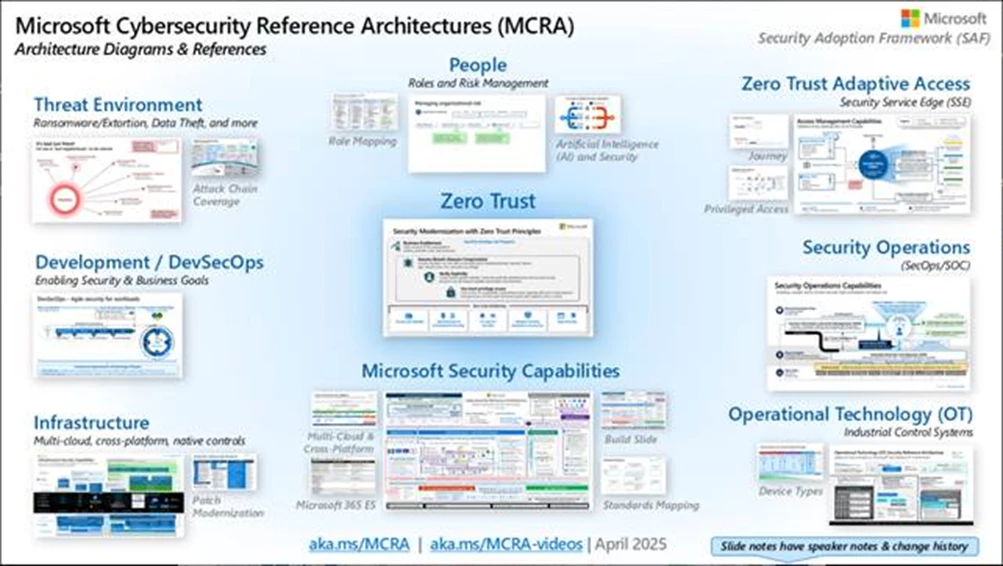
Microsoft Cybersecurity Reference Architectures (MCRA): Your Security Blueprint
The Microsoft Cybersecurity Reference Architectures (MCRA) is a comprehensive resource providing security best practices through detailed technical diagrams and guidance.
What's Inside
MCRA covers essential cybersecurity domains including:
- Zero Trust architecture and implementation guidance
- Security operations workflows and processes
- Multi-cloud and cross-platform security capabilities (Azure, AWS, GCP)
- Operational Technology (OT) security
- Attack chain analysis and defense coverage
- Azure native security controls
- Security roles and responsibilities framework
The resource also features Microsoft and The Open Group's Zero Trust overview, plus the Zero-Trust Rapid Modernization Plan (RaMP) for practical implementation.
Built for Hybrid Environments
MCRA is specifically designed for today's "hybrid of everything" reality, addressing security across:
- On-premises datacenters
- Microsoft 365 and Azure
- Third-party platforms (ServiceNow, Salesforce, Box, Dropbox)
- Multi-cloud environments (AWS, GCP)
This makes MCRA an essential reference for organizations navigating complex, distributed IT estates while maintaining robust security posture.
Microsoft Cybersecurity Reference Architectures (MCRA) | Microsoft Learn
The Microsoft Cloud Security Benchmark (MCSB) is a security framework that provides best practices for securing infrastructure and development platforms across hybrid environments, including Azure, on-premises datacenters, and other cloud providers like AWS and GCP.
Key Components
MCSB consists of two types of guidance:
- Security controls: High-impact security recommendations generally applicable across any environment
- Service baselines: Specific interpretations of security controls for individual Azure services, providing prescriptive recommendations for service security configuration
Integration with Microsoft Defender for Cloud
Microsoft Defender for Cloud (MDC) uses MCSB as its default security compliance initiative, implementing over 200 Azure Policy checks to automatically measure security posture. MCSB security controls are mapped to other recognized security standards, including CIS Controls, NIST SP 800-53, and PCI-DSS, with additional mappings available in the MDC regulatory compliance dashboard.
Full documentation is available at https://aka.ms/benchmarkdocs.
Cybersecurity Best Practices Summary
Core Principles:
- Technology is essential to automate security processes but doesn't replace security experts
- Best practices are found throughout MCRA and MCSB frameworks
Key Recommendations:
Technology & Tools:
- Learn and utilize all available security capabilities
- Use multi-technology approaches (not just firewalls/SIEM)
- Apply both data plane and management plane security controls
- Protect platform/infrastructure AND specific workloads
- Use native cloud controls with consistent tooling across providers
Holistic Security:
- Secure the full lifecycle: people, accounts, devices, interfaces, resources, and underlying services
- Balance security with productivity ("healthy friction")
- Avoid blocking productivity without meaningful risk reduction
Privileged Access Protection (Critical):
- Implement elevated protections for privileged accounts/systems
- Use strong MFA, threat detection, and rapid response
- Secure workstations with PAWs
- Protect intermediaries (VPNs, PIM/PAM, domain controllers)
Ransomware Preparedness:
- Validate BC/DR processes include all critical systems
- Test ransomware scenarios regularly
- Protect backups against attacker sabotage/encryption
- Ensure privileged access protection
Bottom Line: Comprehensive security requires technical controls, proper tools, privileged access protection, and ransomware readiness across the entire asset lifecycle.
Recommend best practices for protecting from insider and external attacks
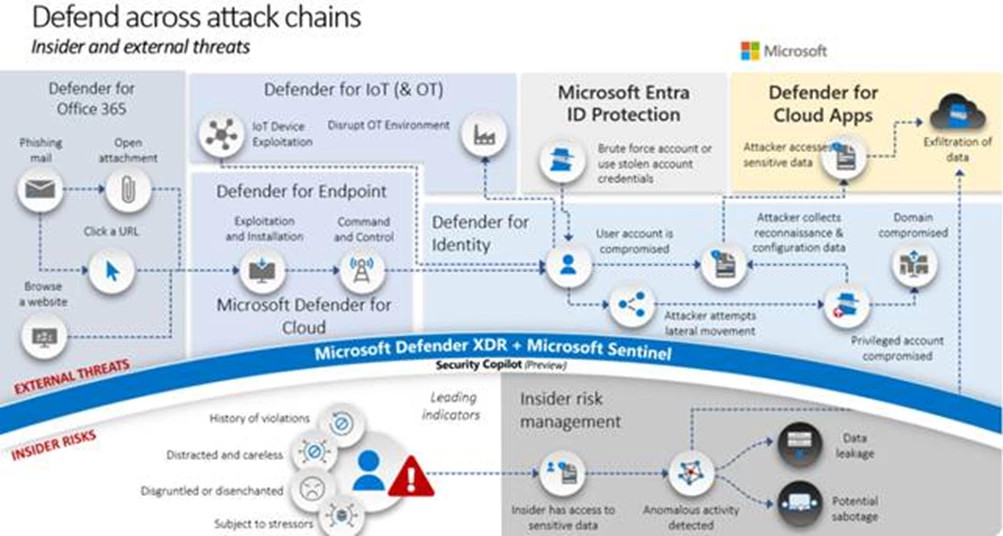
Top diagram: Shows common external attack steps and corresponding Microsoft security capabilities.
Bottom diagram: Shows insider risk indicators and how Microsoft Purview Insider Risk Management detects, triages, and responds to risky user behavior.
External attacks follow common patterns with varying entry points:
- Compromised credentials (password spray/social engineering)
- Phishing emails
- IoT device compromise
- Watering hole attacks
- Cloud application malware
Attack objectives vary: data theft, encryption, ransomware, business disruption, or monetization.
Key insight: Major incidents typically involve privilege escalation via credential theft, mitigated by securing privileged access.
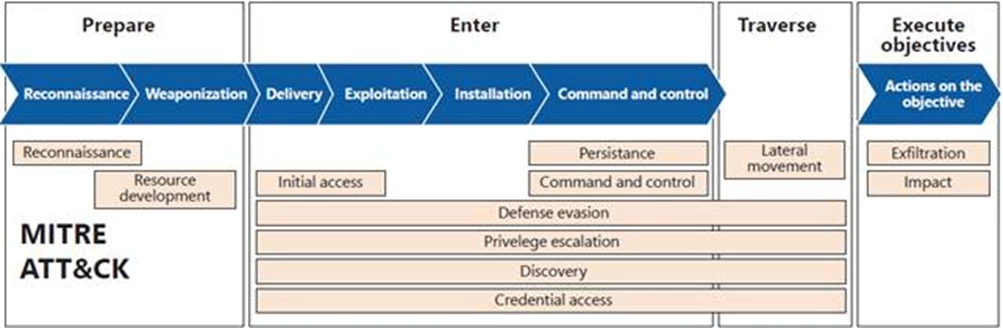
Evolution: Lockheed Martin adapted military "kill chain" concepts to cybersecurity, introducing the "attack chain" concept—viewing attacks as sequential events. Today, organizations use the MITRE ATT&CK framework for detailed security control planning and threat detection coverage.
Attack chain mapping
Security Best Practices
Attack Techniques Overview: Attackers employ various techniques (phishing, credential theft, software vulnerability exploitation) repeatedly or in combination to achieve their objectives across the attack chain phases: preparation, entry, traversal, and execution.
Key Best Practices:
- Continuous Improvement: Systematically enhance coverage across the entire attack chain to eliminate blind spots and strengthen vulnerable areas lacking preventive controls.
- Balanced Investment: Distribute security resources evenly across all lifecycle phases: identify, protect, detect, respond, and recover.
- XDR + SIEM Integration: The security operations landscape has evolved from relying solely on Security Information and Event Management (SIEM) to combining it with Extended Detection and Response (XDR) tools. XDR (including Endpoint Detection and Response/EDR) excels at reducing false positives and improving detection effectiveness for specific platforms, while SIEM provides broad visibility and cross-tool correlation. Both are essential for comprehensive security operations.
- Advanced Automation and Analytics: Minimize manual workload by implementing Security Orchestration, Automation, and Response (SOAR), Machine Learning (ML), and User Entity Behavioral Analytics (UEBA). SOAR technology specifically automates repetitive tasks in detection, investigation, and response, reducing analyst fatigue and distraction.
Recommend Microsoft ransomware best practices
Attack Surface Reduction (ASR) Rules per Ransomware Stage
| Ransomware Stage | ASR Rule |
| Enter Environment | • Block all Office applications from creating child processes |
| Traverse and Spread | • Block executable files from running unless they meet prevalence, age, or trusted list criteria |
Security Best Practices for Ransomware
| Work Item | Best Practice |
| Email/Collaboration | • Implement advanced email security capabilities |
| Endpoint | • Use ASR and tamper protection to block known threats |
| Detection and Response | • Prioritize common endpoints and use integrated XDR tools (e.g., Microsoft 365 Defender) for high-quality alerts and minimal response friction |
| Backup and Recovery | • Create automatic regular backup schedules for critical data |
Secure Backups: The First Line of Defense Against Ransomware
A comprehensive backup strategy is essential for protecting critical business data.
The Problem
After a ransomware attack that encrypted sensitive financial data, the company discovered that traditional backups weren't sufficient. A more robust approach was needed.
The Solution: 6 Security Pillars
1. Multi-Tiered Backups Implement frequent backups covering both on-premises and cloud systems, capturing critical data regularly.
2. Geographic Redundancy Maintain multiple copies in diverse locations to eliminate single points of failure and ensure rapid recovery.
3. End-to-End Encryption Protect data both in transit and at rest, with strict access controls and multi-factor authentication.
4. Continuous Testing Regularly simulate attack scenarios, including ransomware, to validate the effectiveness of recovery systems.
5. Incident Response Integration Define clear roles for IT and security teams in the incident response plan.
6. Personnel Training Educate employees on best practices and risks like phishing that could compromise backups.
The Results
Implementation led to resilient data recovery, reduced downtime, preserved financial data integrity, and a strengthened security posture. Most importantly, it restored trust with customers and regulators.
Special Considerations
OT Environments: In operational technology environments, prioritize safety and availability over updates, using passive detection for legacy systems.
Insider Risk: Manage internal threats (data leaks, confidentiality breaches, IP theft, fraud) separately from external ones.
Key Takeaway: A backup isn't just a data copy—it's a strategic business continuity component requiring continuous planning, testing, and updates.
Check veeam resource:
Simply Resilient: Best Storage for Veeam | Object First
7 Best Practices for Ransomware Recovery: How to make recovery your top priority
Microsoft 365 Ransomware: Prevention, Detection & Fast Recovery | Veeam
Veeam Data Platform: Security Best Practices
veeam-data-platform-security-best-practices_slides.pdf
enjoy



