Solved

Calculator seems off for S3 Immutable GFS Backups

  • December 9, 2025
  • 3 comments
  • 81 views

Hello guys,


I’m using the Calculator on a daily basis, and am pretty sure the calculation is wrong (or maybe I’m?? :D) when you consider Immutable GFS Backups to Object or local storage.

If you backup Immutable the Calculator will ask for a immutability Period, this in fact does not matter when using GFS as always one Full Backup will be kept for the configured GFS Retention.

Or at least as far as I’m aware.


Heres my test:
Lets say we have 16TB of source Data, this is the immutability with 14 days and gfs.
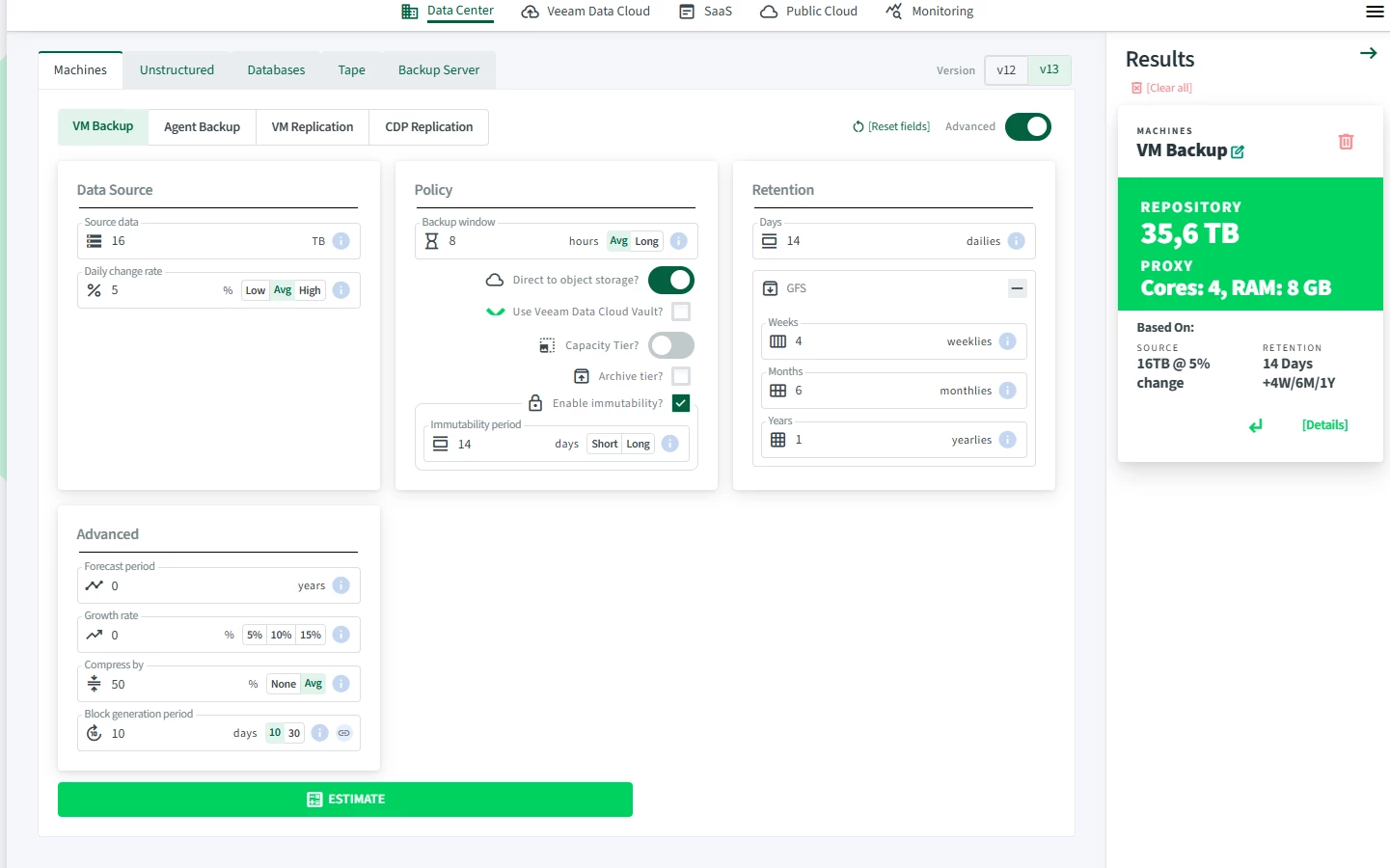
​​​​​​


As far as I understood it, 16TB is round about the source capacity, of course we will shrink it a bit thanks to compression.

Lets say a full backup will then be 10TB which seems surreal already. And lets now turn gfs off in the calculator.

Now we only have 14 Dailies immutable but we are missing another 11 Full Backups as stated, GFS will always take full backups.
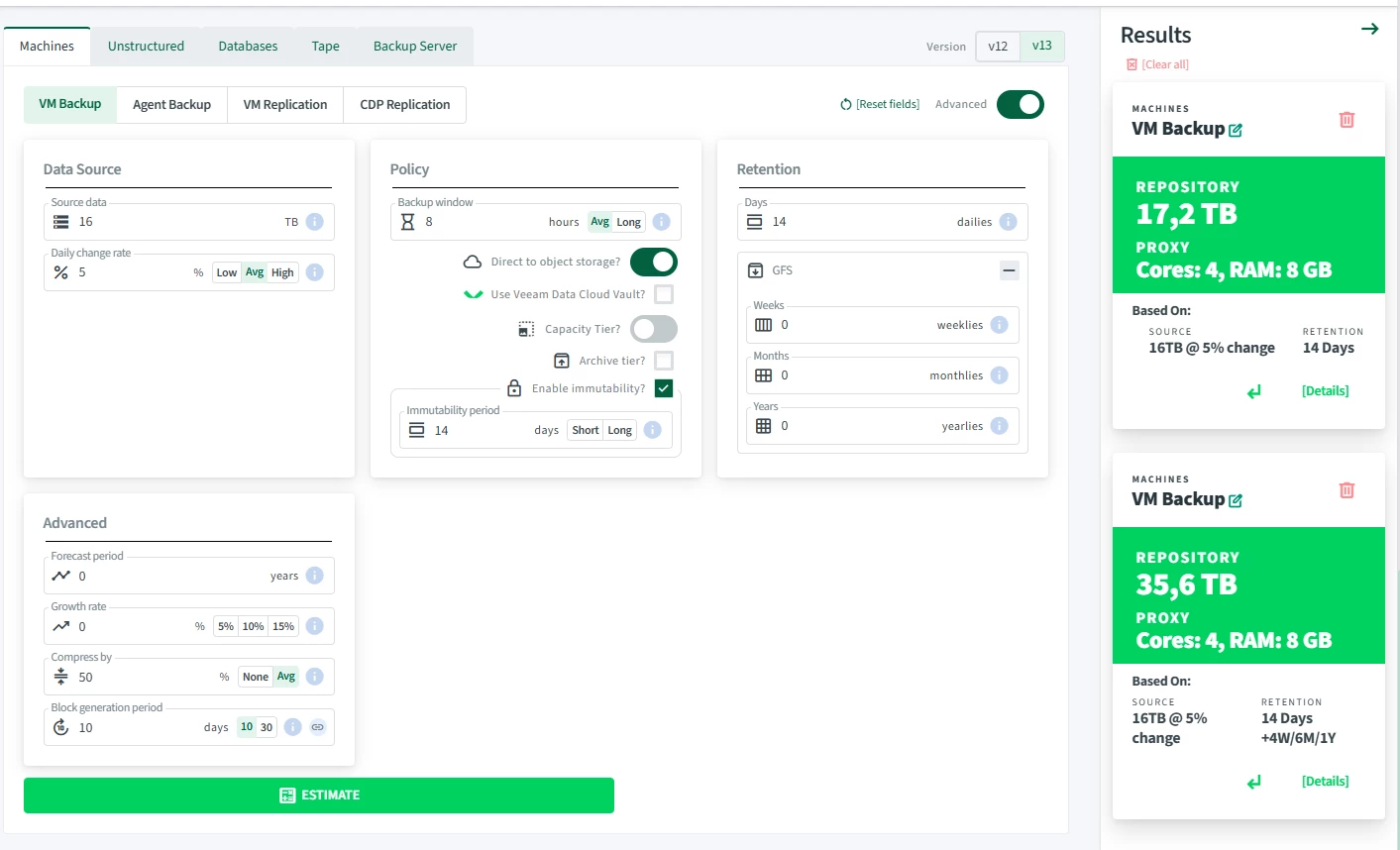
 

Am i doing something wrong? Is the calculator not able to predict this scenario?

 

Best answer by adamC

Hello!

I’m not quite sure I follow this completely. However, the Calculator does not support Active Full to Object storage as it’s not recommended to perform Active Full (same with REFS/XFS) as it negates the space saving technology. 

Backups are using a forever forward technology for regular retention as well as GFS. Meaning that objects are stored and locked at the object (block) level. So we only keep the objects required to restructure a full backup. We do not keep multiple iterations of the full backup unless the user schedules or triggers an Active Full on purpose. 

-AC

3 comments

Forum|alt.badge.img+1
  • Veeam MVP
  • Answer
  • December 15, 2025

Hello!

I’m not quite sure I follow this completely. However, the Calculator does not support Active Full to Object storage as it’s not recommended to perform Active Full (same with REFS/XFS) as it negates the space saving technology. 

Backups are using a forever forward technology for regular retention as well as GFS. Meaning that objects are stored and locked at the object (block) level. So we only keep the objects required to restructure a full backup. We do not keep multiple iterations of the full backup unless the user schedules or triggers an Active Full on purpose. 

-AC


  • Not a newbie anymore
  • June 23, 2026

Hello!

I’m not quite sure I follow this completely. However, the Calculator does not support Active Full to Object storage as it’s not recommended to perform Active Full (same with REFS/XFS) as it negates the space saving technology. 

Backups are using a forever forward technology for regular retention as well as GFS. Meaning that objects are stored and locked at the object (block) level. So we only keep the objects required to restructure a full backup. We do not keep multiple iterations of the full backup unless the user schedules or triggers an Active Full on purpose. 

-AC


Is good old fashioned backup folder on a disk on bare metal considered an object repository?


chas
Forum|alt.badge.img+1
  • Comes here often
  • June 30, 2026

Well, it might be if you configured it as object storage 😊. I daresay there is an operating system and a file system between the bare disk and the folder, so I might assume you are using block storage (not object) with a file system. Object storage on-prem is typically an S3-like protocol, whereas block will typically be a file system like NTFS, ReFS, XFS or even something like NFS. In your screenshot above you have configured an Object Repository as a target, which is why Adam answered that way. Generally, if you are using block, we’d recommend a hardened repo which means XFS so the same answer may apply.