Question

Calculator for Real Physical Immutable Linux Hardened Repository

  • March 26, 2026
  • 7 comments
  • 39 views

Hi there my friends!!

Can you help understanding the calculator? It doesnt seem to me it has taken into consideration real physical backup servers linux hardened immutable servers and all.

There is lots of terminology and calculations for S3 and Object-Storage servers, not so many for real physical linux hardened immutable repo.


Also I feel it kinda misleading. Let’s see:
>I have forward incremental backup chain with full on sundays and I have 7 days immutability.

>For the immutability to be ACTUALLY REAL I understand I should have 14 days immutability.

>Otherwise when I get to day 8, I have the full from yesterday, and I have the original full I did.

>Hacker gets into repo pwns the box, messes, modifies, destroys my original full.

>All week lost also yesterdays backup because it depended on the previous chain.


I understand that your documentation says that the immutability locks will be automatically applied to the whole chain, however, thats not what your calculator says:
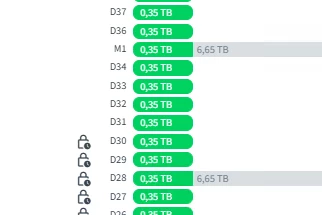
Here you can see, lets say hacker pwn backup 31 to 35.
Then, too sad :( no backup for 29 and 30 cause incremental depended on that
If no backup for 29-30 > then NO REAL IMMUTABILITY till day 30
Which is it? Please clarify calculator

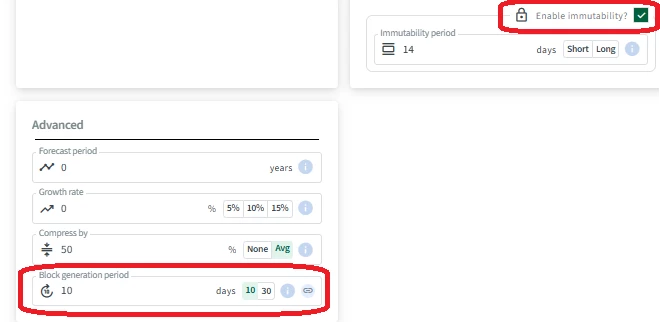
Also guys, block generation period. Hard to understand if that should apply to my scenario or not, or what it even is at all.

Cannot be disabled, always showing 10 minimum. Click on the documentation link send you to Object Storage.

 

I am not using object storage, so can you help me with the right documentation or right calculator?


Also I set dailies to 60, why am I getting it up to the 70 daily??
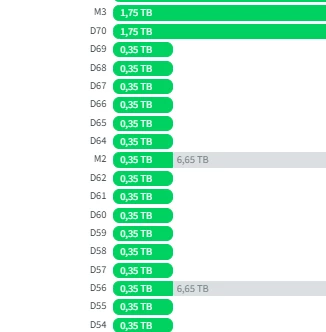
It seems it should have been enough up to 67. That should guarantee coverage for the 7 days after the 60 I set, instead of calculating all the way to 70.
If you are wondering, maybe is because of the monthlies? Then again, it could “go to” 70, but then, you have no reason to retain 69 or 68 either
In this scenario I could let go of backups 64 to 70 actually if I only need up to M2 to keep that chain to the day 60.
The problem I suspect is here, you are mixing up backups M2 and D70 like if one depended on the other or something.


I hope you can help out and understand my questions. It does seem theres some things to fix up and improve here. Like If i got some of this wrong or misunderstood, you can still work on the understanding of it.

EDIT: Also, why do the Fulls, show some GREY data??

Isnt it Full? are you telling me it is synthetic full? What is that? Why is that there? Why is it not explained? Whats different on day 70 that it doesnt have the grey data?


Lots of questions unanswered by this calculator….
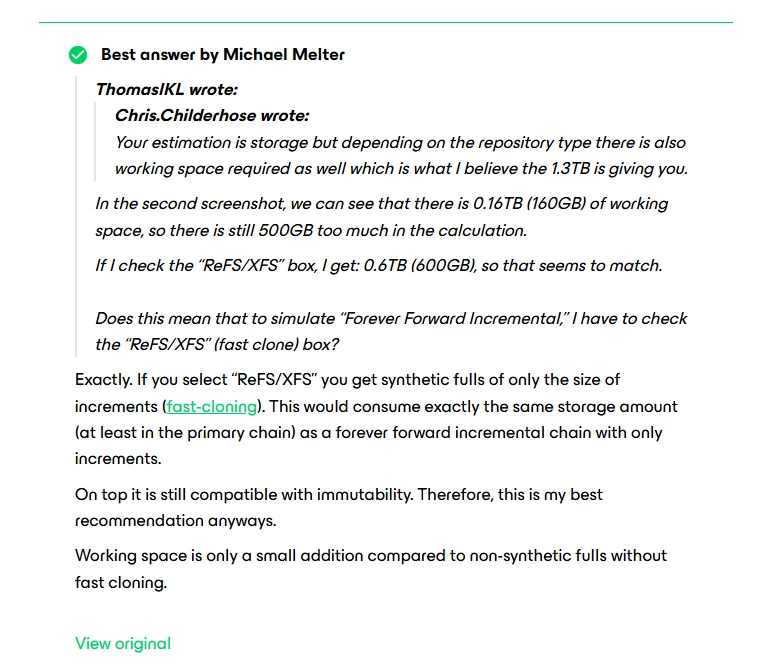
 

Last comment: I saw this forum response. Seems to imply, or I read it as, “to calculate for Synthetic Backups, you must click ReFS/XFS because thats the thing that allows it”. Well it could have been more useful if there aws a little something clarifyin that. Or it could have been more useful, if the calculator allowed for selecting these abstract categories (synthetic, reversed, forward, incremental etc) parameters, and THEN tell you what you need to do to have it.


7 comments

  • Author
  • Not a newbie anymore
  • April 8, 2026

@david.tosoff ​@safiya is this something the team is thinking about internally reviewing or something?

Will this probably cause some modifications in future for the calculator?

Are you planning to add new features and change the UI/UX to accomodate for the other scenarios that veeams offers that are not object storage on cloud providers?

Sorry for bad enlighs Thank you!


david.tosoff
Forum|alt.badge.img+1

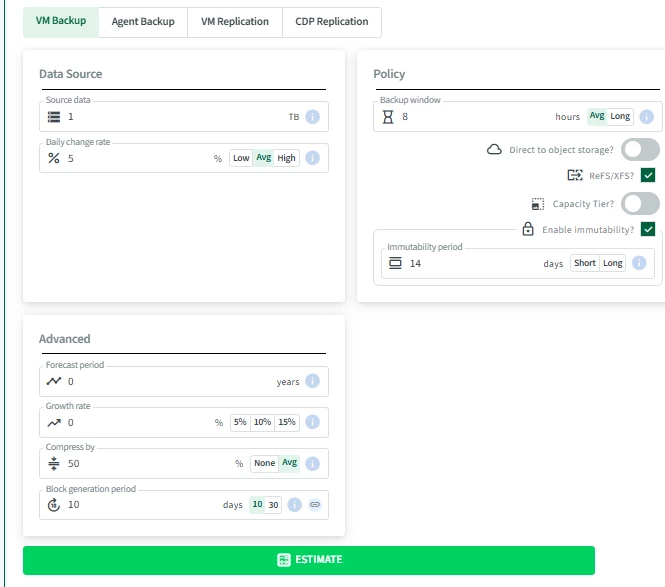
@maurodriguez the default settings when you enter the tool are based around an non-object repo. So long as you haven’t added Direct to Object storage or Capacity Tier, it is built as block storage.


  • Author
  • Not a newbie anymore
  • April 8, 2026

@maurodriguez the default settings when you enter the tool are based around an non-object repo. So long as you haven’t added Direct to Object storage or Capacity Tier, it is built as block storage.

Mr David thank you for reaching out this is thoughtful of you I appreciate it.


Please see below If I enable immutability, automatically get block generation period, which is an object storage thing, it  read it as contradictory to your statement.


The calculator is black box to us. We dont know what it does inside. This detail alone makes it untrustworthy. Because I cannot pinpoint this against a calculation that matches what documentation explains. In other words, If I read official documentation for Immutable Repo and there is nothing about block generation, but there is on repo that im NOT using (object storage), IF for some reason i get discrepancy in calculations (which is what im calling out), then I no longer trust/no longer know, whats going on or why my calculation is different, I can only guess: Its the WRONG calculator. Add to that the other points i was calling out originally.


  • Author
  • Not a newbie anymore
  • April 8, 2026

Look sorry for not full picture, here is full picture i am NOT doing no object storage thing


david.tosoff
Forum|alt.badge.img+1

Thanks ​@maurodriguez. That’d be a UI bug. You’re correct that block Gen does not apply. I’ll put in a fix for it. 


  • Author
  • Not a newbie anymore
  • April 8, 2026

Thanks ​@maurodriguez. That’d be a UI bug. You’re correct that block Gen does not apply. I’ll put in a fix for it. 

Ok thank you for having the team take a look at it. What concerns me is what else is going on with the logic behind it that might be tied up/related/or dependent on that.


If a function sets block generation = true because i did immutability = true then what else could be influencing the calculation, you see what I mean? Especially since I believe I am seeing a whole unnecesasary extra week of backups with the set retention i used.


david.tosoff
Forum|alt.badge.img+1

Nothing else is contingent on it. It’s just that that the UI shows block generation field if any of immutability settings are turned on, where it should ignore if not D2O.


the extra week of backups you’re seeing is by design.