Hi all,
I am currently involved in an opportunity to deploy over 1,000 VMs and 500 TB of storage to a single GCP region.
I went through all the documentation and pulled out some key facts that I think will help you optimise your Veeam Backup for Google Cloud jobs.
The first point is that with the default settings, you can have up to:
- 15 Parallel jobs running (global across all regions)
- 25 concurrent VMs being backed up per job
This means that the maximum number of concurrent VMs you can back up is 375.
Now, this might not sound like a lot, but when you consider that the default worker instance (e2-highcpu-8) can run at a blistering 420 MBps (NTFS disks up to 540 MBps), that comes to 153.8 GBps!
This is before going to the e2-highcpu-16, which has a speed of up to 800 MBps, at which point I think the backups would finish before they even start.
Of course, this assumes all backups start at the same time; the actual throughput equals the number of concurrent backups.
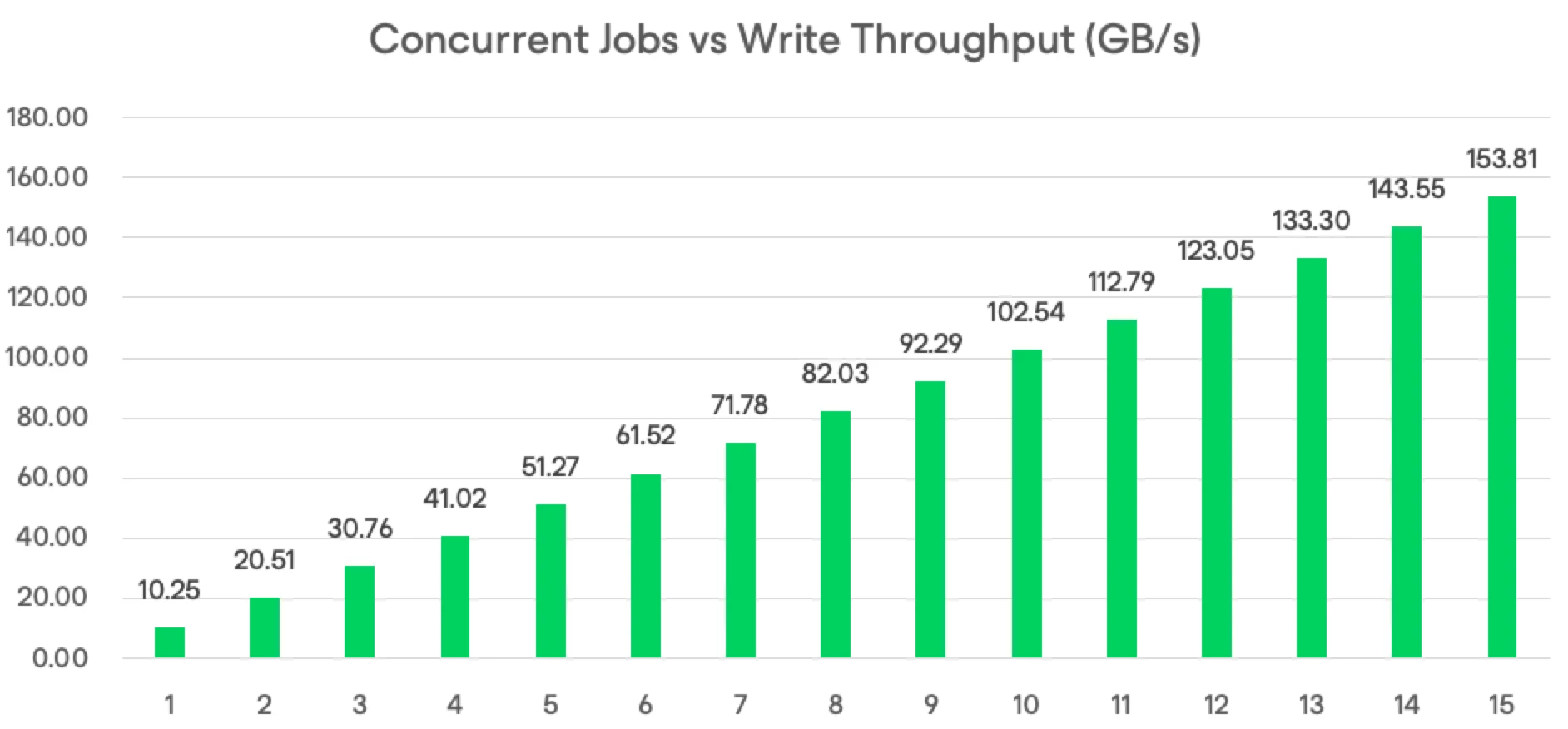
This is based on 420 MBps per worker.
Now you might be thinking that there aren’t sufficient workers to process all 1000 VMs, and that is true, the key is that you can have more VMs in the jobs than 25. In the ideal case, there would be 67 VMs per job, with 25 VMs running concurrently, and 3 batches of 25 VMs per job (actually, two batches of 25 and one of 17 in this case). Note that I am aware I am assuming every VM has exactly the same amount of storage.
Now, this raises the question of whether Google Cloud Storage can handle this throughput. Well, according to Google, there’s no upper limit on performance, but there is an initial 1000 PUT limit per bucket, and it takes time to scale out to meet performance requirements. So the advice I can give on that so far is to pre-warm the bucket with some lower-priority jobs before getting to the more important ones. Even though we’re talking about the difference of a few minutes. In fact, the estimated backup time for all the VMs in this example was under 2 minutes. So, waiting for the ramp-up time is likely to push out only a few minutes at worst.
Now there is more nuance to the disk quota required based on the amount of data being backed up, but I’m still digging into this and will try to follow up in the future.
My advice on job design at the moment is to keep it to a maximum of 15 concurrent jobs. As you have seen, there’s a lot you can do within that limit.
If you can stagger the jobs, that will keep the overall concurrency down and will require less overall throughput to the Google Cloud Storage. Keep in mind that we are running at 420 Mbps, so the increments will complete quickly, and we don’t have the usual constraints we would normally have on-premises. Ideally, keep up to 25 VMs per job, but it is better to oversubscribe each job than to go over the maximum concurrent jobs, based on my experience.
Thanks for reading, and I welcome any feedback.
Ed