


Veeam Backup Configuration Restore – MS SQL Error & Workaround
Context
During a Veeam Backup & Replication configuration restore on a new server, I encountered an error. “XML Parsing: document parsing required too much memory”
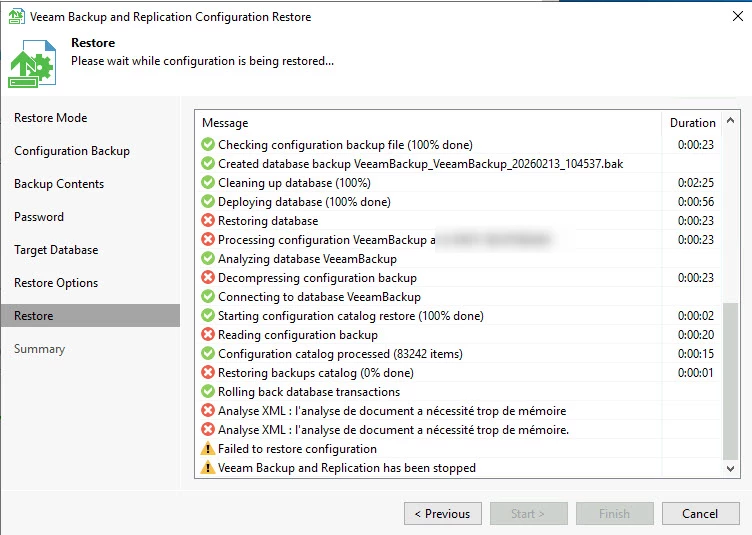
- Source server: MS SQL Standard Edition
- Destination server: MS SQL Standard Edition (same version)
What I tried
- Same MS SQL Standard Edition → Same error
- Migrated to MS SQL Express Edition → Same error
- Switched to PostgreSQL → It worked!
This confirmed that the issue was related to MS SQL.
Veeam Support Recommendations
Veeam Support provided two options:
Option 1: Restore without session history or backup/replica catalog
Restore the configuration backup without the session history or backup/replica catalog.
⚠️ In my case, this did not resolve the issue.
Option 2: Change the SQL bulk write method to row-based writing
If the SQL Server is dedicated to Veeam and does not host any other production database, you can change the way SQL writes its data by switching from "bulk" to "rows" via the following registry key:
HKEY_LOCAL_MACHINE\SOFTWARE\Veeam\Veeam Backup and Replication\ConfBackupAdd the following value:
DatabaseWriter (REG_DWORD) = 0Steps:
- Add the registry key mentioned above
- Restart the Veeam Backup & Replication service
- Restart the SQL Server service
- Retry the configuration restore
Takeaway
If you are stuck with MS SQL during a configuration restore, consider:
- Switching to PostgreSQL as a quick workaround
- Or applying the registry fix provided by Veeam Support if you want to stay on MS SQL
Cheers




