


I've been thinking about writing a blog about how I approach backup tagging and design for quite some time.
When working with larger environments, it can become increasingly difficult to ensure that every single VM is properly protected. I've spoken with several customers who manually add newly deployed VMs to their backup jobs.
The problem with this approach is that it relies heavily on people remembering to perform an additional task every time a new VM is deployed.
It usually doesn't take long to discover VMs that have been running for weeks or even months without being included in any backup job.
So, I started thinking about how we could solve this problem in a more structured way.
My proposal was to build a tag-driven backup design based on agreed SLAs, while also introducing an additional safety net to catch VMs that might have been forgotten during the tagging process.
The goal was simple:
Make backup protection predictable, automated and, most importantly, ensure that no VM is accidentally left unprotected.
1. Start by defining the backup SLA
Before creating any tags or backup jobs, I believe it's important to sit down with the customer and establish what level of protection is actually required.
Don't simply accept the customer's existing backup configuration. Challenge them and discuss the requirements for each workload.
There are three important questions to answer:
How often should we back up the data, and what retention is required?
Configuring GFS Policy Schedules - Veeam Backup & Replication User Guide
Different workloads have different requirements. Some VMs might require frequent backups and longer retention, while others may only need daily backups with a shorter retention period.
Where should the backups be stored?
Veeam Hardened Repository Part 3 - Adding to VBR and Usage | SAMURAJ-cz.com
Consider the customer's infrastructure, available repositories, off-site requirements and any additional copies needed to meet their recovery objectives.
How should we identify and tag the VMs?
This is where the actual design starts to take shape.
We need a consistent tagging structure that is easy to understand and maintain. It should also be straightforward for administrators to select the correct tags when deploying new VMs.
I have included screenshots from my original design below. Apologies for the Norwegian text, but they should give you a good idea of how I approached the design.
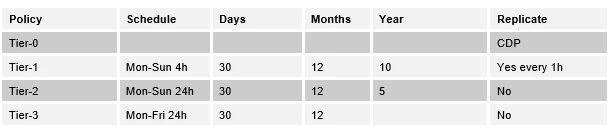
2. Create the vSphere tag structure
Once the SLA requirements have been agreed upon, we can translate the design into vSphere tags.
Using VM Tags with vSphere and Veeam Backup & Replication - virtualhome.blog
The idea is to create a consistent tagging structure that represents the backup requirements defined in the SLA.
Rather than manually selecting individual VMs in Veeam, we use vSphere tags to determine which backup policy each VM belongs to.
This makes the design easier to manage as the environment grows.
It also provides a clear relationship between the agreed SLA and the actual backup configuration.
3. Create the Veeam backup jobs
With the tags in place, the next step is to create the corresponding Veeam backup jobs.
VM Tags - Veeam Backup & Replication User Guide
Each backup job is configured to include the appropriate vSphere tags, based on the SLA design we established earlier.
We also configure the corresponding backup copy jobs where required, ensuring that the backup storage and retention requirements are met.
The important thing here is that the backup jobs are no longer dependent on administrators manually adding individual VMs.
When a VM receives the correct vSphere tag, it becomes part of the corresponding backup policy.
This significantly reduces the amount of manual administration and makes the backup configuration much easier to maintain.


4. Tag all existing VMs
Now comes the biggest part of the implementation: actually tagging all the existing VMs.
Depending on the size of the environment, this can be a considerable task.
We need to review the existing workloads, understand their business requirements and assign the correct tags according to the agreed SLA.
This is also a great opportunity to clean up the environment and identify VMs that may no longer be needed or that have unclear ownership.
It is important to get this right from the beginning. The tags will determine which backup policy protects each VM.
5. The safety net – Protecting VMs that haven't been tagged
This is probably the most important part of my design.
Even with a well-defined tagging structure and automated backup jobs, there is still one potential problem:
What happens when someone deploys a new VM and forgets to assign the correct tag?
We wanted to avoid having a VM running in production without any backup protection simply because someone forgot an administrative step.
To address this, we also created a separate backup job targeting the vCenter inventory.
The intention was to use this as a safety net for VMs that were not included in the SLA-based backup jobs.
By excluding the VMs already covered by the tag-driven jobs, we could identify and protect the remaining VMs that had not yet been assigned a backup tag.
This gave us an additional layer of protection against human error.
The result is a backup design with two layers:
-
Primary protection: VMs are automatically protected according to their assigned SLA tags.
-
Fallback protection: VMs that have not been assigned the correct tags are still captured by the safety-net job.
This approach helps prevent newly deployed or accidentally forgotten VMs from silently falling outside the backup strategy.
Conclusion
For me, the biggest benefit of this approach is not just automation. It's the confidence that the backup configuration is designed to handle human error as well.
In larger environments, relying entirely on administrators to remember to add every new VM to a backup job is not a particularly robust strategy.
By combining SLA-based vSphere tags with Veeam backup jobs and an additional safety net, we can create a much more predictable and manageable backup design.
It also makes it easier to onboard new workloads, maintain consistency and ensure that backup protection follows the actual requirements of the business.
My recommendation: Don't just automate what should be backed up. Also consider what happens when someone forgets to do it.
I'd be interested to hear how others approach this in larger VMware environments.
Are you using tag-driven backup policies, or have you implemented other ways to ensure that no VM gets left behind?