

Every environment has a system that everyone knows is old, but nobody can simply turn off.
During a new Veeam Data Platform 13 deployment, I reached one of those systems: an Oracle 10g database running in a Solaris zone. It held almost 48 TiB of data and supported core applications and services used across a worldwide company.
The customer knew it needed to be modernized. They also estimated that replacing or migrating the applications and databases around it would cost millions of dollars. That project wasn’t going to happen before we needed a reliable backup.
The backup job wouldn’t complete
My initial plan was to protect the Oracle workload as part of the new Veeam deployment. The jobs failed, so I started troubleshooting them like any other failed backup.
Eventually, the support requirements gave me the answer. The Veeam Plug-In for Oracle RMAN supports Oracle Database 11g Release 2 and newer; Oracle 10g isn’t listed. Solaris 10 is listed as a supported operating system for the standalone plug-in, so the database version was the issue I had to design around. Veeam’s RMAN plug-in system requirements.
With nearly 48 TiB involved, I needed a solution I could operate and recover from. Continuing to troubleshoot a configuration that fell outside the support matrix wasn’t going to get me there.
Why I upgraded to 13.1
While I was working through the Oracle issue, Veeam Data Platform 13.1 introduced the Application Backup Repository (ABR). I upgraded the new Veeam 13 environment to 13.1 specifically to use it.
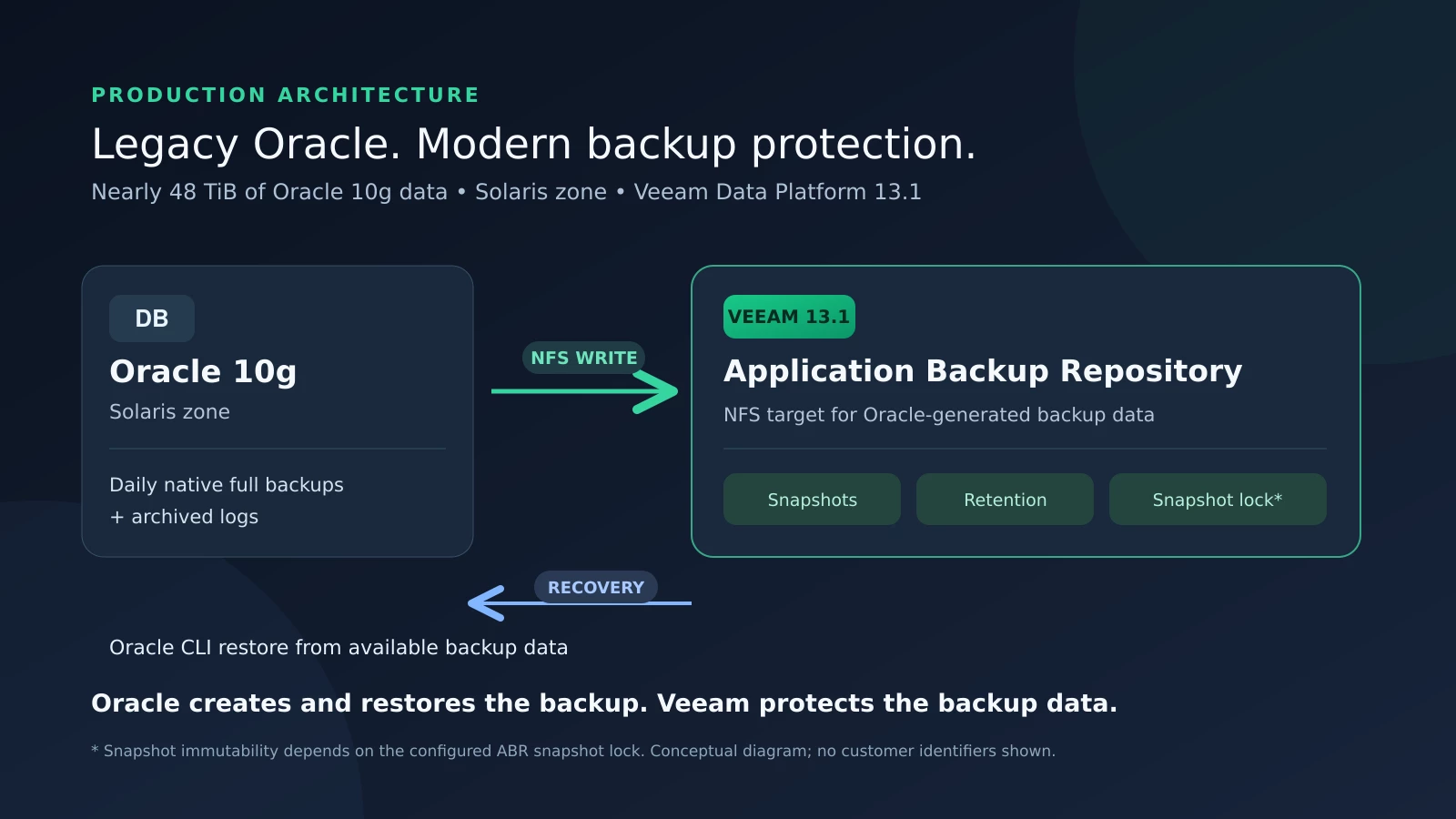
ABR let me change the design. Oracle could create its own backup and write it to an NFS target, while Veeam managed snapshots and retention for the repository. Veeam describes ABR as a capability of the Veeam Infrastructure Appliance in Hardened Repository mode, with NFS targets for application-generated data. Veeam 13.1: Application Backup Repository.
Oracle creates the backup. Oracle restores the backup. Veeam protects the backup data.
That distinction matters. Upgrading Veeam didn’t add Oracle 10g to the RMAN plug-in support list. I changed where Oracle’s native backups landed and how I protected the resulting data.
Getting it working was only half the job
After the upgrade, I configured the Application Backup Repository, made its NFS storage available to the Solaris environment, and directed the Oracle backup process to that location. I configured daily full backups and archived log backups.
At this size, repository capacity, retention, backup windows, and recovery time all mattered. I wasn’t looking for a place to park files. I needed a backup process I could manage and, above all, use when something went wrong.
So I tested recovery from the Oracle CLI. The native backups completed, and I successfully restored using Oracle’s tools. That gave me confidence in the part that matters most: Oracle could use the backup data I had written to the repository.
Veeam also documents an ABR instant export option that exposes a selected snapshot through a temporary, read-only NFS path. That provides a way to access an older repository point without changing the live share. It’s a useful recovery option to understand, though I’m not claiming I used that specific export workflow in my test. Veeam’s ABR recovery options.
The larger lesson
What made ABR useful here wasn’t that it understood Oracle 10g. It didn’t need to.
Plenty of applications can produce their own backup, export, or configuration files even when they don’t fit a current backup product’s application support list. Those files still need retention, protection, and a tested path back to the application.
For this customer, the workload was old, but it was still essential. The migration price was measured in millions, and the data was measured in tens of TBs. I couldn’t wait for an application modernization project to improve its protection.
Why upgrade to Veeam Data Platform 13.1?
In my case, the answer is straightforward: I needed ABR, so I upgraded from 13 to 13.1.
It gave me a way to bring the native backups from a critical Oracle 10g system into a Veeam-managed repository while keeping backup creation and recovery with Oracle. I got successful backups and tested restores without claiming the RMAN plug-in supported a database version it doesn’t.
Sometimes the application has to stay where it is for a while. Its backup strategy doesn’t.
#VeeamCommunityChallenge
#veeamcommunity

