


We recently had a customer environment running Veeam Backup & Replication (VBR) 12 on a Windows server that was approaching end-of-life. The existing setup also included a local Windows repository for short-term retention and an HPE StoreOnce repository used for long-term retention.
With both the VBR server and the StoreOnce platform approaching their lifecycle limits, we needed to plan a migration that would:
- Replace the aging VBR server
- Maintain the existing Veeam configuration and backup jobs
- Preserve all existing backup data
- Replace the legacy short-term repository
- Move the long-term backup data away from StoreOnce
- Improve the security posture with immutable backup storage
- Continue using the customer's existing socket-based Veeam licensing
The goal was not simply to build a new Veeam server, but to move the customer to a more modern and secure backup platform without losing access to the existing backup history.
The Existing Environment
The starting point consisted of:
- Veeam Backup & Replication 12
- Windows-based VBR server
- Local Windows repository used for short-term retention
- HPE StoreOnce repository used for long-term retention
- Socket-based Veeam licensing
The hardware hosting the VBR server was approaching end-of-life, and the StoreOnce platform used for long-term retention was also nearing the end of its lifecycle.
This gave us a good opportunity to rethink the repository architecture rather than simply replacing the existing hardware with an equivalent platform.
Design the target platform before starting the upgrade
The final design will often depend on what new components the customer is able — or willing — to invest in. Because of this, it is important to understand the available options and how the different components work together before starting the upgrade.
In our case, this meant looking at the VBR server, repositories, retention requirements, existing backup data, licensing, and the available hardware before deciding on the migration approach.
Spending some time on the design up front made it possible to perform the migration in controlled steps and avoid unnecessary changes later. It also meant we could make sure the new platform delivered more than just replacement hardware — it provided a more secure architecture with immutable storage.
Step 1 – Upgrade Veeam
Before starting the infrastructure migration, we upgraded the existing VBR installation to Veeam Backup & Replication 13.1.
Doing the upgrade first gave us a known starting point and ensured that the existing Veeam configuration was already running on the target software version before moving it to the new server.
The customer's existing socket-based licensing was retained, as this was still the preferred licensing model for the environment.
Step 2 – Replace the Short-Term Repository
The first repository we replaced was the local Windows repository used for short-term retention.
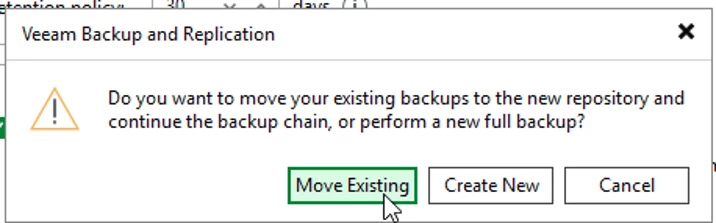
We deployed a new Veeam Hardened Repository using a Veeam-based image and migrated the existing backup data from the old local repository to the new repository.
One important advantage of doing this migration at the repository level was that we did not need to make changes to the underlying backup platform.
The amount of data involved meant that the migration took some time, but the limiting factor was primarily the available network throughput between the old and new repositories.
In other words, this was mostly a question of:
How much data do we need to move, and how fast can the network move it?
Once the data migration was complete, the new Hardened Repository could take over as the short-term backup target.
Step 3 – Deploy the New VBR Server
With the repository migration completed, we deployed a completely new VBR server running Veeam Backup & Replication 13.1.
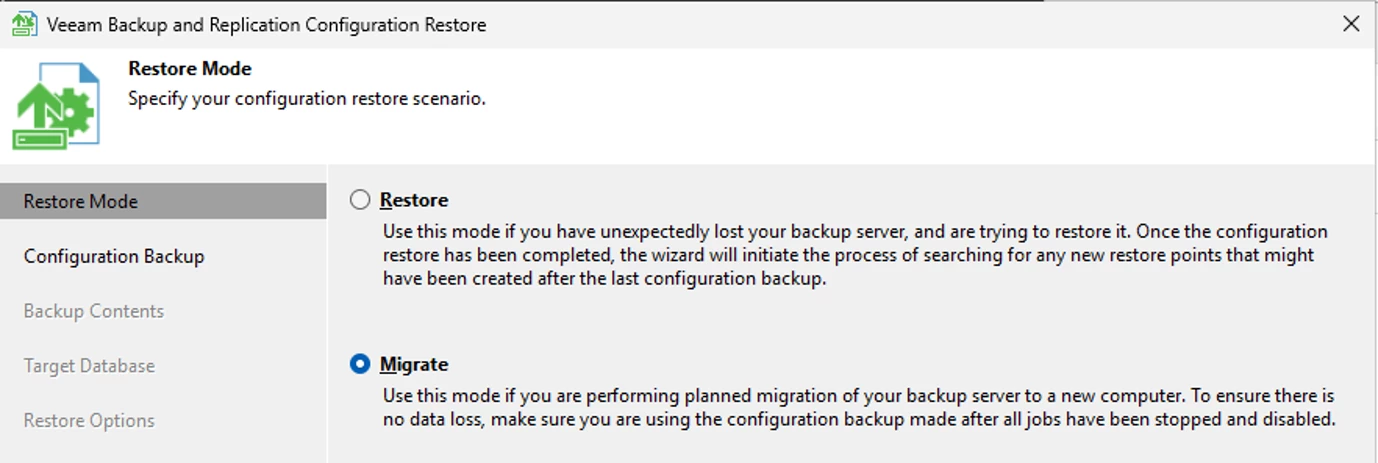
We then migrated the Veeam configuration from the old VBR server to the new server.
One important decision
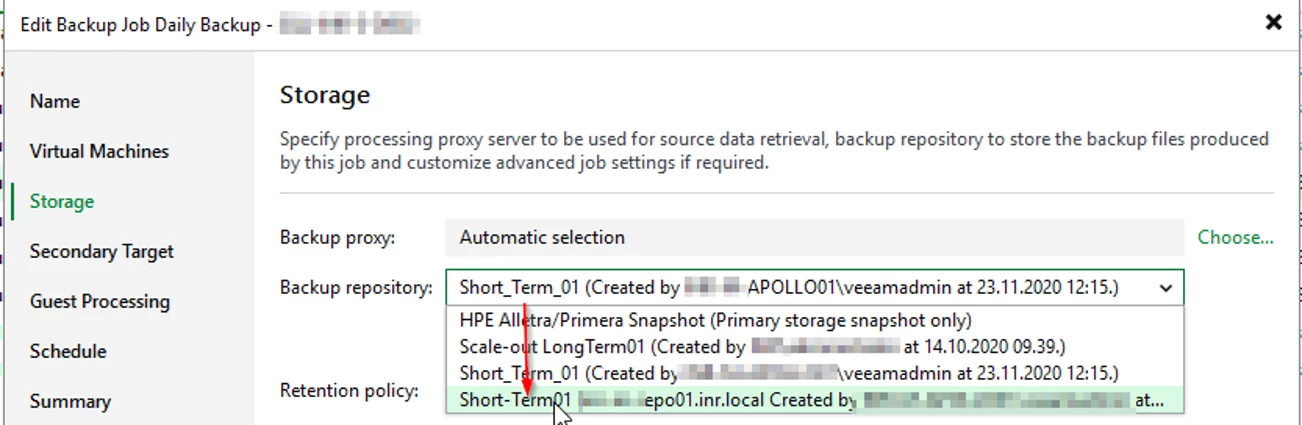
Before performing the VBR configuration migration, we deliberately changed the repository configuration so that the jobs were already pointing to the new repository.
This was an important detail in our migration plan.
Had we migrated the VBR configuration first, we would have had to temporarily bring the old repository back into the configuration and then change the jobs again after the migration.
By changing the repository first, the configuration migrated to the new VBR server already reflected the desired final state.
This reduced the number of configuration changes required during the actual VBR migration.
Step 4 – Move the Long-Term Backup Data
After the new VBR server was operational, we tackled the second major part of the migration: the long-term backup data stored on StoreOnce.
We deployed another new Hardened Repository for the long-term retention data.
The existing long-term backup data was then migrated from the StoreOnce repository to the new Hardened Repository.
Again, the amount of data meant that this was not an instantaneous process. Network performance was the main factor determining how quickly the data could be transferred.
The key objective was to retain the existing backup data and make it available on the new platform rather than starting the long-term retention chain from scratch.
The Result
After completing the migration, we had moved the customer from an aging infrastructure platform to a completely new Veeam environment.
Before
VBR
- Veeam Backup & Replication 12
- Aging Windows server
Short-term retention
- Local Windows repository
Long-term retention
- HPE StoreOnce
After
VBR
- New server
- Veeam Backup & Replication 13.1
Short-term retention
- New Hardened Repository
Long-term retention
- New Hardened Repository
Most importantly, we achieved the migration without losing the existing backup data.
Security Improvements
One of the biggest benefits of the new design is the improved security posture.
The customer has moved from traditional Windows-based repository storage and StoreOnce-based long-term retention to Hardened Repositories with immutability.
This provides an important additional layer of protection against scenarios such as ransomware or an attacker gaining access to the backup infrastructure.
Having immutable backup copies means that even if the backup infrastructure itself is compromised, the attacker cannot simply modify or delete the immutable backup data during the configured immutability period.
Lessons Learned
There were a few important lessons from this migration.
1. Plan the repository migration separately from the VBR migration
Treating the repository migration as its own phase made the overall migration much easier to control.
2. Change repositories before migrating the VBR configuration
This was probably the most useful design decision in our migration.
By changing the repository references before migrating the VBR configuration, the new VBR server came online with the repository configuration already pointing to the final destination.
3. Network throughput matters
When moving large amounts of backup data between repositories, the network can quickly become the limiting factor.
The migration time is therefore heavily influenced by:
- Amount of data
- Available network bandwidth
- Network latency
- Repository performance
- Concurrent migration activity
For large environments, it is worth calculating the expected transfer time before starting the migration.
4. Don't underestimate existing backup data
Replacing the VBR server itself is usually straightforward. The more challenging part can be moving years of existing backup data while maintaining the ability to use that data for restores.
A good migration plan therefore needs to consider both the VBR configuration and the backup data.
Final Thoughts
This migration allowed us to replace an aging Veeam infrastructure while maintaining the customer's existing backup history and licensing model.
We moved from:
Veeam 12 + legacy Windows repository + StoreOnce
to:
Veeam 13.1 + Hardened Repositories + immutable backup storage
The end result is a newer, simpler and more secure backup platform, while retaining the existing backup data and avoiding the need to start the backup environment from scratch.
For us, the key takeaway was that a Veeam migration doesn't have to mean abandoning existing backup data. With proper planning, the VBR configuration and repository data can be migrated in separate, controlled stages.
And perhaps most importantly: we ended up with a platform that is not only newer, but significantly better protected against the threats modern backup environments need to consider.


