


'Why Now' initiative around 13.1
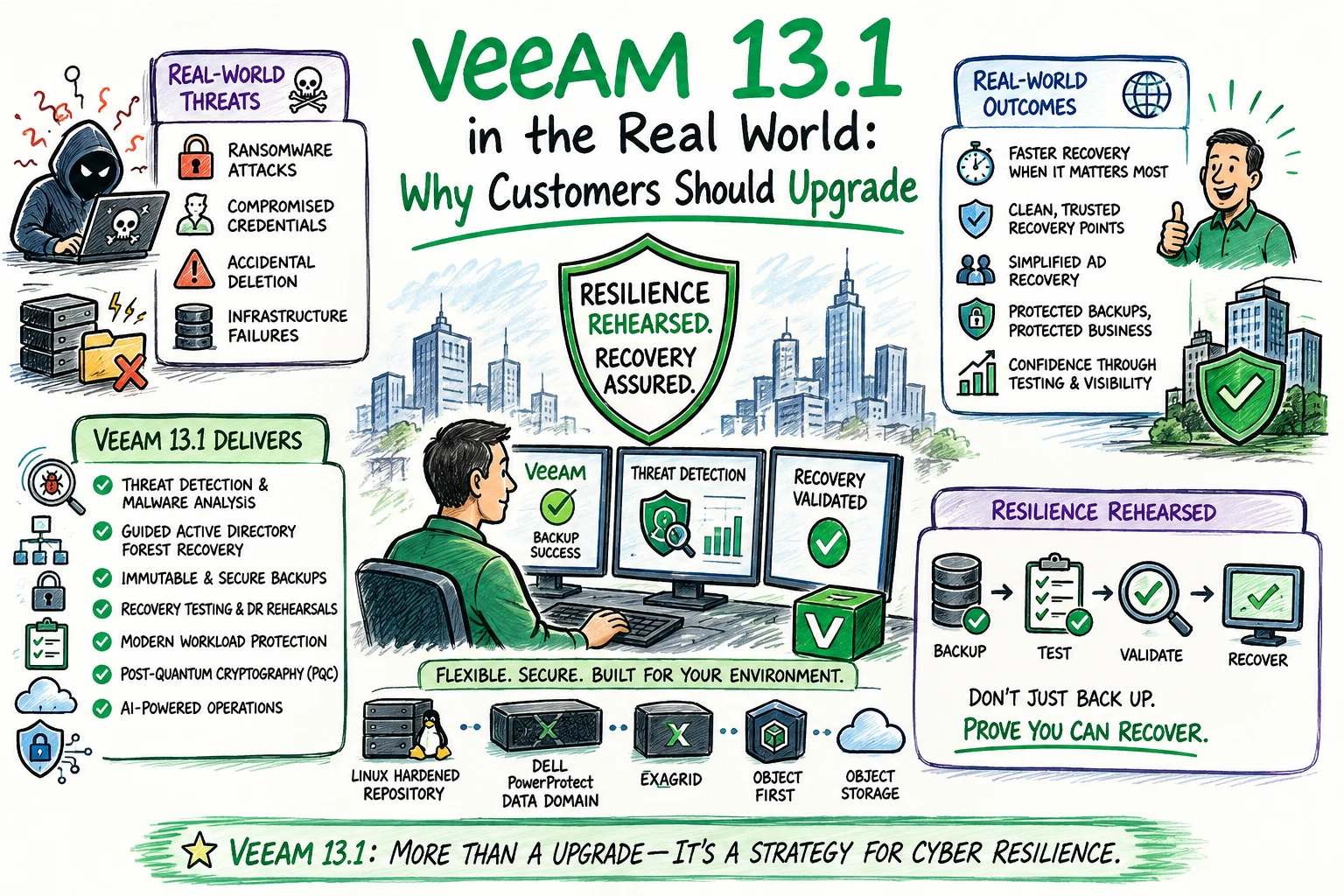
Every time a new version of Veeam is released, the same question comes up:
Do I really need to upgrade right now?
It’s a fair question.
If backups are running, jobs are completing successfully, and restores work, it can be difficult to justify changing an environment that seems to be doing exactly what it was built to do.
But I think Veeam Data Platform 13.1 changes that conversation.
After spending time working with Veeam 13.1 in the lab, I don't look at this release as simply another collection of new features. The bigger story is how Veeam continues to move from traditional backup and recovery toward a much broader cyber resilience platform.
Customers today aren't just asking:
“Did my backup complete successfully?”
They're asking:
“If we're hit with ransomware tonight, how quickly can we recover?”
“How do I know the restore point I'm using is clean?”
“What happens if Active Directory is compromised?”
“Are my backup repositories protected from the attack?”
“Have we actually tested our recovery plan?”
Those are very different questions than we were asking about backup five or ten years ago.
And that's where I think Veeam 13.1 becomes interesting.
Veeam says the 13.1 release introduces more than 70 new capabilities and enhancements across security, recovery, workload protection, identity resilience, storage efficiency and operations.
But rather than going through another list of features, I wanted to look at Veeam 13.1 from a different perspective:
What do these changes actually mean in a real customer environment?
Backup Success Is No Longer Enough
For years, backup administrators lived by a relatively simple measurement:
Green = good. Red = bad.
If the backup console was green every morning, we felt pretty good.
Unfortunately, ransomware changed that.
A successful backup job tells me that Veeam successfully protected the workload. It doesn't necessarily answer the questions I care about during an actual cyber incident.
Was the workload already compromised when I backed it up?
When did suspicious activity begin?
Which restore point should I use?
Is the backup repository still trustworthy?
Can I recover without reintroducing malware?
And can I prove any of this before the business is waiting for me to restore production?
That's why one of the biggest reasons I see for moving to 13.1 is the continued integration of security into the backup and recovery process.
Veeam 13.1 expands threat detection with capabilities including Indicators of Compromise scanning and inline AI-powered entropy analysis, while expanding malware detection across additional workloads such as NAS and Azure.
The workflow starts looking less like:
Backup → Store → Restore
and more like:
Protect → Detect → Analyze → Validate → Recover
That's an important change.
Here are some real-world examples and conversations I've had with customers who are currently running Veeam or looking to move away from the current solution.
Real-World Scenario #1: Ransomware Hits at 2:00 AM
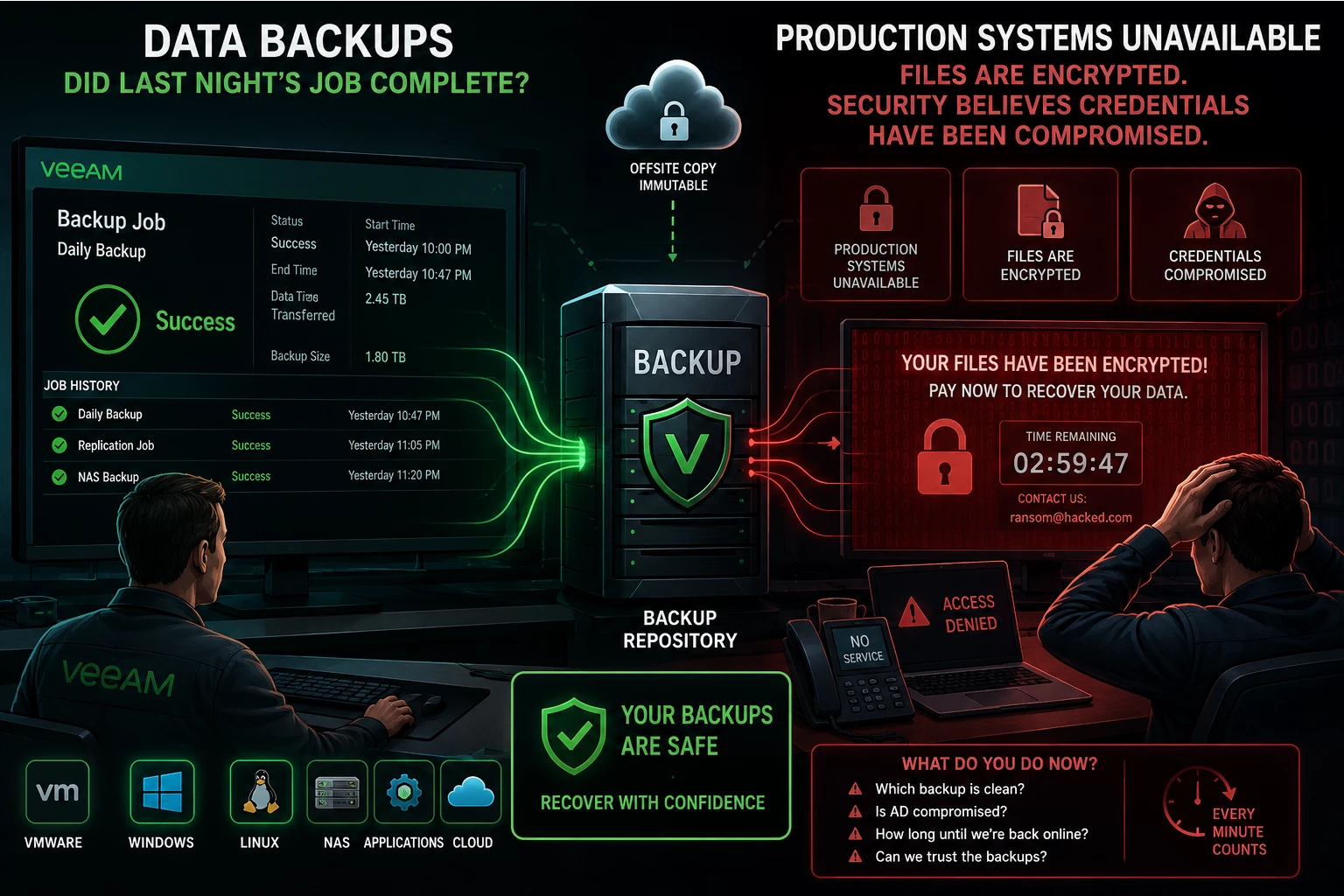
Imagine getting the call nobody wants.
Production systems are unavailable. Files are encrypted. Security believes credentials have been compromised.
The first question from management probably isn't going to be:
“Did last night's backup job complete?”
It's going to be:
“How long until we're back online?”
Now the backup team has some difficult decisions to make.
You might have 30 restore points available, but which one do you trust?
Restoring the newest backup isn't necessarily the right answer if the workload was already compromised at that point.
This is where Veeam's continued investment in malware detection and backup analysis matters.
Instead of treating the backup environment only as somewhere to store recovery points, backup data becomes another source of information that can help identify suspicious activity and make better recovery decisions.
That can help narrow down the question from:
“Which backup should we restore?”
to:
“Which restore point gives us the best chance of recovering cleanly?”
That's a much better position to be in during an incident.
Real-World Scenario #2: Active Directory Is Compromised
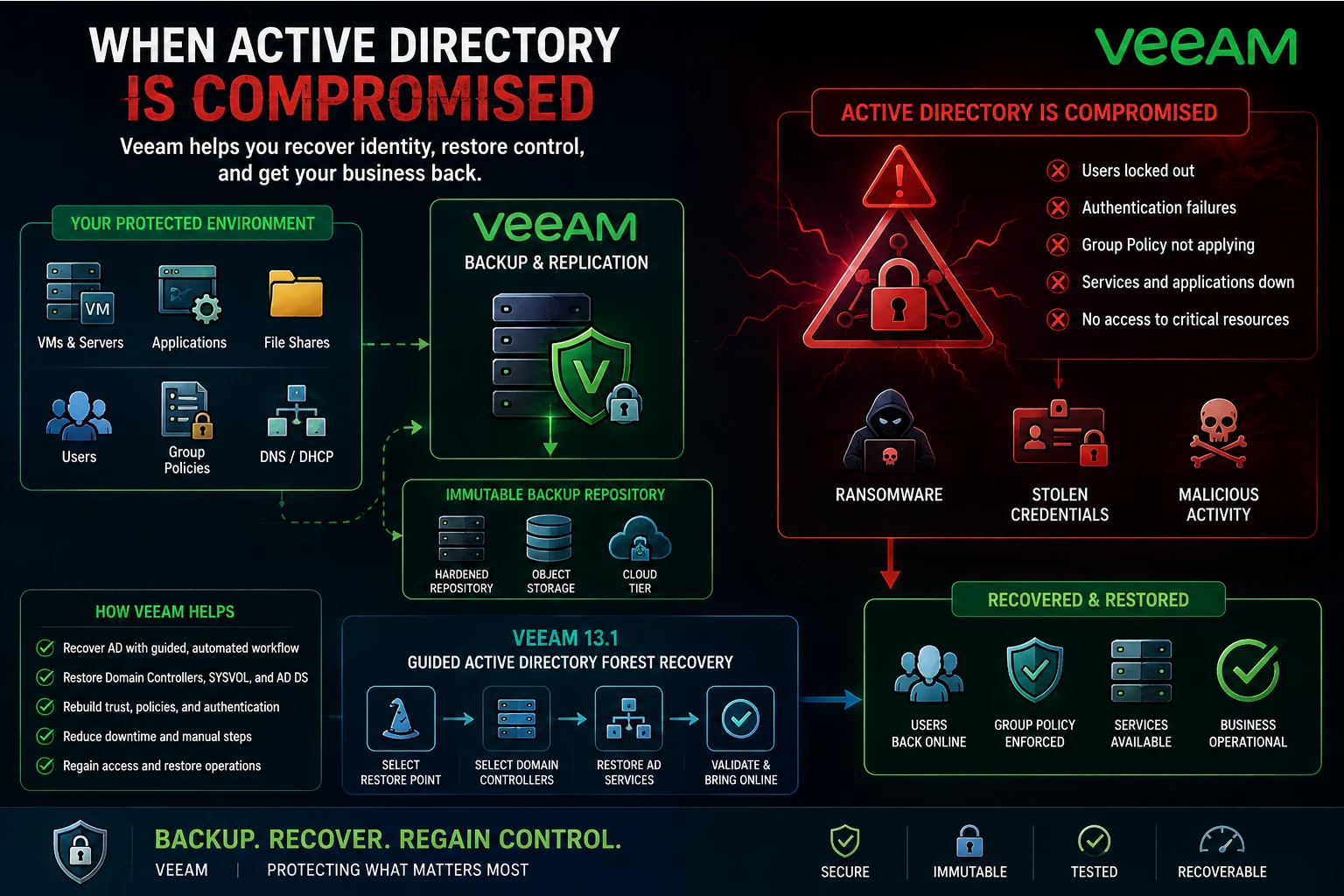
This may be one of my favorite additions to 13.1 because it addresses a recovery scenario that can become extremely complicated very quickly.
We spend a lot of time talking about recovering applications and virtual machines.
But what happens when Active Directory is part of the attack?
AD is often at the center of the environment. Applications, administrators, servers and users depend on identity services.
You can have perfectly good backups of hundreds of virtual machines, but if identity is unavailable or compromised, getting everything operational again becomes much more difficult.
Veeam 13.1 introduces guided Active Directory Forest Recovery.
Instead of relying entirely on manual runbooks and coordinating a long series of AD-specific recovery steps under pressure, Veeam provides a workflow for selecting the recovery point, defining domain controllers and orchestrating the forest recovery process.
That's a real-world improvement.
During an actual cyber incident, reducing manual steps isn't just about convenience.
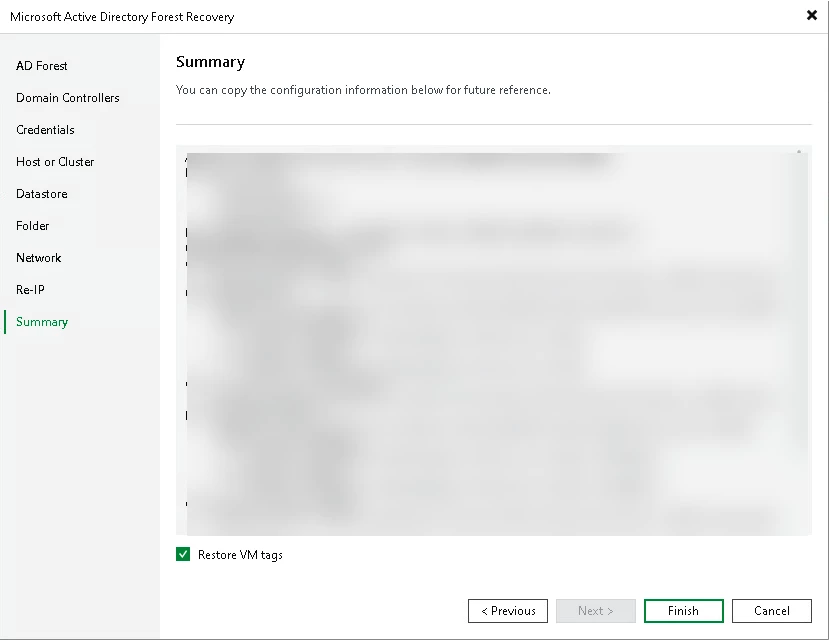
It's about reducing opportunities for mistakes when the recovery team is already under pressure. Here is a quick step-by-step for Veeam 13.1 Active Directory Forest Recovery
Step 1: Launch Restore Wizard
Open Home ==> click Restore and select AD Forest Recovery. Select VMware vSphere as the target
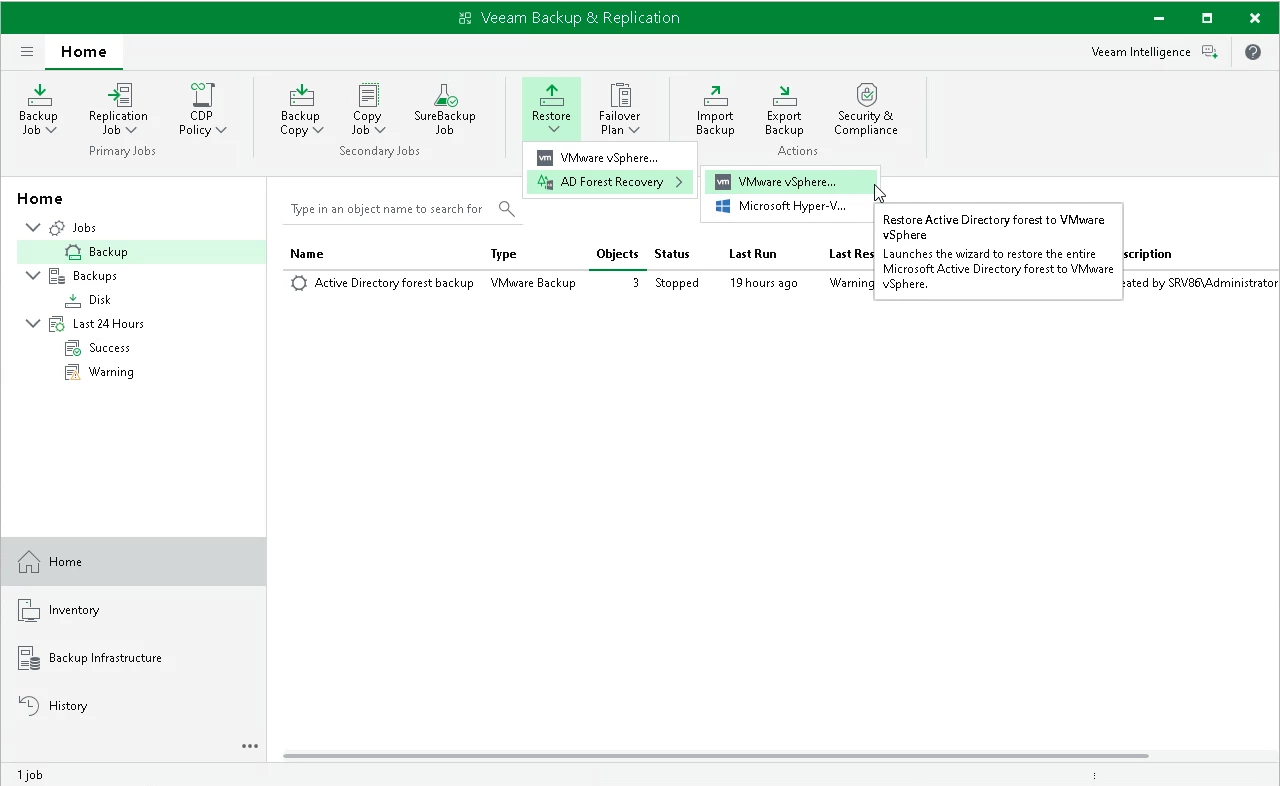
Step 2: Specify Forest and Point in Time
From the drop-down menu under Select Microsoft Active Directory forest to recover, select the Active Directory forest you want to restore.
Under Select point in time, select a point in time for the root domain controller, which defines the schema and hierarchy of the forest.
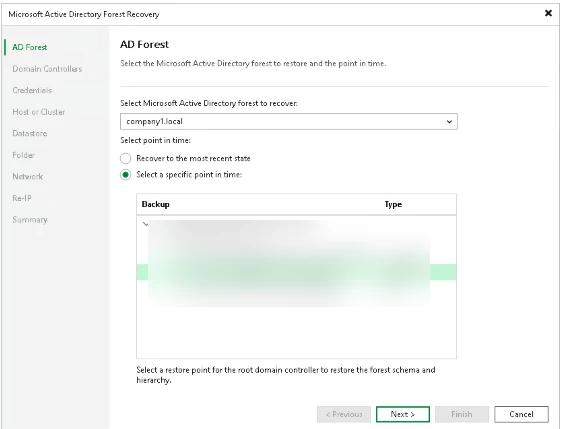
Step 3: Specify Restore Points for Authoritative Domain Controllers
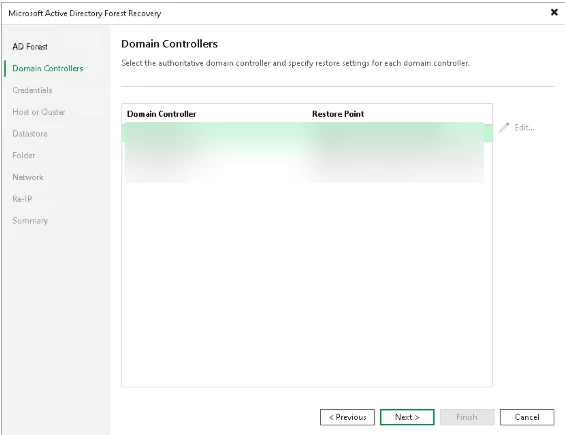
Step 4: Specify Domain Controller Credentials
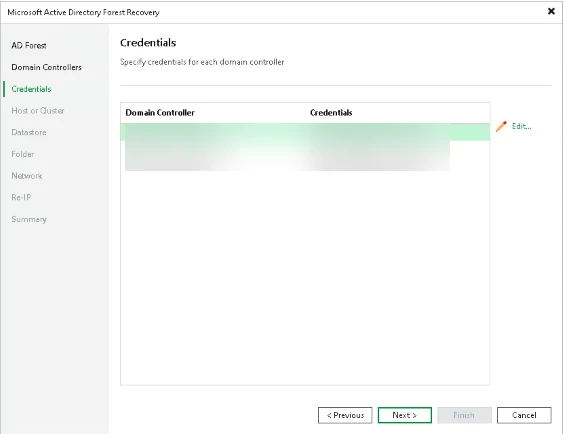
Step 5: Select Hosts
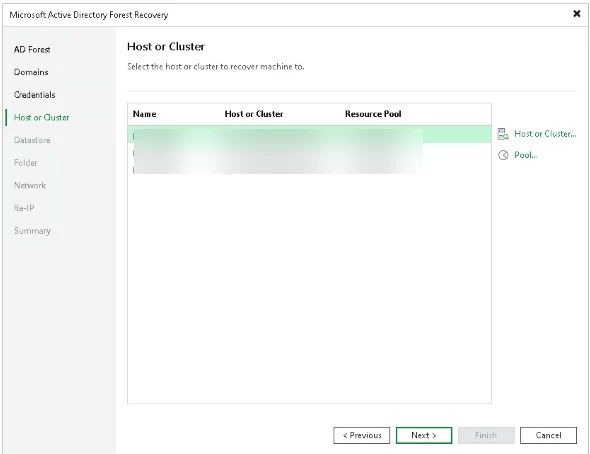
Step 6: Select Datastores
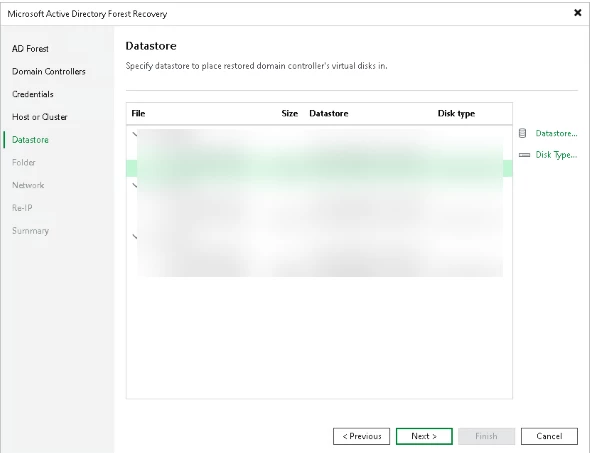
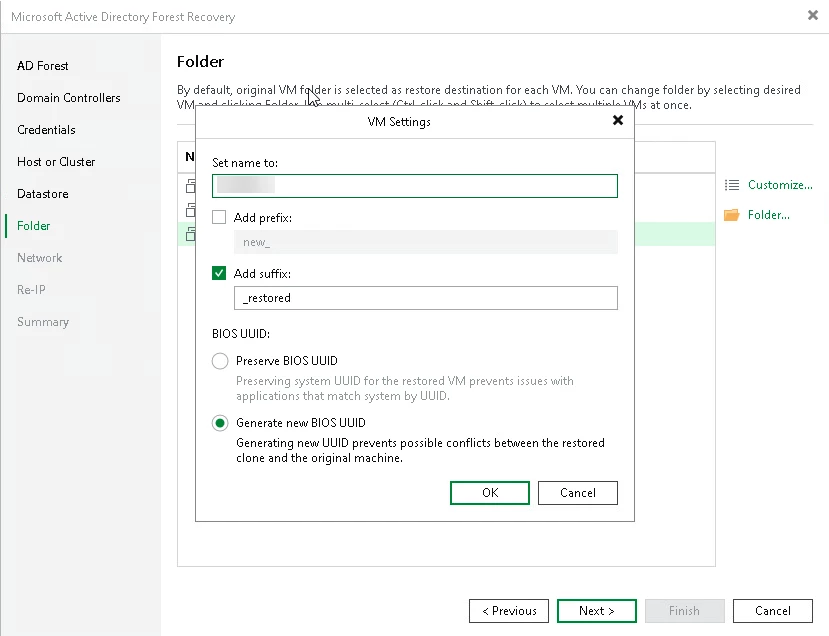
Step 7: Select Folder
At the Folder step of the wizard, select the destination folder for the domain controllers to restore and configure their VM name and BIOS UUID settings.
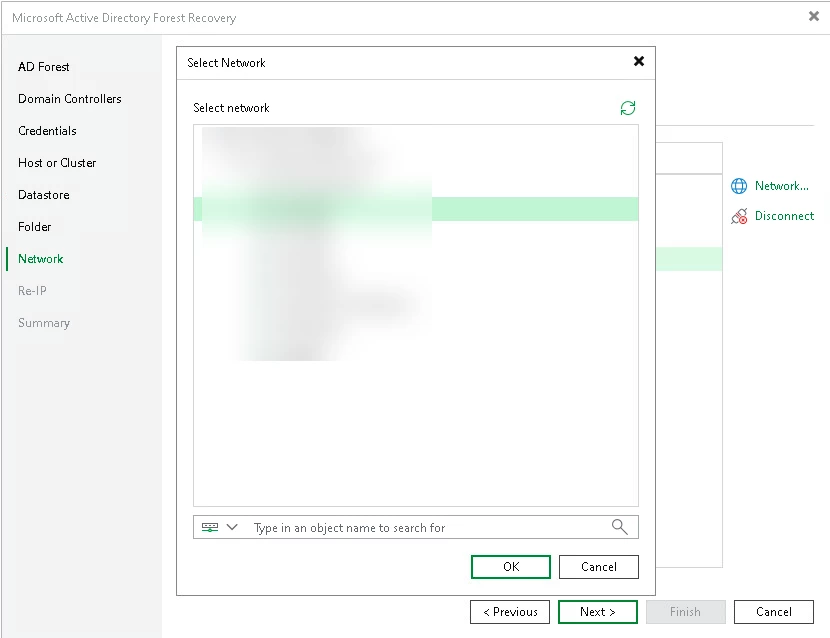
Step 8: Configure Network Mapping
At the Network step of the wizard, map source virtual networks to target virtual networks for each domain controller to restore.
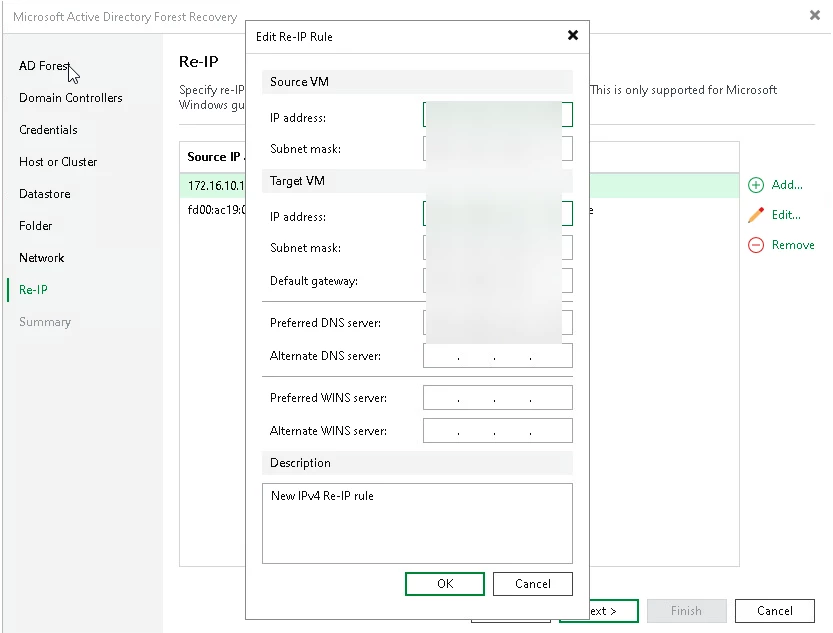
Step 9: Configure Re-IP Rules
At the Re-IP step of the wizard, configure re-IP rules for the restored domain controllers. Re-IP rules reassign IP addresses to restored domain controllers to meet the target site IP addressing scheme.
Step 10: Finish working with Wizard
Real-World Scenario #3: Your Backups Are the Target
One thing customers sometimes overlook is that attackers understand backup environments too.
If I'm an attacker and I want maximum leverage, one of the first things I want to know is:
Where are the backups?
Because if I can encrypt production and destroy the backups, I've dramatically changed the recovery options available to the organization.
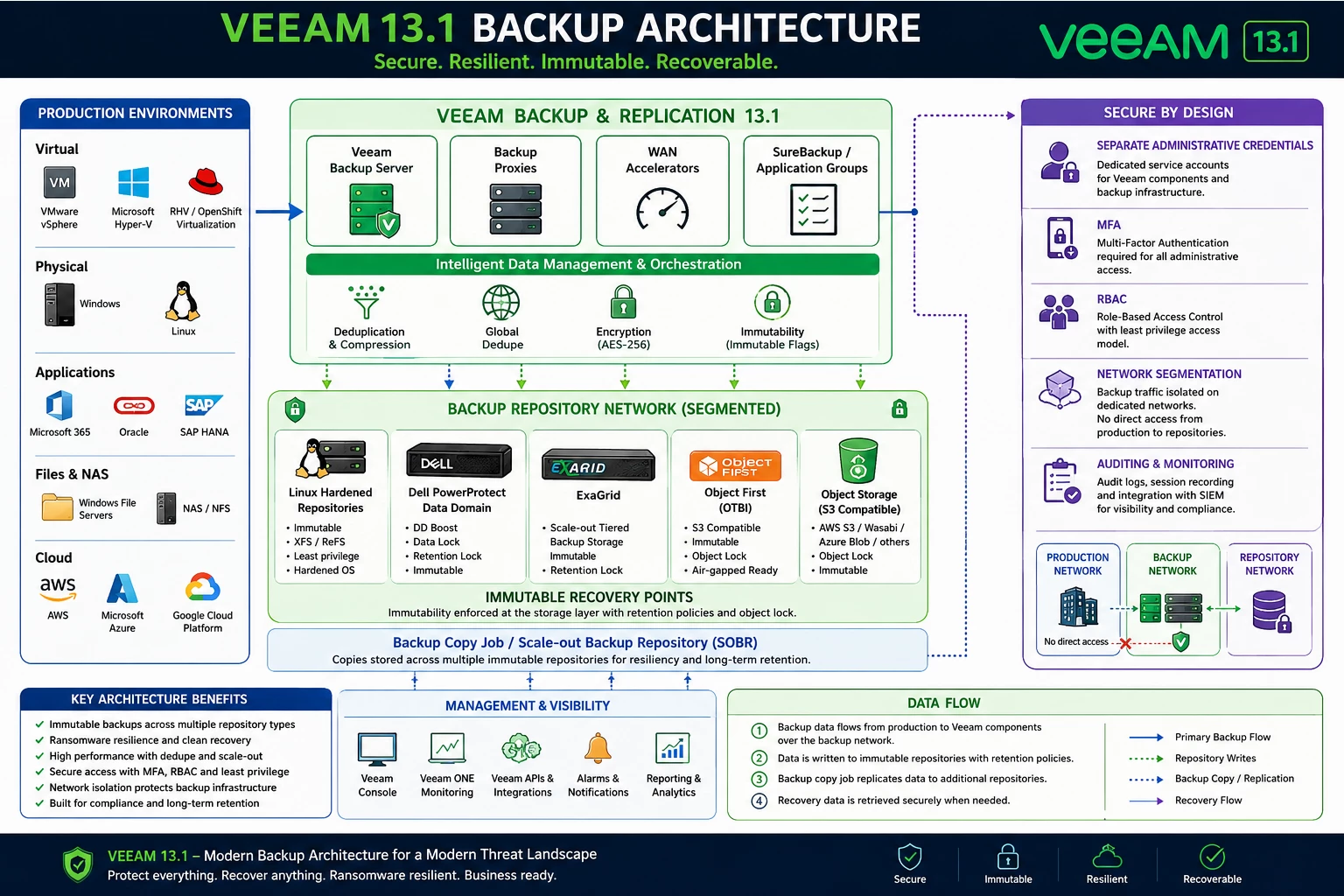
That's why I think Veeam 13.1 should also trigger a larger conversation about backup architecture.
Don't just upgrade the backup server and call the project finished.
Look at the entire environment.
In my lab, that means looking at Veeam together with technologies such as:
- Linux Hardened Repositories
- Dell PowerProtect Data Domain
- ExaGrid
- Object First
- Object Storage
- Immutable recovery points
- Separate administrative credentials
- Network segmentation
- MFA and RBAC
The technology used to store backups is just as important as the software creating them.
A modern Veeam architecture should assume that production credentials could eventually become compromised.
The goal is to make sure compromising production doesn't automatically mean compromising recovery.
Real-World Scenario #4: The Backup Works — But Does the Recovery Plan?
This is another area where I think organizations need to change their thinking.
Running backups every night isn't the same thing as having a disaster recovery plan.
And having a DR plan written in a document isn't the same thing as knowing it works.
I've always been a big believer in testing recovery.
Veeam 13.1 continues pushing in that direction with the ability to perform recovery testing and DR rehearsals without impacting production, including storage read-only capabilities designed to support testing while protecting the underlying recovery points.
That means organizations can move toward a much better model:
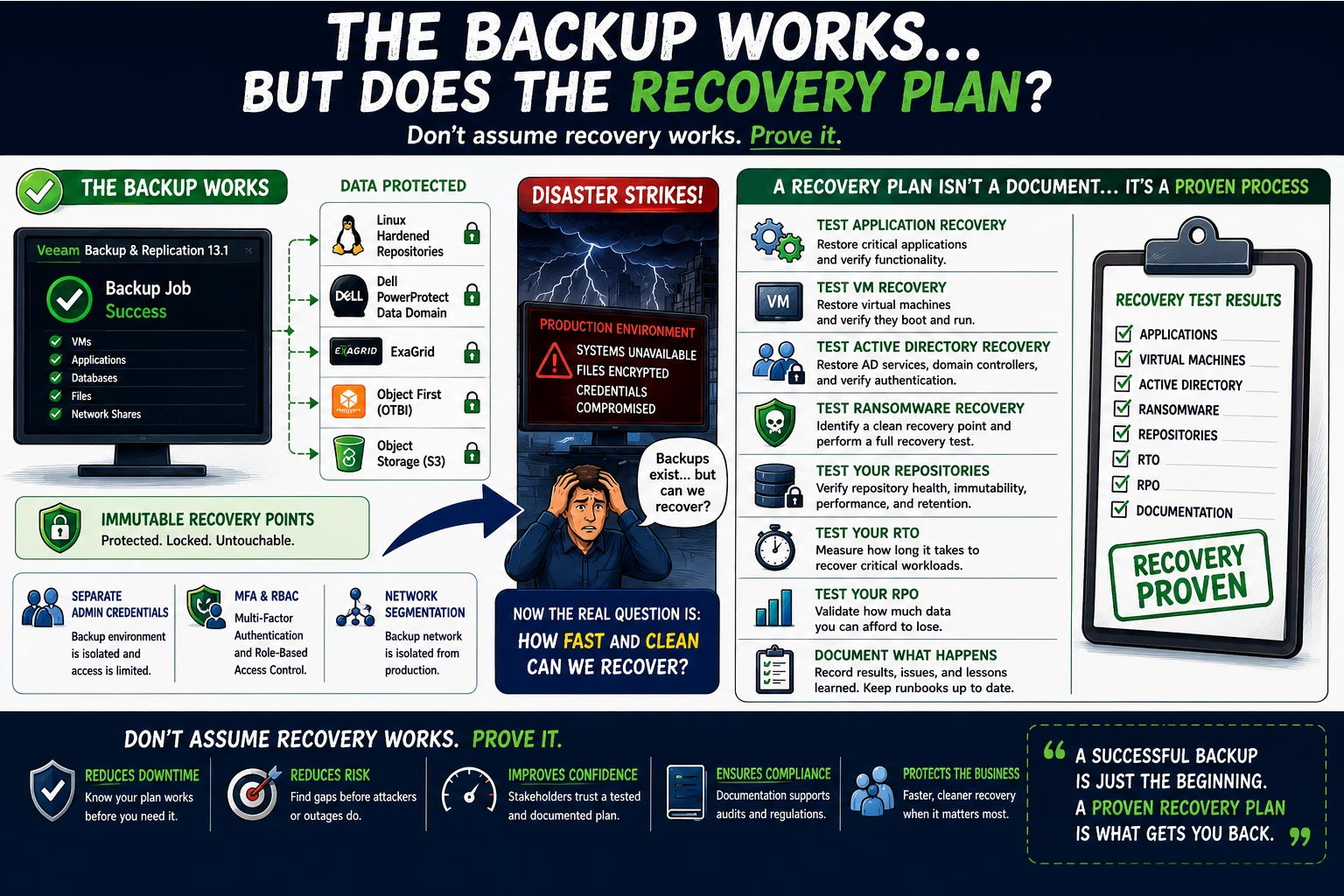
Don't assume recovery works. Prove it.
Test application recovery.
Test VM recovery.
Test Active Directory recovery.
Test ransomware recovery.
Test your repositories.
Test your RTO.
Test your RPO.
And most importantly, document what happens.
Because the worst time to discover a missing dependency or outdated recovery procedure is during the actual outage.
Real-World Scenario #5: The Data Center Isn't Just VMware Anymore
Another reason customers should be looking at 13.1 is how much infrastructure has changed.
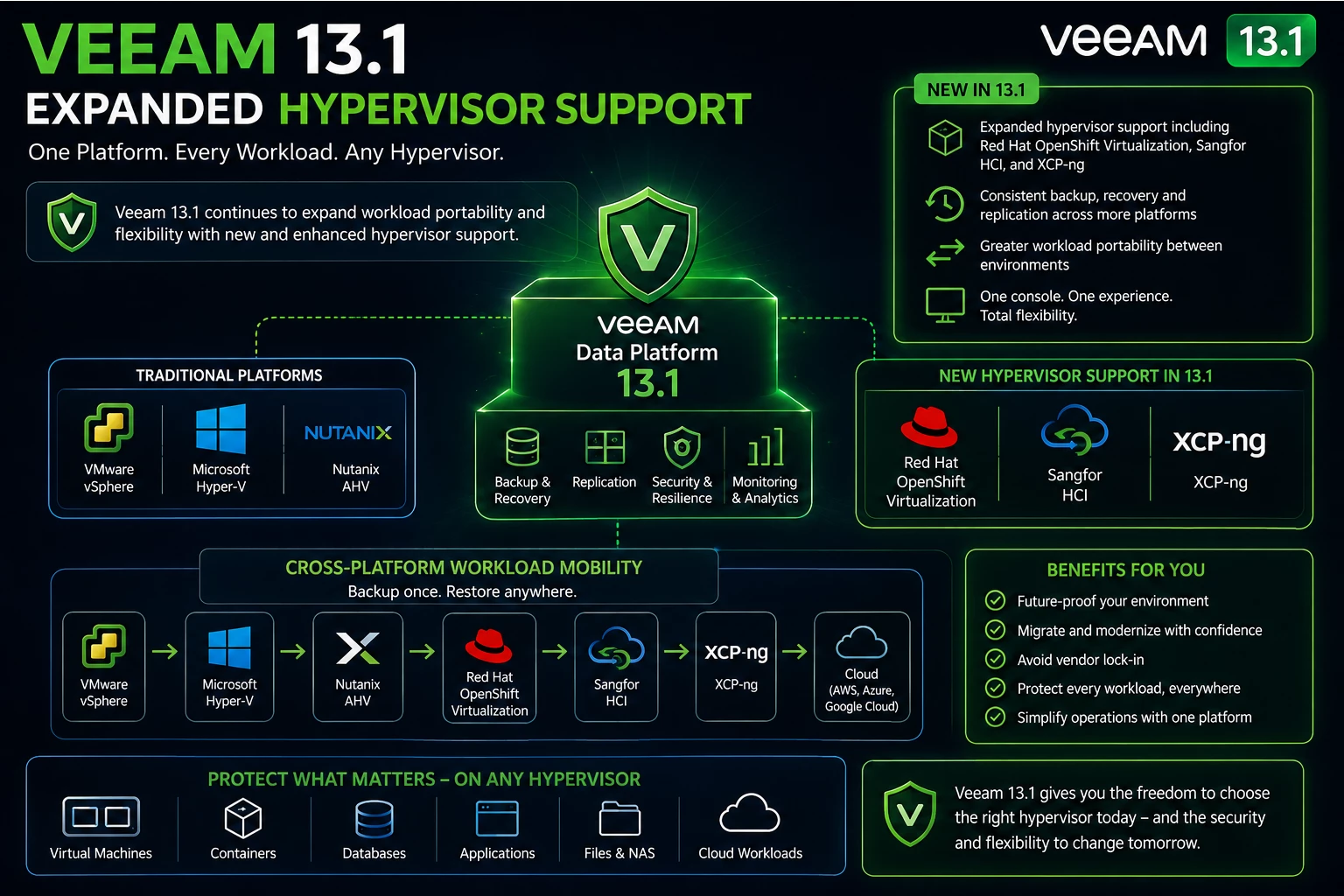
A typical customer environment today may include VMware, physical servers, cloud workloads, NAS, Kubernetes, enterprise applications and alternative hypervisors.
And that list keeps growing.
Veeam 13.1 expands workload coverage and continues Veeam's move toward greater portability across infrastructure platforms. Veeam has highlighted expanded support including Red Hat OpenShift Virtualization, Sangfor and XCP-ng, along with additional protection capabilities for NFS-based applications and Linux workloads.
That matters because customers shouldn't have to completely redesign their data protection strategy every time the infrastructure team changes platforms.
The hypervisor shouldn't define the recovery strategy.
The workload should.
Real-World Scenario #6: Security Requirements Keep Changing
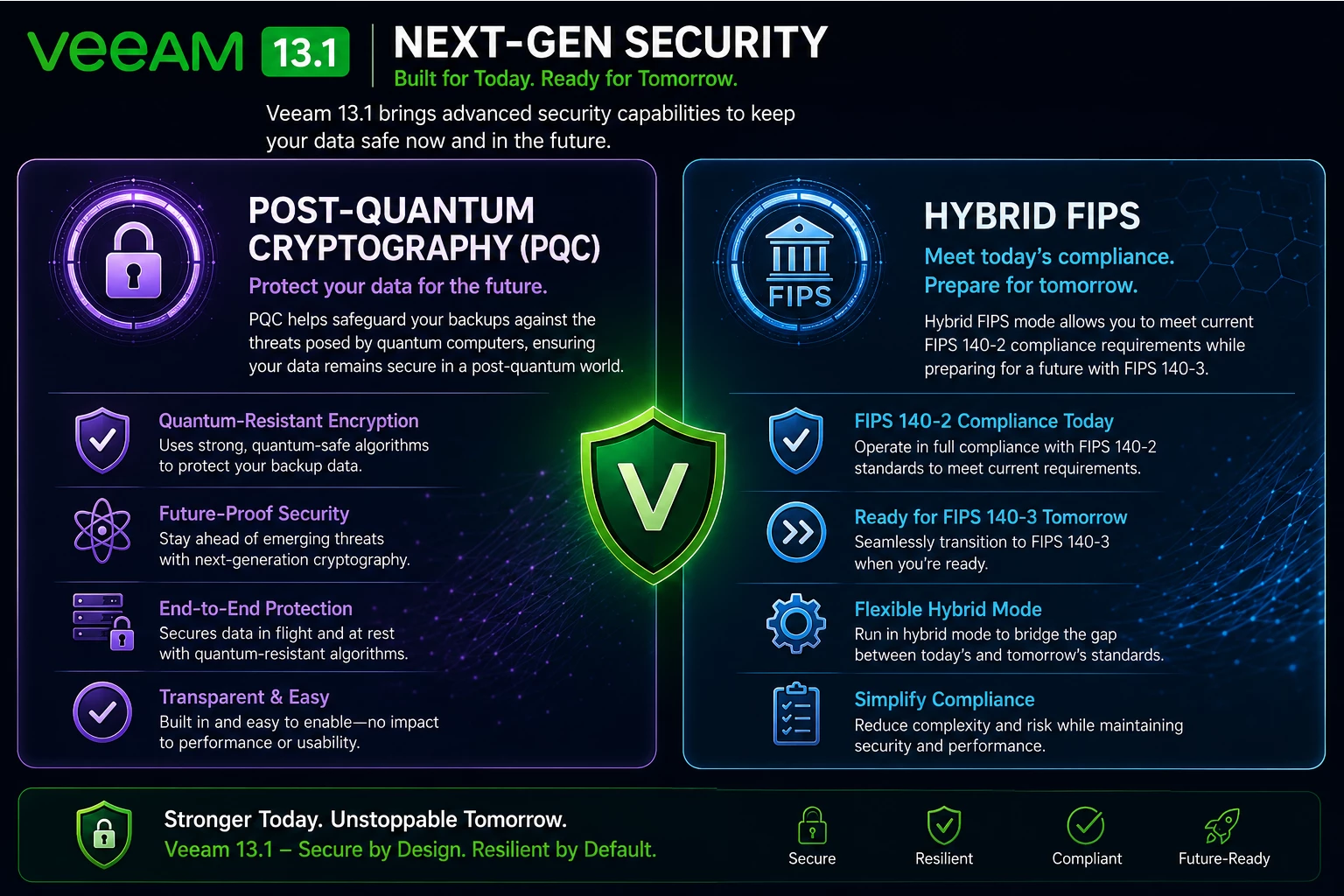
Security isn't standing still either.
One of the more forward-looking additions in 13.1 is support around Post-Quantum Cryptography and Hybrid FIPS.
Does that mean quantum computers are going to break everyone's Veeam backups tomorrow?
No.
But security architectures aren't built for tomorrow morning. They're built to protect information for years.
Veeam is introducing a hybrid approach designed to allow organizations to begin adopting post-quantum cryptography while continuing to address FIPS requirements.
For many customers, especially those in regulated industries or government-related environments, this becomes another reason to start evaluating 13.1.
It isn't necessarily about needing PQC today.
It's about making sure the platform you're deploying today is preparing for the security requirements you'll face tomorrow.
Storage Still Matters
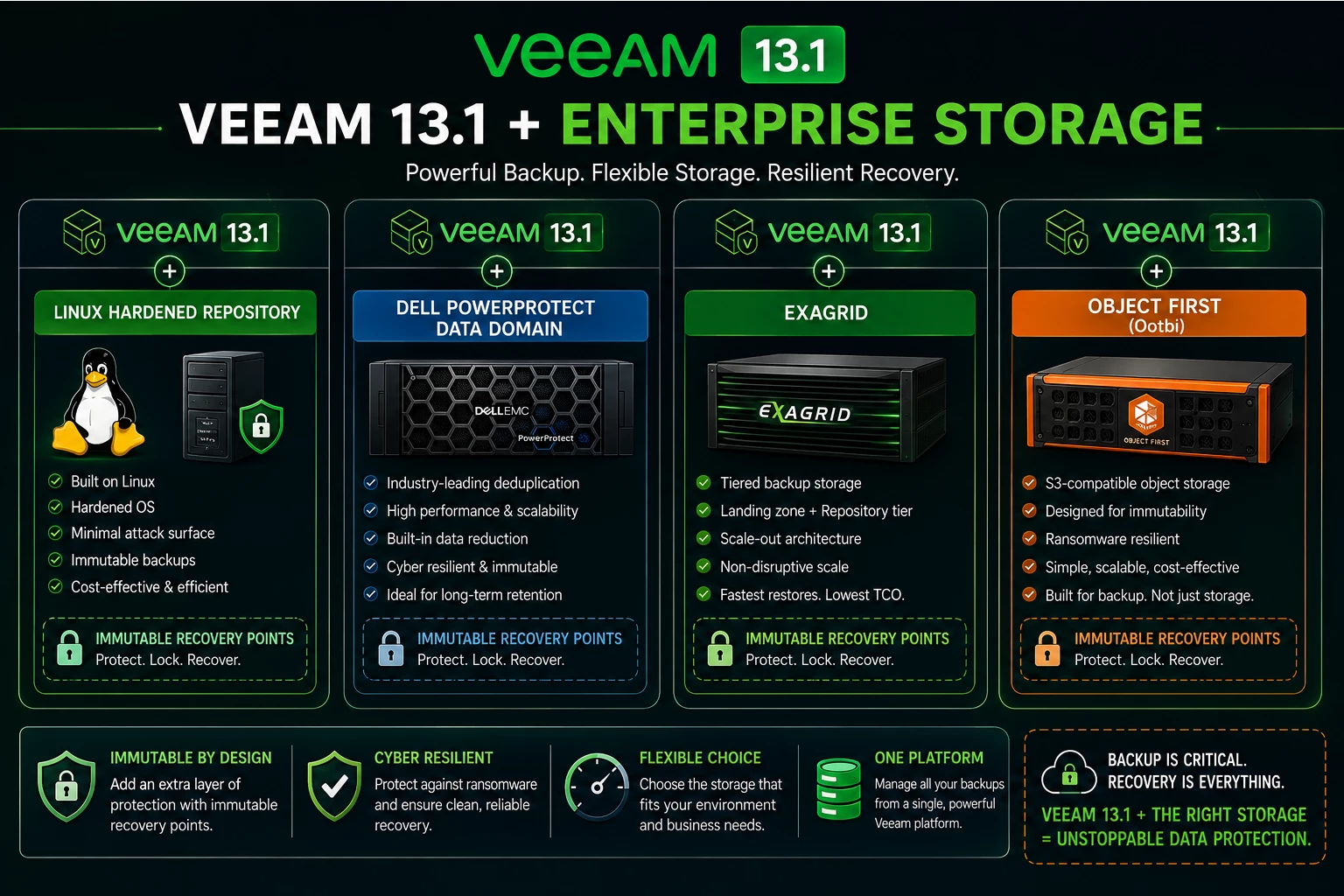
With all the discussion around ransomware, AI, malware detection and cyber resilience, I don't think we should forget about storage.
Where backup data lives still matters.
A lot.
This is something I've spent quite a bit of time testing in the lab because customers don't all have the same requirements.
One organization may prioritize capacity.
Another may prioritize restore performance.
Another wants immutability.
Another already owns Data Domain.
Another may want a purpose-built immutable appliance.
And another may be moving aggressively toward object storage.
That's why I like testing Veeam with different repository architectures rather than presenting one design as the answer for everyone.
For example:
Veeam + Linux Hardened Repository
Provides a strong option for organizations looking to build immutable backup storage using Linux and commodity or enterprise server hardware.
Veeam + Dell PowerProtect Data Domain
Makes sense for organizations that already have Data Domain in their environment or want to take advantage of an enterprise purpose-built backup platform.
Veeam + ExaGrid
Provides another purpose-built backup storage option with architecture designed specifically around backup and recovery workloads.
Veeam + Object First
Provides an immutable object-storage platform specifically designed around Veeam environments.
The important part isn't choosing the same repository for every customer.
It's designing the repository around the customer's recovery, security, performance, retention and operational requirements.
Veeam 13.1 is a good opportunity to revisit those decisions.
Don't Upgrade Just to Change the Version Number
This is probably the biggest point I want to make.
I wouldn't tell a customer:
“Upgrade because 13.1 is newer.”
That's not enough of a reason.
Instead, use the upgrade as an opportunity to evaluate the entire data protection architecture.
Ask:
Are our backups immutable?
Are backup administrative accounts separated from production?
Is MFA enabled?
Could compromised Active Directory credentials impact our backup infrastructure?
Are we detecting suspicious activity during backup?
Do we know how to identify a clean recovery point?
Have we tested Active Directory recovery?
Have we tested a ransomware recovery scenario?
Are our RTOs and RPOs still realistic?
Can our repository deliver the recovery performance the business expects?
Are we protecting every workload the business now considers critical?
Those answers are much more important than the version number displayed in the Veeam console.
So, Why Upgrade to Veeam 13.1 Now?
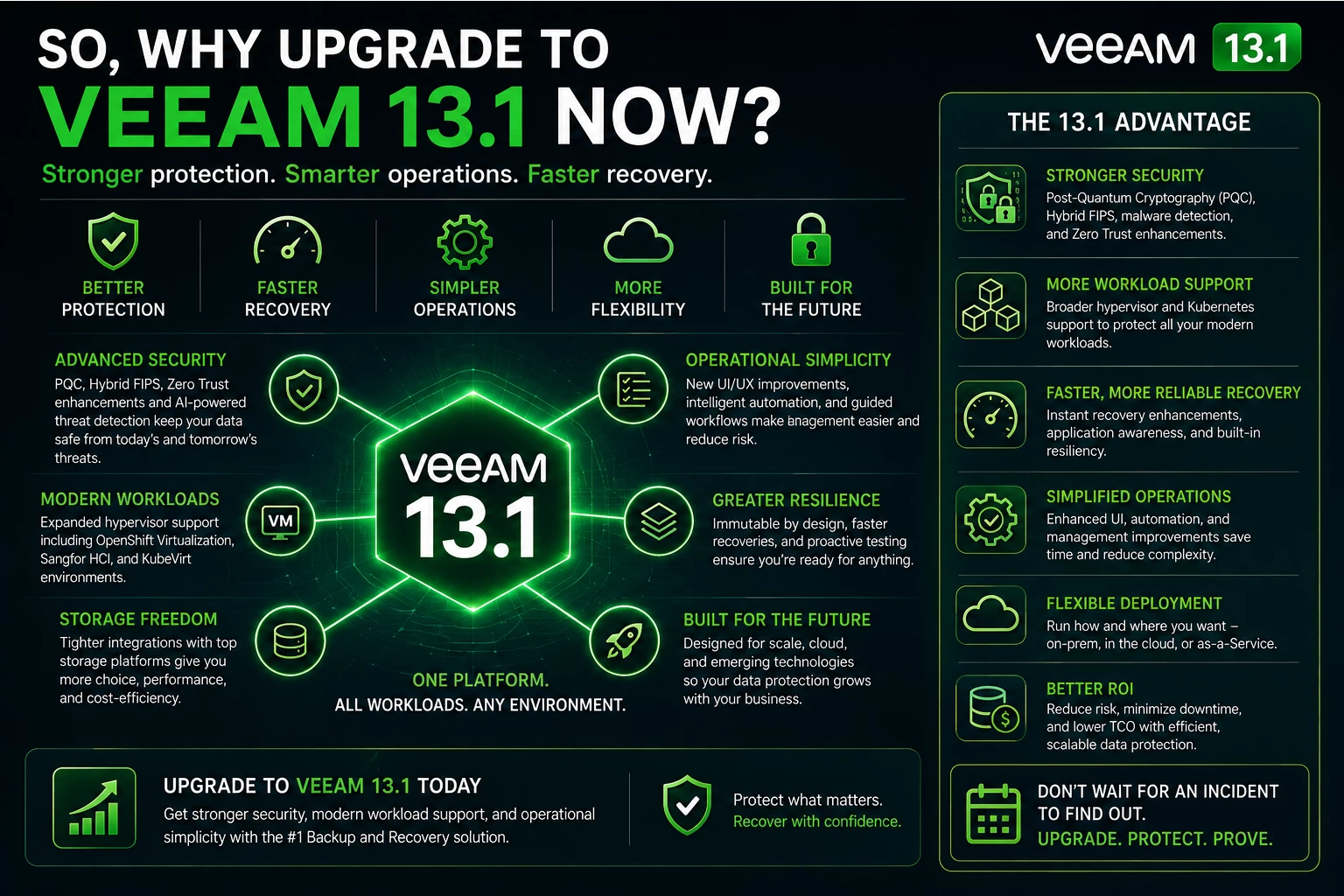
For me, the answer comes down to one word:
Recovery.
Backup is obviously still important.
But organizations aren't buying backup software simply because they want another copy of their data.
They're buying it because eventually something is going to go wrong.
Maybe it's ransomware.
Maybe someone deletes something.
Maybe a storage array fails.
Maybe a cloud service has an issue.
Maybe Active Directory gets compromised.
Maybe someone simply makes a mistake.
Whatever causes the outage, the backup platform has one job when that moment arrives:
Help the organization recover.
That's why I think Veeam 13.1 is worth evaluating now.
It's not because of one individual feature.
It's the combination of stronger threat detection, identity recovery, immutable architectures, recovery validation, broader workload protection, storage flexibility and forward-looking security.
Veeam is positioning 13.1 around the idea of “resilience rehearsed” — knowing that recovery works rather than assuming it does.
That matches how I think customers should approach data protection.
Don't wait until ransomware hits to find out whether your recovery strategy works.
Build it.
Secure it.
Make it immutable.
Test it.
Break it in the lab.
Recover it.
Then test it again.
Because at the end of the day, the most important backup isn't the one with the green checkmark.
It's the one you can actually recover from when the business needs it.

