A Hands-On Look at the Next Generation of Cyber Resilience
Every time I get access to a new Veeam BETA release, I have the same routine. I spin it up in the lab, build out a realistic customer environment, and start testing. While new platform support and performance improvements are always exciting, the first area I wanted to explore in Veeam Backup & Replication 13.1 BETA was security.
Over the past few years, customer conversations have changed. We still talk about backup jobs, recovery times, and storage, but today almost every discussion includes ransomware, Zero Trust, immutability, and cyber resilience. Customers want to know one thing:
"If we get attacked, can we recover?"
After spending time with Veeam 13.1 BETA in our CIC lab, it's clear that security continues to be one of the biggest areas of investment. This release doesn't rely on a single feature to stop threats—it layers multiple technologies together to help organizations detect suspicious activity, protect backup data, and recover with confidence.
I've had the opportunity to test Inline Entropy Analysis security feature in my lab and included screenshots in this article. I'm continuing to work through the remaining features and will share additional hands-on findings in a future post.
Let's take a closer look
Lab Environment
For this test, I used the following components:
- Veeam Backup & Replication 13.1 BETA (13.1.0.308)
- VMware vSphere lab environment (VxRail E660N cluster))
- Windows Server test virtual machine
- Windows guest indexing enabled
- Dedicated backup repository (Object First Ootbi, Dell PowerProtect DD, & Exagrid)
- Veeam mount server
- Internet connectivity for applicable threat-intelligence services
The protected Windows VM contained normal office documents, text files, images, PDFs, and application data. I completed several clean backup cycles before introducing suspicious activity.
This clean history is important because anomaly-based detection works best when the system has normal restore points available for comparison.
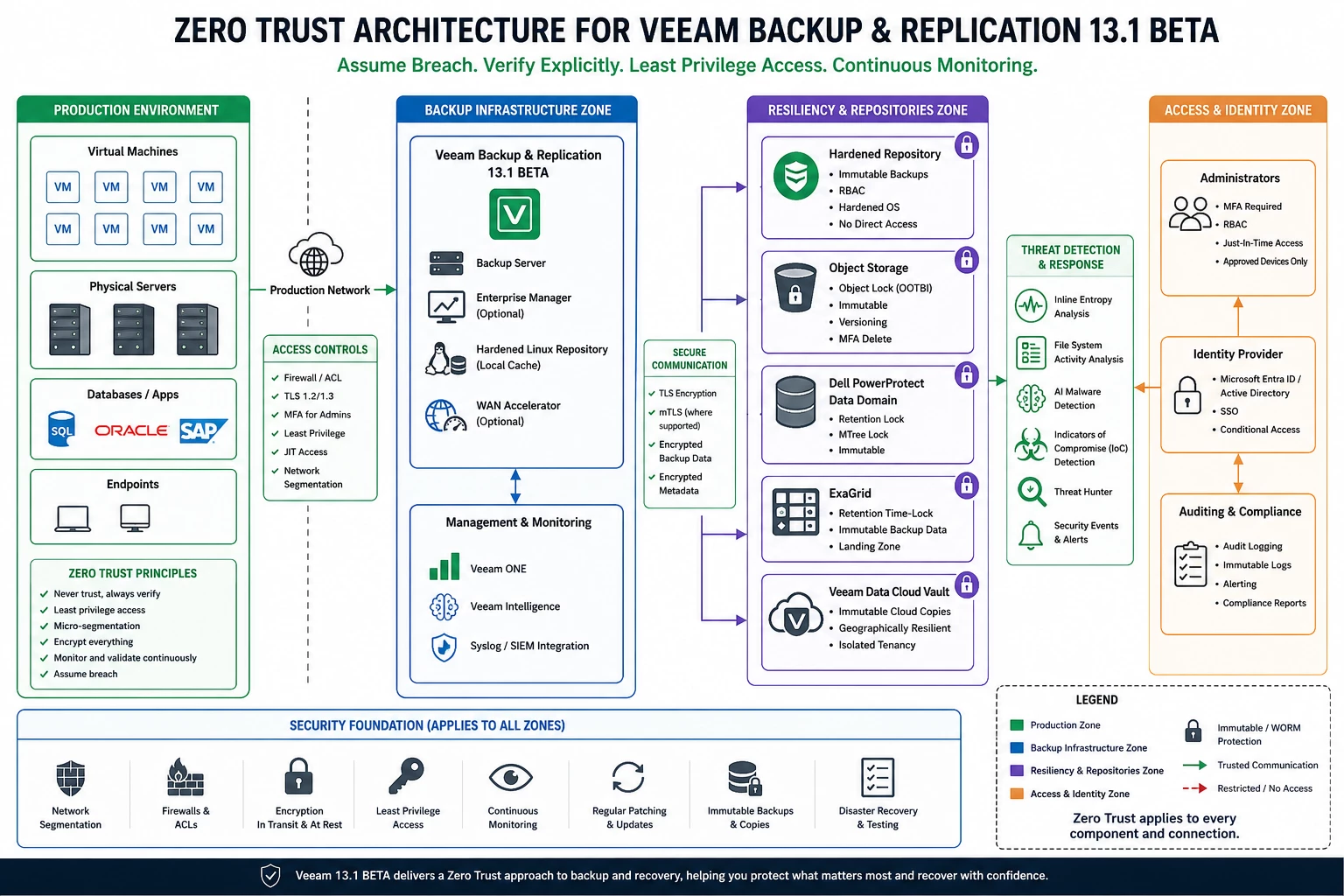
Zero Trust: Trust Nothing, Verify Everything
Zero Trust has become one of the biggest buzzwords in IT, but what does it actually mean for backup?
To me, it's pretty simple.
Assume your production environment will eventually be compromised. Then design your backup environment so it can survive the attack.
In my lab, I separate production workloads from the backup infrastructure whenever possible. The Veeam Backup Server, repositories, and management components are treated as their own security domain with limited administrative access, network segmentation, and immutable storage.
Veeam 13.1 continues to embrace that philosophy.
Rather than relying on one layer of protection, Veeam encourages multiple resiliency domains:
- Production workloads
- Backup infrastructure
- Immutable repositories
- Cloud-based immutable copies
- Identity protection
- Threat detection and recovery validation
If one layer is compromised, the others continue protecting your recovery data.
Real-World Example
Imagine ransomware encrypts every VM in your production cluster. If your backup server and repositories are isolated, protected with MFA, and writing to immutable storage, the attacker may successfully encrypt production—but they'll have a much harder time touching your backups.
That's exactly what Zero Trust is designed to accomplish.
Zero Trust Architecture Diagram
Inline Entropy Analysis
One of the features I was most interested in testing was Inline Entropy Analysis.
Entropy measures randomness in data. When ransomware encrypts files, the data becomes significantly more random than normal business files.
During the backup process, Veeam analyzes the data stream looking for those abnormal encryption patterns. Instead of waiting until a restore to discover something went wrong, Veeam can identify suspicious activity while the backup is running.
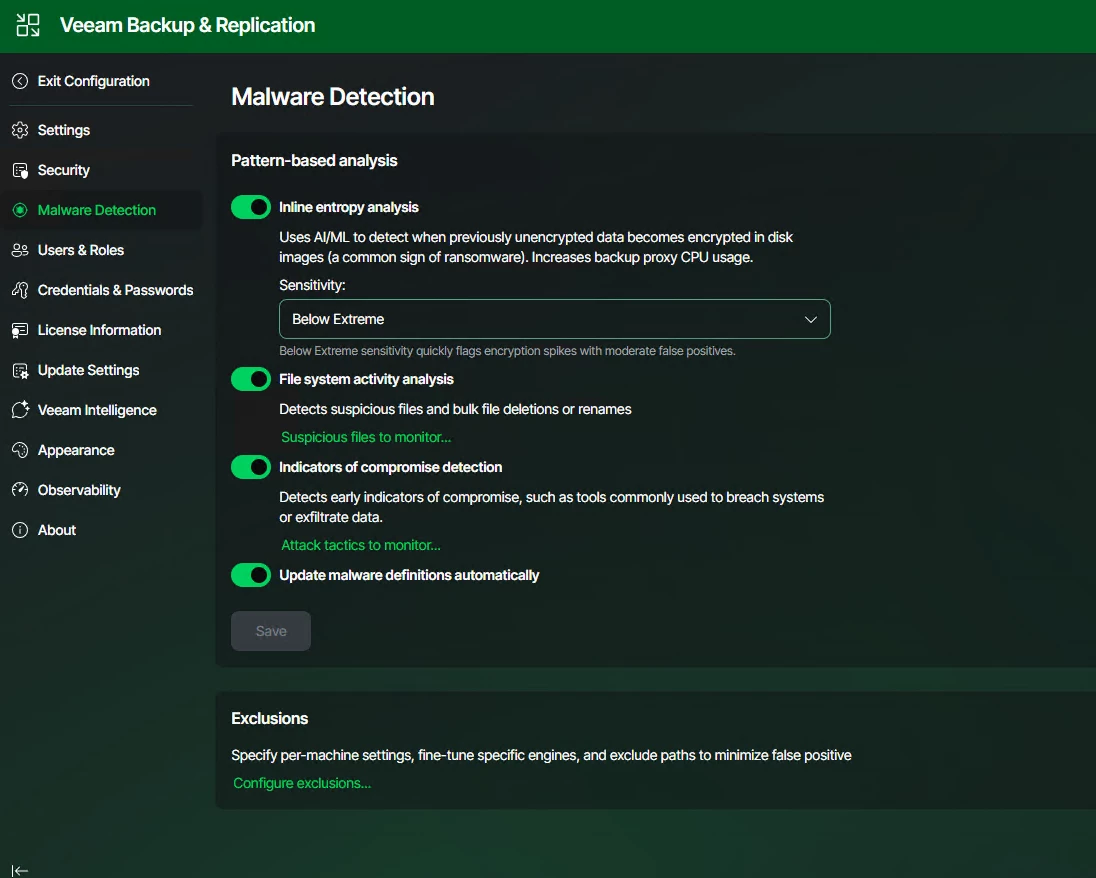
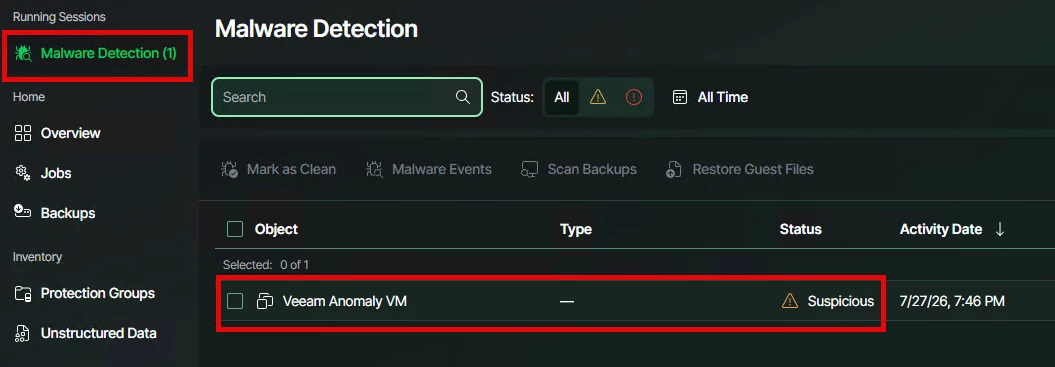
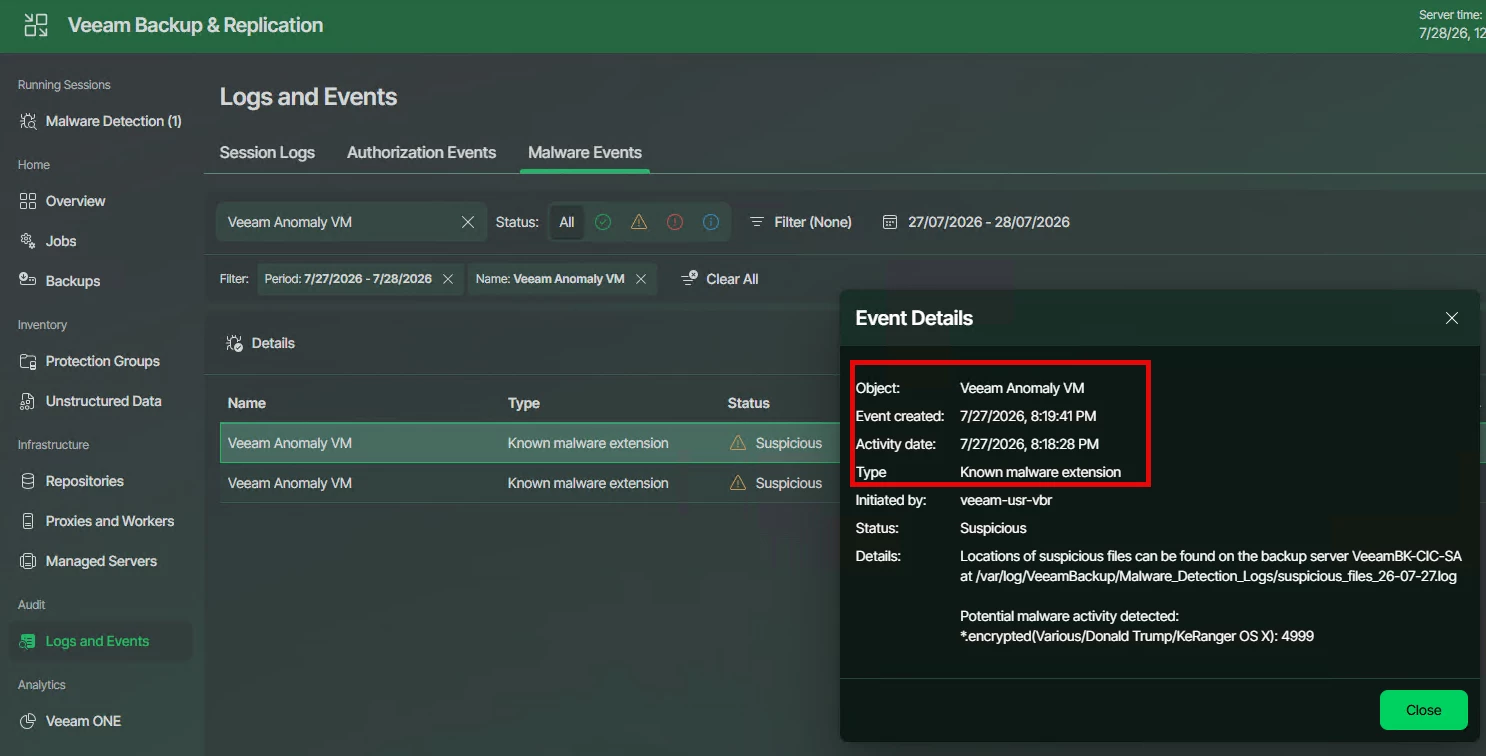
In my lab, I maintain a VM that's intentionally infected with ransomware so I can test these security features. During one of my backup jobs, Veeam detected the abnormal encryption activity and automatically marked the restore point as suspicious.
That's exactly what you want.
Instead of discovering the problem during a recovery, you're alerted while the backup is still being processed.
Why it matters
Inline Entropy Analysis gives administrators an early warning that something may be wrong before users even begin reporting encrypted files.
Screenshots from an Infected VM from my lab
Malware settings that are Enabled for backups
The VM marked as Suspicious
The Event details of the Suspicious behavior
Indicators of Compromise (IoC) Detection
One of the hardest questions to answer after a ransomware attack isn't whether you have backups—it's whether those backups are clean.
This is where Indicators of Compromise (IoC) Detection becomes extremely valuable.
IoC Detection scans restore points looking for evidence that a workload may have already been compromised. Rather than searching only for known malware signatures, Veeam looks for artifacts commonly left behind by attackers, such as:
- Ransom notes
- Suspicious executables
- Registry changes
- Persistence mechanisms
- Known attacker tools
- Other forensic indicators
Think of it as a second opinion before recovery.
Real-World Example
Let's say ransomware isn't discovered until Friday afternoon.
You have backups from Monday through Thursday.
Without IoC Detection, you're guessing which restore point is safe.
With IoC Detection, you can scan each restore point and identify the last known-good backup before you restore production.
That can save hours of investigation and dramatically reduce the chances of restoring an already compromised system.
Threat Hunter
If IoC Detection tells you that something looks suspicious, Threat Hunter helps you answer the next question:
How far back does the compromise go?
Threat Hunter allows administrators to search backup data for Indicators of Compromise across multiple restore points.
Instead of manually restoring several backups to investigate, you can quickly identify:
- When suspicious activity first appeared
- Which workloads were affected
- Which restore point is likely clean
This becomes incredibly valuable during a real incident when every minute of downtime matters.
AI-Powered Malware Detection
Traditional antivirus still plays an important role, but attackers continue finding ways around signature-based detection.
Veeam takes a layered approach.
Instead of relying on a single detection engine, Veeam combines multiple technologies, including:
- Inline Entropy Analysis
- File System Activity Analysis
- Indicators of Compromise Detection
- Threat Hunter
- Signature-based malware scanning
- YARA scanning
Each one looks for different characteristics of an attack.
Individually they're useful.
Together they provide much greater confidence that suspicious activity won't go unnoticed.
One thing I really like is that these features work together. They're not isolated tools—they complement one another throughout the backup lifecycle.
Real-World Example
Imagine ransomware encrypts a critical file server overnight. During the backup, Inline Entropy Analysis detects abnormal encryption patterns, while File System Activity Analysis identifies a sudden spike in file modifications and renames. An IoC scan then confirms signs of compromise, and Threat Hunter helps identify the last known-good restore point. Before recovery, signature-based and YARA scanning validate the selected backup, giving administrators greater confidence that they're restoring clean data instead of reinfecting the environment.
This concise example highlights how Veeam's layered security features work together to detect, investigate, and recover from a ransomware attack.
Preparing for the Future with Post-Quantum Cryptography (PQC)
Quantum computing isn't something most organizations are worrying about today.
But encryption protecting your backups today may need to protect them for many years.
That's why I was excited to see Veeam introducing support for Post-Quantum Cryptography (PQC).
PQC is designed to help protect encrypted data against future quantum-based attacks while remaining compatible with today's encryption standards.
Will every customer need this today?
Probably not.
But it's encouraging to see Veeam investing in technologies that prepare customers for what's coming rather than waiting until quantum computing becomes a real-world problem.
Real-World Example: A hospital may need to retain patient records for many years to meet regulatory requirements. While quantum computing isn't an immediate concern, those backups still need to be protected years from now. Veeam's support for Post-Quantum Cryptography (PQC) helps organizations prepare for the future by strengthening long-term encryption without requiring them to redesign their backup environment.
Hybrid FIPS Support
For customers in healthcare, financial services, government, or other regulated industries, compliance is just as important as security.
Veeam 13.1 introduces support for Hybrid FIPS, allowing organizations to take advantage of modern cryptographic standards while meeting regulatory requirements.
For many customers, this means they don't have to choose between stronger encryption and compliance—they can have both.
Real-World Example
Imagine a state government agency that stores citizen records and must comply with strict security standards. They want to adopt the latest encryption technologies without risking compliance issues or redesigning their backup environment. With Hybrid FIPS support in Veeam 13.1, they can strengthen the security of their backup infrastructure while continuing to meet the regulatory requirements their organization depends on.
Security Is No Longer Just About Backups
One thing became very obvious during my testing.
Veeam isn't just protecting backup files anymore.
It's protecting the entire recovery process.
Instead of asking:
"Did my backup complete successfully?"
We're now asking:
- Is my backup infrastructure secure?
- Are my restore points clean?
- Can I identify the last known-good backup?
- Can I recover Active Directory?
- Can ransomware reach my immutable copies?
Those are the questions customers are asking today, and Veeam 13.1 is taking meaningful steps toward answering them.
Final Thoughts
After spending time with Veeam Backup & Replication 13.1 BETA in the lab, I came away impressed with how much focus has been placed on security and cyber resilience.
Features like Zero Trust, Inline Entropy Analysis, Indicators of Compromise Detection, Threat Hunter, AI-powered Malware Detection, Post-Quantum Cryptography, and Hybrid FIPS aren't just new boxes to check on a feature list. They work together to help organizations detect attacks sooner, protect backup data, and recover with greater confidence.
The biggest takeaway for me is that security is no longer something that happens after a backup finishes. It's built into every stage of the backup lifecycle—from protecting the infrastructure itself to validating restore points before recovery begins.
As I continue testing the 13.1 BETA in the SHI CIC Lab, I'll be diving deeper into each of these features with step-by-step configuration guides, real screenshots from my lab, and hands-on testing using a VM intentionally infected with ransomware.
Because at the end of the day, the best way to understand these capabilities isn't by reading about them—it's by putting them to the test before your customers need them.
Why should customers upgrade to Veeam Data Platform 13.1 now?
The biggest reason to upgrade is cyber resilience. Customers aren't asking how fast backups run anymore—they're asking how quickly they can recover after a ransomware attack. Veeam 13.1 helps answer that with earlier threat detection, stronger security around the backup infrastructure, improved recovery confidence, and future-ready encryption. It's about giving customers the confidence that their backups are protected and that when they need to recover, they can recover from a clean, trusted restore point."