



In this article, we’ll explore why backup validation matters and how you can validate backup integrity using Veeam Backup & Replication.
A question I always ask customers. Do you test your backups? The answer I get is I don’t have the time or the resources. So, how do you know if the backup is good? Well, it's successful. A successful backup isn't always effective and should be tested periodically. Veeam can help validate the backups.
Backups are often considered the last line of defense in any data protection strategy. However, a backup that cannot be restored is effectively useless. Many organizations invest heavily in backup infrastructure but overlook one critical aspect: backup validation.
With modern cyber threats, ransomware attacks, and increasing data volumes, verifying the integrity of backups is essential. Fortunately, Veeam provides built-in mechanisms to ensure that backups are not only created successfully but can also be restored when needed.
Why Backup Validation Matters
A successful backup job does not automatically guarantee a successful restore. Backup files can become corrupted due to storage issues, network interruptions, ransomware, or misconfigurations.
Without validation, organizations risk discovering backup issues only during a disaster recovery scenario—when it’s already too late.
Validating backups ensures that:
- Backup files are readable and consistent
- Data can be restored successfully
- Recovery time objectives (RTOs) can be met
- Compliance and audit requirements are satisfied
Regular validation also increases confidence in your data protection strategy.
Methods to Validate Backup Integrity in Veeam
There are several ways to verify the integrity of backups within the Veeam ecosystem.
1. SureBackup: Automated Backup Verification
One of the most powerful validation tools in Veeam Backup & Replication is SureBackup.
SureBackup automatically tests backups by running virtual machines directly from backup files in an isolated environment.
How It Works
SureBackup performs several automated checks:
- Boots the VM from the backup
- Tests heartbeat signals
- Verifies network connectivity
- Confirms application responsiveness
This process ensures that the backup is not only intact but also fully recoverable.
Steps to Configure SureBackup
- Create a Virtual Lab
- Navigate to Backup Infrastructure ==> SureBackup ==> Virtual Labs ==> Right Click ==> Add virtual lab
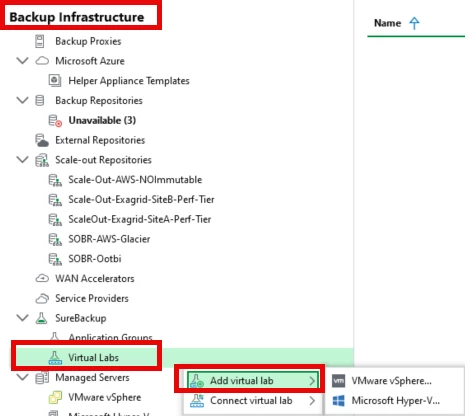
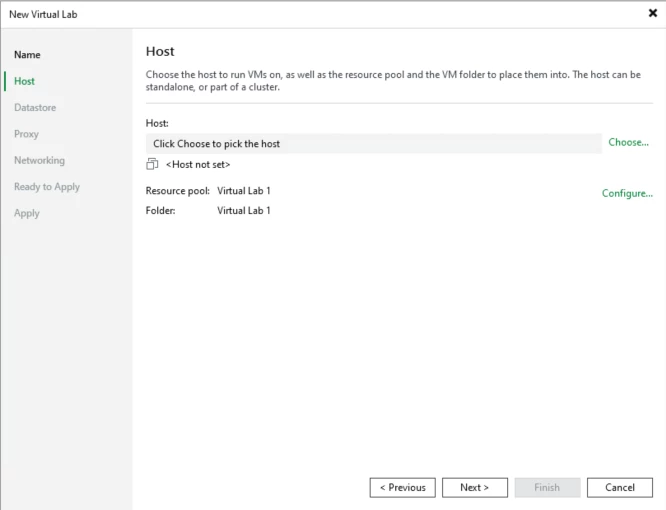
Select the VM host for the Virtual Lab
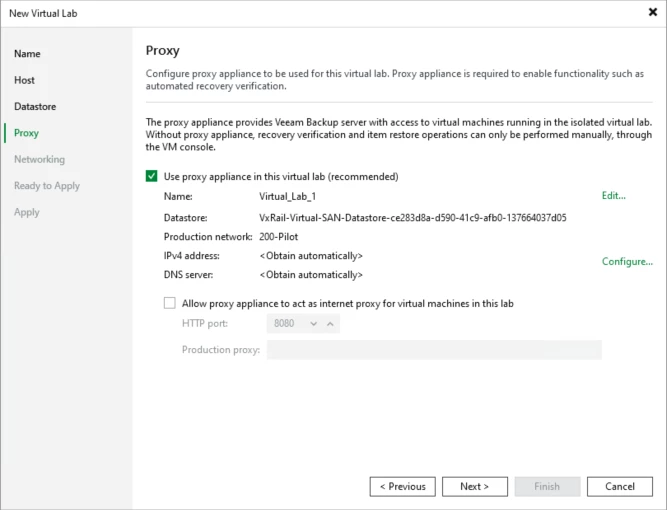
Create the Proxy Appliance to be used with the Virtual Lab, select the Datastore, and configure networking
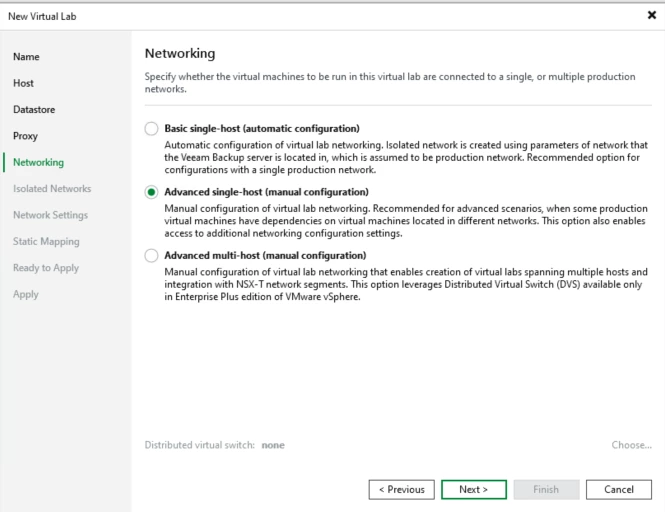
Select the Networking configuration
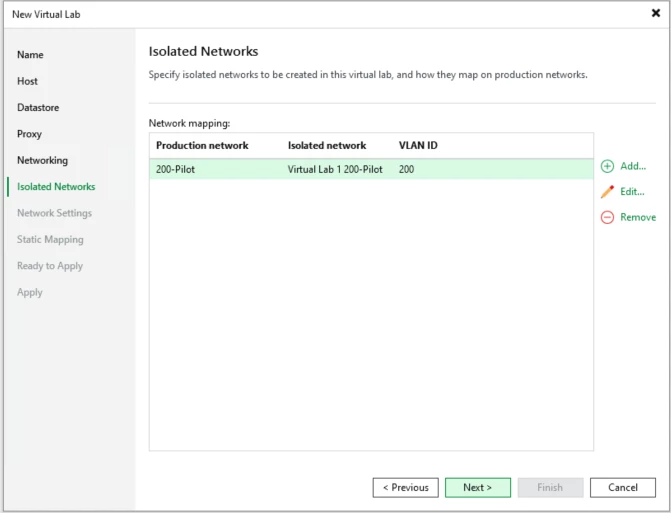
Select the Isolated network to be created in the virtual lab
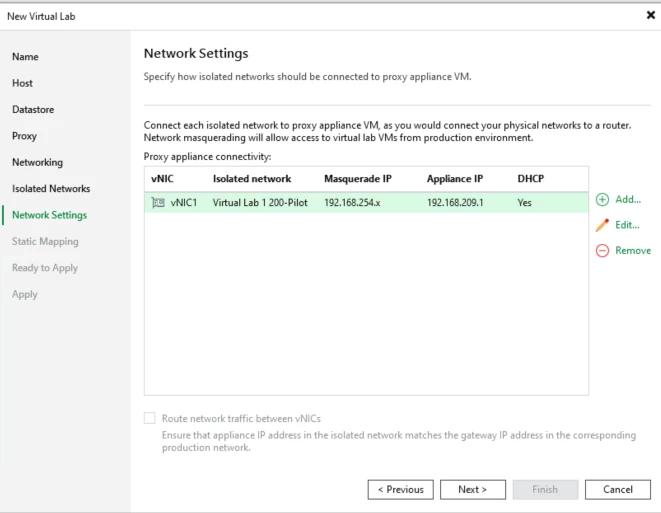
Configure the Network settings for that network
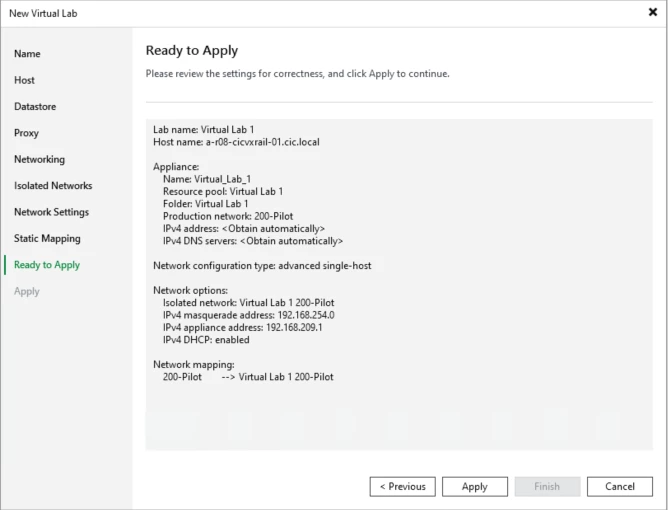
Click on Apply
- Define an Application Group
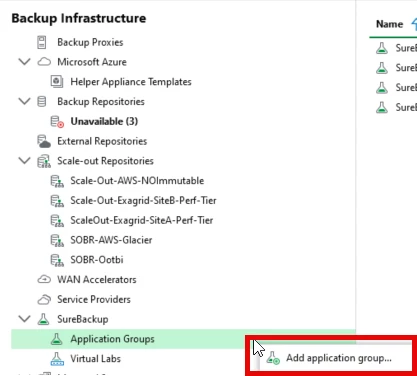
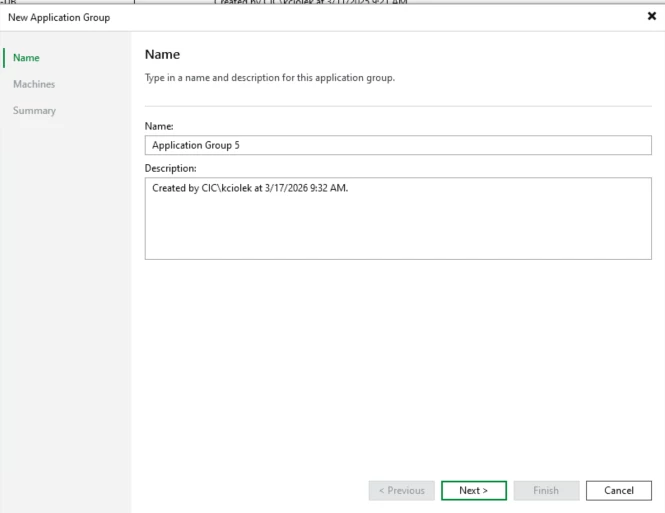
Right-click on Application Groups ==> Add application group
Enter the Name for the Application Group
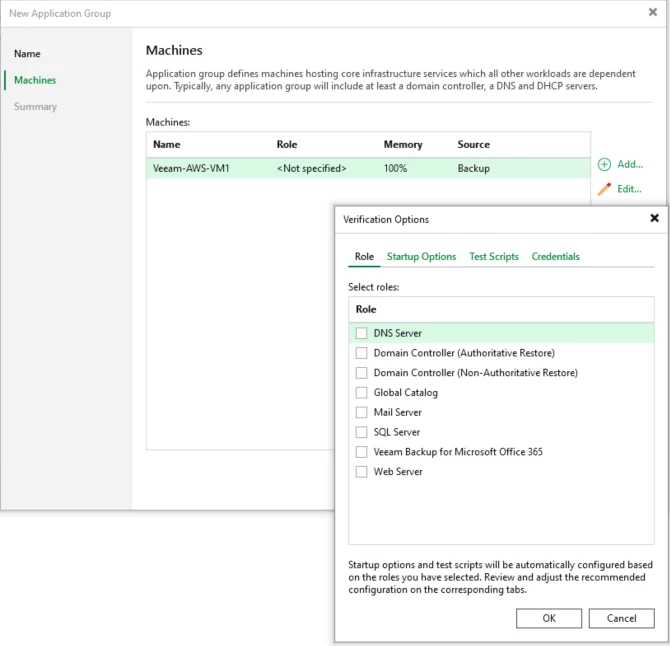
Add machines to the application group. You can specify the role of the server, and it will perform additional startup options and test scripts.
- Configure a SureBackup Job
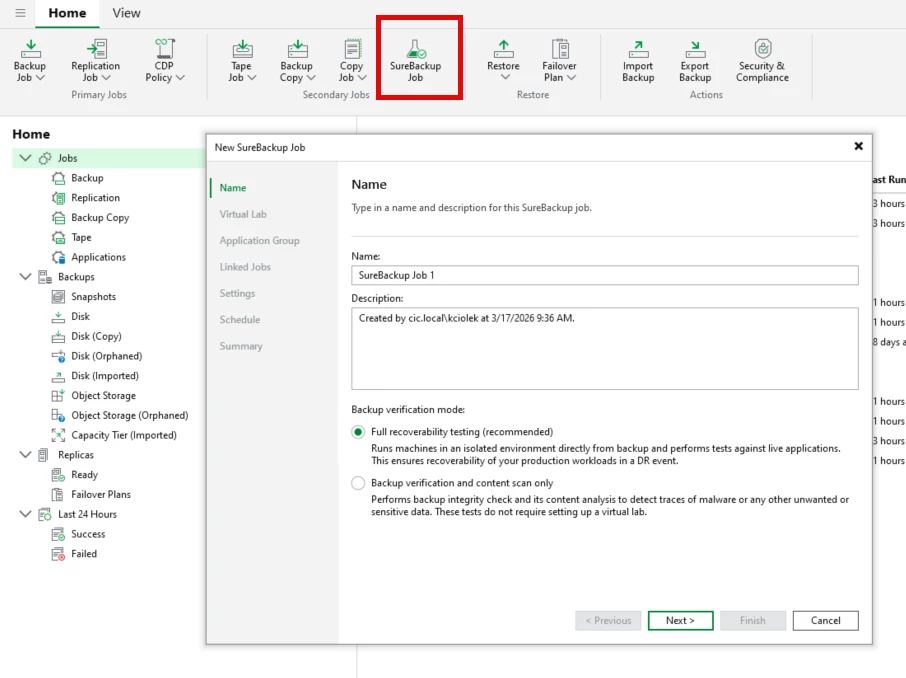
Navigate to Home, at the top Select SureBackup Job ==> The wizard will open for configuration. Give the job a name and select the Backup Verification Mode
Full recoverability testing - is an automated process that verifies backups by booting virtual machines (VMs) in an isolated DataLab. It confirms VMs start correctly, applications initialize, and dependencies function, ensuring they can be restored in a disaster recovery scenario. It tests data integrity by performing Heartbeat, Ping, and Application tests.
Backup verification and content scan only - Backup verification and content scan only" in Veeam SureBackup is a lightweight, mode that mounts backups to scan for malware, ransomware, or corruption without booting VMs, needing a Virtual Lab, or using application groups. It validates data integrity through content analysis and YARA rules to ensure Windows-based VM backups are safe and restorable.
Schedule the job for regular validation
By automating verification, administrators can continuously confirm that recovery points are usable.
1. Health Check for Backup Files
Another built-in feature is Backup Health Check.
This process periodically scans backup files and compares them against stored checksums to detect corruption.
Benefits of Health Check
- Detects silent data corruption
- Verifies the integrity of backup chains
- Ensures backup files remain consistent over time
Best Practice
Enable health checks in backup job settings and schedule them periodically, particularly for long-term retention backups.
2. Instant VM Recovery Testing
Another effective way to validate backup integrity is by performing a test recovery using Instant VM Recovery.
This feature allows administrators to instantly run a VM directly from the backup storage without fully restoring it.
Benefits include:
- Rapid verification of restore capability
- Minimal storage impact
- Fast testing of recovery workflows
Running occasional restore tests ensures that both backup files and recovery procedures function as expected.
3. Monitoring Backup Job Logs
Administrators should also regularly review backup job logs and reports.
Important indicators include:
- Backup job warnings or errors
- Storage latency issues
- Backup chain inconsistencies
Monitoring these metrics helps identify potential problems early before they affect recoverability.
Best Practices for Backup Validation
To ensure reliable data protection, consider the following best practices:
Validate Backups Regularly
Automated verification should be part of the standard backup strategy.
Follow the 3-2-1-1-0 Rule
A common best practice promoted by Veeam is the 3-2-1-1-0 backup rule, which emphasizes verified recoverability with zero backup errors.
Automate Verification Processes
Tools like SureBackup remove the need for manual testing and ensure regular validation.
Perform Periodic Restore Drills
Testing real recovery scenarios helps teams confirm operational readiness during a disaster.
Final Thoughts
Creating backups is only half the battle. The real value lies in knowing that those backups can be restored when needed.
By leveraging features like SureBackup, Health Checks, and Instant VM Recovery, organizations can continuously validate backup integrity and maintain confidence in their data protection strategy.
In a world where downtime and cyber threats are constant risks, validated backups are the foundation of true cyber resilience.




