



When designing a Hyper‑V backup architecture, one of the most important decisions you’ll make is how will backups be moved from a hypervisor and how are they processed. In Veeam Backup & Replication, Hyper‑V backups rely on backup proxies, and unlike vSphere, Hyper‑V proxy behavior comes with some unique considerations that require upfront planning.
Hyper‑V supports two types of backup proxies:
- On‑host proxies
- Off‑host proxies
At a high level, these operate similarly to VMware proxies—but the implementation details, limitations, and operational overhead are significantly different. Let’s break them down and discuss when (and when not) to use each.
On‑Host Proxy: The Default and Recommended Choice
For most environments, the on‑host proxy is the simplest, most reliable, and recommended backup transport mode.
When a Hyper‑V host is added as a managed server in Veeam Backup & Replication, the on‑host proxy is automatically deployed to it. Each Hyper‑V host runs its own proxy, leveraging native Hyper‑V checkpoints and the Microsoft software VSS provider to read VM data locally.
Why On‑Host Proxies Work Well
- Automatically deployed—no additional servers required
- Minimal configuration and maintenance
- Uses standard Hyper‑V checkpoints
- Scales naturally with the cluster
Because of this simplicity, on‑host proxies should be considered the default design choice for most Hyper‑V backup architectures.
Performance Considerations: Concurrent Tasks
On‑host proxies consume CPU and RAM on the Hyper‑V host during backup operations. The impact depends on:
- Number of VMs being protected
- Backup window requirements
- Available host compute resources
Each on‑host proxy has a configurable maximum number of concurrent tasks. By default, this value is set to 4.
You can adjust this setting by navigating to:
Inventory → Managed Servers → Hyper‑V Cluster → Properties → Review page
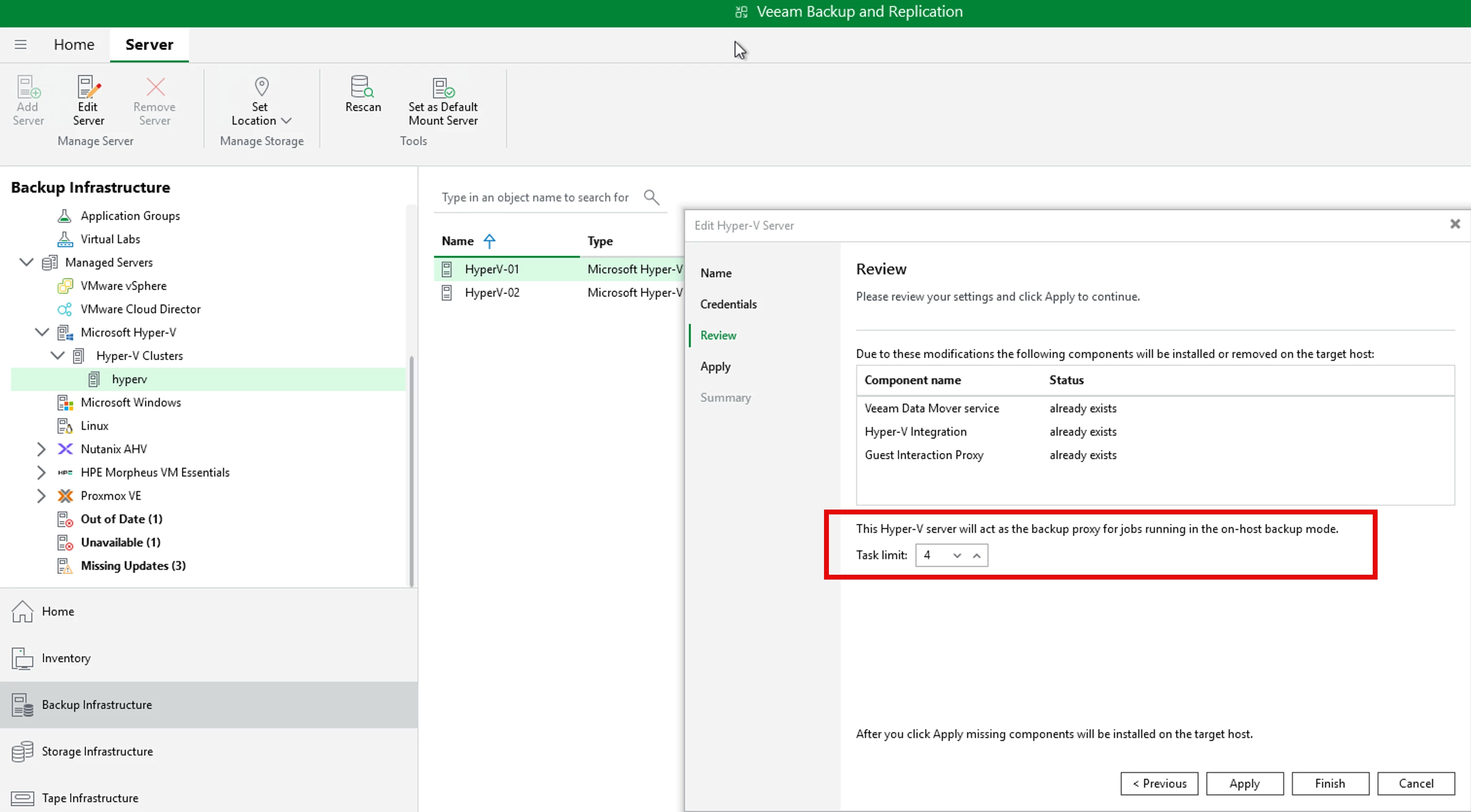
If backups begin to contend with production workloads, you may need to:
- Reduce the number of concurrent tasks per proxy, or
- Increase host compute resources
Off‑Host Proxy: Storage Snapshot–Based, but Complex
The off‑host proxy is conceptually similar (but not equivalent) to VMware’s backup from storage snapshots (BfSS). Instead of creating Hyper‑V checkpoints on the production host, backups are processed using transportable VSS snapshots on the storage array.
While this sounds appealing in theory, off‑host proxies are significantly more complex to deploy and maintain—and often provide limited real‑world benefits.
Off‑Host Proxy Requirements
To use an off‑host proxy in Hyper‑V, all the following conditions must be met:
- The off‑host proxy must run on a physical server
- It must run the same version of Windows and Hyper‑V as the production hosts
- The proxy server must not be a member of the Hyper‑V cluster
- It must have direct storage access to the volumes being backed up (FC, iSCSI, or Ethernet)
- A hardware VSS provider that supports transportable shadow copies is required
- The provider is obtained, and maintained by the hardware vendor
- The provider must be installed on every Hyper‑V host being protected
- It must also be installed on the off‑host proxy server
In practice, this typically means integrating vendor‑specific storage software across the entire cluster.
Common Challenges with Off‑Host Proxies
Off‑host proxies frequently introduce friction and operational risk, including:
- Storage vendor VSS dependencies
Many hardware VSS providers are bundled with full management suites that customers don’t want—or aren’t supported in production. - Vendor support complexity
The storage vendor may need to be engaged just to obtain or validate the correct VSS components. - Strict version alignment
The off‑host proxy must be upgraded in lockstep with every Hyper‑V host.
A version mismatch will cause backups to fail.
Because of these challenges, off‑host proxies often create more problems than they solve.
If an off‑host proxy is required, engaging the storage vendor early is strongly recommended.
Key Design Recommendations
Based on real‑world deployments and support experience, the following guidance applies:
- Avoid off‑host proxies unless the you really need them to solve a particular issue
If you do need the off-host proxy, make sure you fully understand the requirements and limitations as documented in the VBR User Guide. - Do not equate off‑host proxies with VMware storage integration
This is not recovery from storage snapshots. There is:- No ability to vault snapshots to another location
- No second‑site restore capability
- No snapshot‑based backup copy workflow
- No ability to restore VMs from storage snapshots
It is simply backup from a VSS snapshot instead of a Hyper‑V checkpoint.
- Prefer on‑host proxies whenever possible
They are easier to deploy, easier to support, and far easier to operate long‑term.
Final Thoughts
For Hyper‑V environments, on‑host proxies are the right answer in most cases. They provide predictable behavior, low operational overhead, and align well with modern Hyper‑V cluster designs.
Off‑host proxies remain a niche option—best reserved for very specific storage‑driven requirements and implemented only with a clear understanding of the trade‑offs involved.
If simplicity, reliability, and maintainability matter (and they usually do), on‑host proxies should be your default architectural decision.


