


This is a repost from Climb Japan engineer Veeam blogs. Tips on using Veeam tools, insights on cyber security and various other topics, etc. are regularly posted in Japanese. We would like to share English versions of selective articles here in this Veeam Community.
Veeam Backup & Replication enables the agentless protection of Hyper-V virtual machines. In order to maintain the data integrity of Hyper-V VMs, when you process a Veeam backup, a temporary Hyper-V checkpoint is automatically created and it is then deleted when the data capture is completed.
However, in some exceptional situations, e.g. as a result of antivirus software interference, the checkpoint may remain on the protected VM. In that case, you might see the remaining checkpoint named “Veeam Recovery Checkpoint (XXXX)” on the Hyper-V Manager screen as below. The red marked section shows the remaining checkpoint. Note the UI is in Japanese.
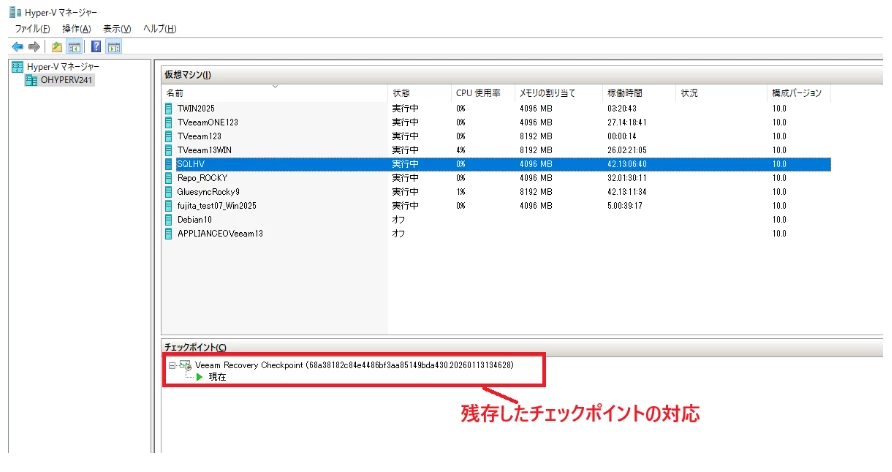
The Hyper-V checkpoint size may increase as time goes by, because it will reflect the protected VM’s data changes. Therefore, if the checkpoint is left there for a longer period, the size may become large enough to negatively impact the performance of the protected VM. It may also affect the Hyper-V host disc space.
For that reason, if you find any remaining checkpoint after processing a Veeam backup, it is recommended to delete it manually. As the Veeam-created checkpoint is always in “Recovery” type, however, you cannot delete it using the Hyper-V Manager UI. You would need to use a PowerShell command.
For the detail instruction of how to delete the remaining checkpoint using a PowerShell command, please visit our Climb Veeam Information Bureau website.