

The Start
This series of blogs, which I will try update weekly, is about me getting to understand Kubernetes and is for someone like me coming from a level of zero dot 1, a true beginner. If you have been working with containers and know something about it, you will most probably be bored with these blogs although you might also learn something new. Luckily in this Veeam Community we have some very high-level resources that I am sure will deliver some interesting insights, and
Please comment and discuss freely so everybody can learn what seems to me at present a confusing technology, but don’t try proving your prowess - this is for us that do not know to learn by taking baby steps helped along the way by you.
I will be writing down my understanding while doing some basic courses, reading what AI has to say about what I still don’t understand – and spending my evenings watching YouTube videos on the subject before crying myself to sleep because I have no life….
I might understand wrong and will leave such wrong understandings in here, but with a line through it and the moderated explanation next to it in red - thank you
So, what is Kubernetes? Wait, what, Dockers? Containers? Pods? Node’s? Clusters?
Docker:(Container Runtime) The tool you use to add your microservice. Traditional app’s as we know it are built with a monolithic architecture meaning the UI, business logic and data access is bundled together running as one service, where microservices architecture is the opposite, all those services run independently (1) (Docker is not used any more as default container runtime, depending on the Kubernetes distribution there are different ones like Containerd or Cri-o. Containerd is the most common) into a
Container: which acts as a box (container) keeping your app and it’s dependencies inside. Typically you find the microservice code, it’s runtime/libraries and dependencies, and a single main process that runs that service.
Kubernetes: (2) Can now be seen as the logistics system, allowing you to scale and manage many containers across many networks. (Main idea is that Kubernetes is an orchestrator, without it running containers in Docker, Podman or manually at scale would be a nightmare) Kubernetes places these containers in
Pods: (Kubernetes objects) which are seen as wrappers put around the containers to make it easier to control in any scaled environment. (Kubernetes Objects consist of one container or more. The one comparison I used to make was to VMware Cloud director vApps. vApp (3) added metadata around a group of Vm’s in a manner of speaking) These pods must live and draw resources from somewhere and are convenient for shared network/storage etc., so live in
Node’s: In traditional mode this is like a VM scenario (If comparing, with a stretch, it is like a node in VM cluster (Hyper-V VMware etc.) but again be careful. That is why Kubernetes gets folks with a lot of experience sometimes mixed up as there is a temptation to associate with a thing one knows well already.) As with traditional thought, coupling several node’s together form a
Cluster: which has several “worker nodes – there can be more than one pod in a node” (most workloads are created as deployments, so a bunch of pods) , and then at least one “Controller Plane.” Self-explanatory I suppose – Controller Plane Node controls/manages everything in the cluster - the various worker nodes, scheduling Pods on all worked nodes etc.
Now that I think I know the basic language – let’s move over to the basics of the bigger things and an understanding what is running inside the environment.
Firstly, you need something on your end point device with which you can communicate/access your Kubernetes cluster – and the tool is “kubectl”. https://kubernetes.io/docs/tasks/tools/install-kubectl/ You also find this “vendor packaged” depending on which Kubernetes distribution you use.
This is your command line interface, allowing you to connect your end point to your cluster “Controller Plane Node”, which of course is managing your cluster of nodes, remember. All the “kubectl” requests are pushed to the API server within your “Controller Plane Node”, but of course, need to be configured so not any “kubectl” can talk to any cluster across the whole world, duh…….
The API server, which resides inside of your “Controller Plane Node”, will do things like accept requests to create/change/view things like pods, deployments and services; check authentication and permissions; store cluster states and acts generally as the communication point for the control plane. More on this later – I hope – I am writing as I am learning, and that’s what “he” said……
Back to the configuration of “kubectl”: inside the same machine you have “kubectl” installed (you can put a remote address in a kubeconfig file), you will have a “kube config file”. This will have things like the location of the cluster but also include where the certificate and key file is, (should also be on your personal environment) which in turn would allow you to authenticate yourself and allow you to talk to that cluster. (Often the cert/keys are embedded in the kubeconfig file in (4) Base64, so that way you don't need to use file paths.)
Not only does the API server in the “Controller Plane Node” do bi-directional communication with your correctly configured “kubectl”, all communication to every single node in the cluster communicates through this. More important it seems to me at this learning stage; the API server is also the only thing that talks to “etcd”.
But more of this next time, as it seems I will have to focus on this and the other components of the “Controller Plane Node” in much more detail than time permits for now.
(1) I think I am starting to see the advantages of containarism (now here’s a new word I had to add to “Word’s” dictionary). With all the services (hence the things that run the processes and chow’s your resources) coupled in traditional monolithic architecture, should one service have a higher demand for resources, the entire architecture must be scaled. It also becomes complex/difficult in such a monolithic architecture should you want to add, improve or implement new ideas/make changes. Decoupling the services in a microservice architecture, running each service independently, should a service need more resources you only have to scale that service. Want to make changes or experiment – you only have to make changes to that specific service. And it becomes much cheaper: In a real world scenario - and here I must thank
(2) Various Kubernetes Distribution flavors exist.
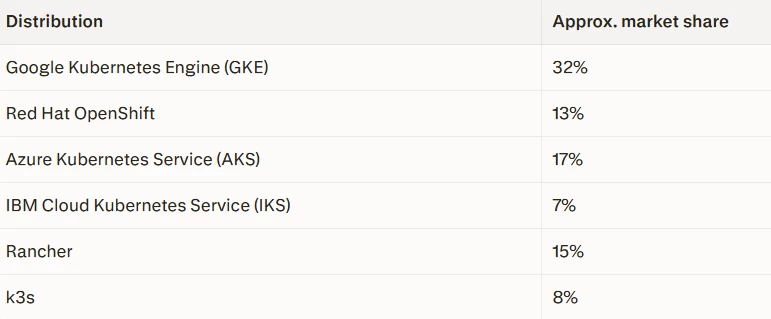
(3) vApp is a small app environment made of one or more VMs that belong together.
(4) Base64 is a way to represent binary data as text using a fixed set of 64 characters and is commonly used when binary data needs to be stored or transmitted safely in text-based formats.