Introduction
On December 4th, 2025, CISA, NSA, and the Canadian Centre for Cyber Security released a joint analysis detailing a new and highly sophisticated backdoor targeting VMware vCenter environments: “BRICKSTORM”.
Mandiant (Google Cloud) published a report already in September 2025 with an in-depth technical analysis, confirming the threat’s scope and impact.
As this is a very dangerous and sneaky malware, I want to break down what this means for us in the backup and virtualization community—and why you should act now.
What is BRICKSTORM?
BRICKSTORM is a custom backdoor designed for long-term persistence in VMware vSphere environments, especially vCenter and ESXi hosts. It’s not just another piece of malware—it’s a stealthy, multi-functional toolkit that enables attackers to:
- Maintain persistent access to vCenter and ESXi
- Exfiltrate VM snapshots and credentials
- Create hidden or rogue VMs
- Move laterally across Windows and Linux systems (steal credentials from ADS!)
- Evade detection using encrypted DNS-over-HTTPS (DoH) and WebSockets
Victims so far include government, critical infrastructure, and IT organizations. But the techniques used are relevant to any enterprise running vCenter. Luckily, Veeam offers us help to detect it. Stay with me to learn about that.
How Does BRICKSTORM Work?
Attackers typically gain initial access via a vulnerable web server or stolen credentials. From there, they move laterally to domain controllers and vCenter servers, where they deploy BRICKSTORM in locations like /etc/sysconfig/ and modify system init files for persistence.
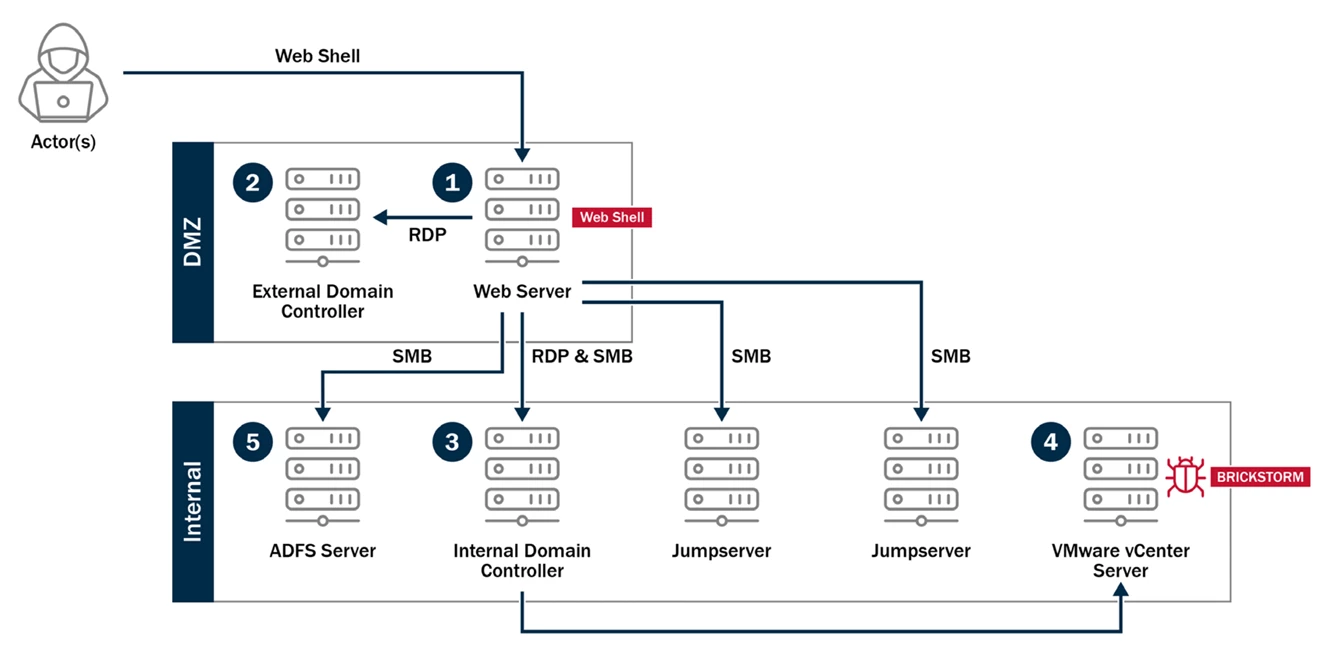
Once installed, BRICKSTORM can:
- Reinstall or restart itself if disrupted
- Set up encrypted command-and-control channels
- Act as a SOCKS proxy for lateral movement
- Provide interactive shell access and file management capabilities
The malware is highly evasive, blending its traffic with legitimate web server activity and using multiple layers of encryption.
Why can this even put backups at risk?
- Backup integrity is at risk: BRICKSTORM can create rogue VMs and exfiltrate snapshots. If your backup jobs include compromised VMs, you may be unknowingly backing up malware or your backup can be rendered useless.
- Recovery operations could spread infection: Restoring infected VMs or system files could reintroduce the backdoor into your environment.
- Detection is challenging: Standard antivirus and EDR solutions may miss BRICKSTORM due to its use of encrypted traffic and masquerading as legitimate VMware processes.
How Can We Detect BRICKSTORM?
Both CISA and Mandiant have published YARA rules and Indicators of Compromise (IOCs).
Fortunately, Veeam Backup and Replication can leverage YARA rules to scrutinize your backups for any hints to a malware. The main target for BRICKSTORM is vCenter.
Sadly, YARA scans until V12 of VBR can only scan Windows systems, as the Windows mount server cannot mount Linux file systems. But With the brand new V13, we can now also scan Linux backups using a Linux mount server. This can e.g. be VBR itself, if it is driven by the Linux appliance (VSA).
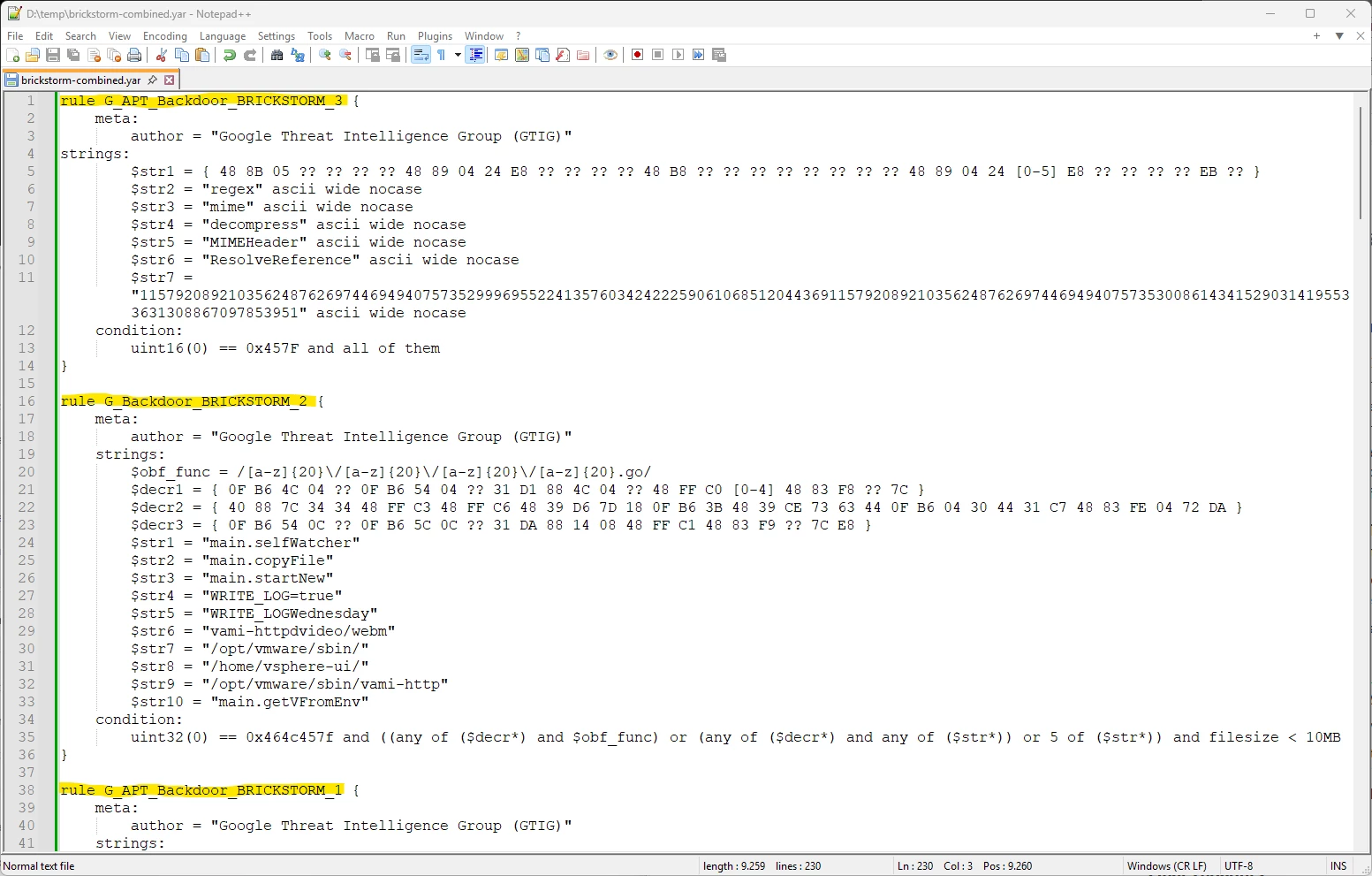
CISA files eight 8 independent rules while Mandiant has two.
We could now just search subsequently for all 10 rules in independent YARA files. But YARA also allows for multiple rules in a file and an “or” relation is applied. So, if you just concatenate all rules one after the other in a single file and upload that file to your Veeam servers YARA folder, we can check for all occurences in a single run.
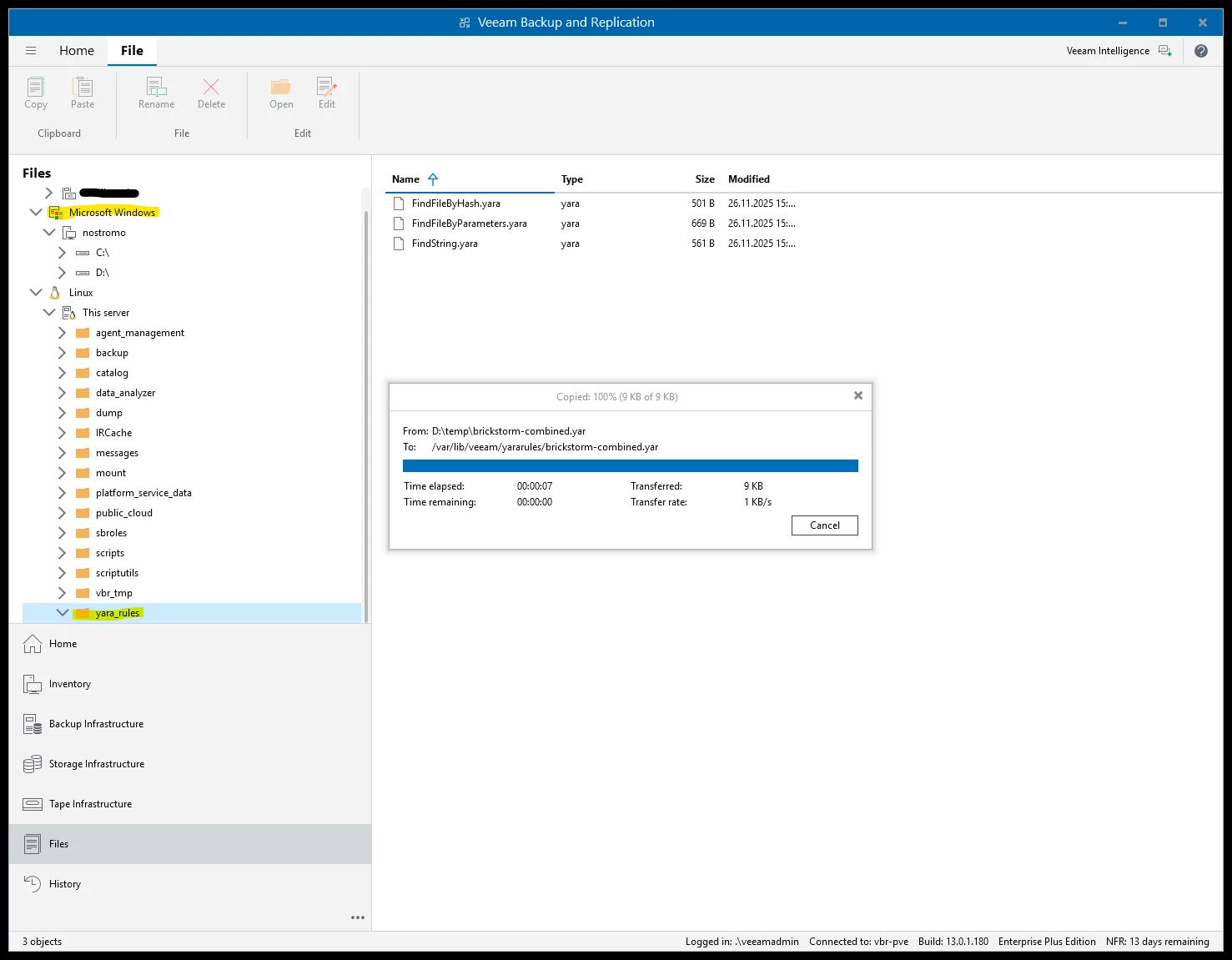
Uploading it to the hardened Linux appliance (VSA) or any other mount server already registered as managed server inside VBR is easier than expected using the files tab. Inside the Veeam Console you’ll find the Windows system you’re running the console on, as well as the VBR system in the VSA. Using copy/paste it you can just push the YARA file to the correct folder.
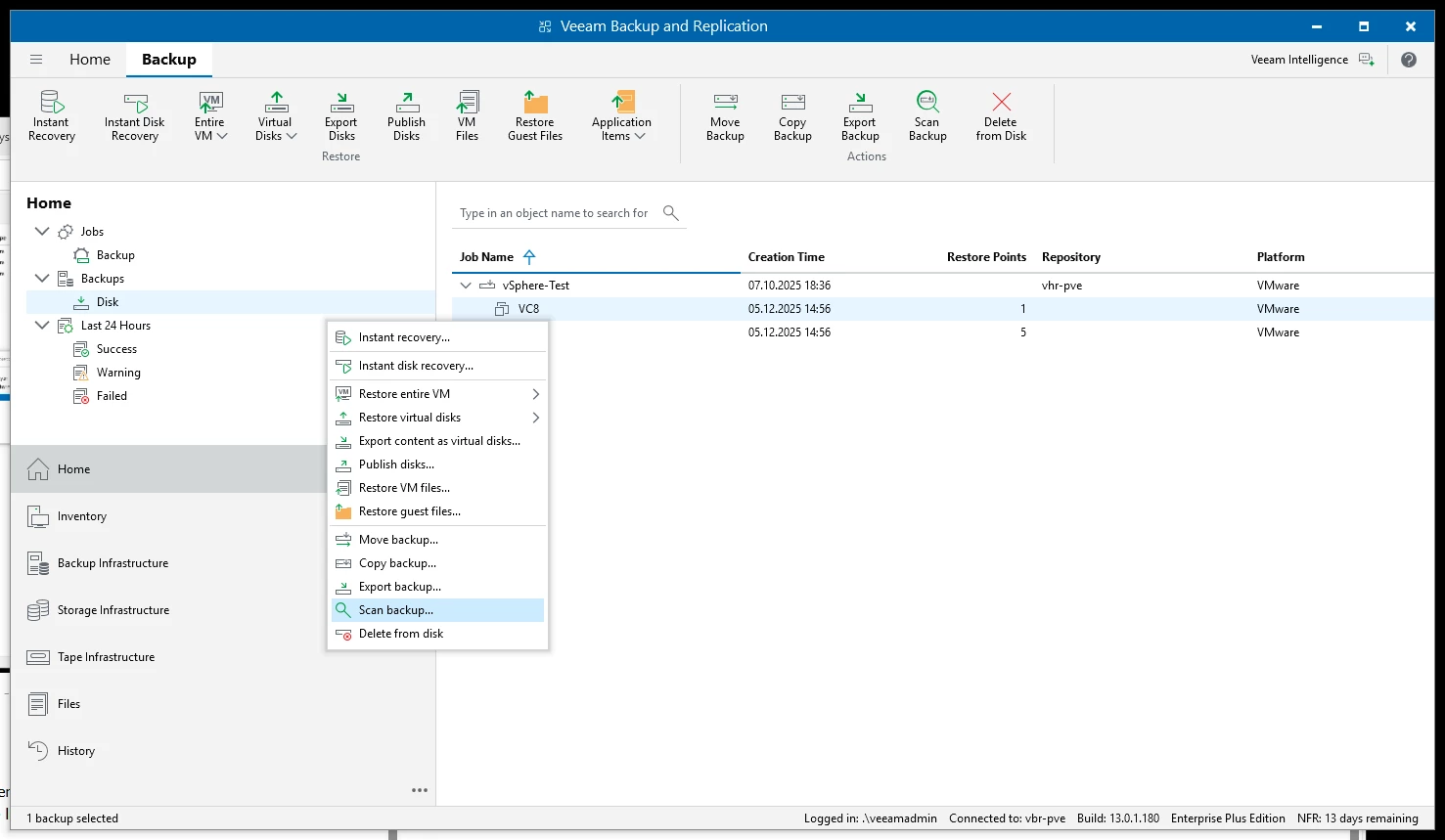
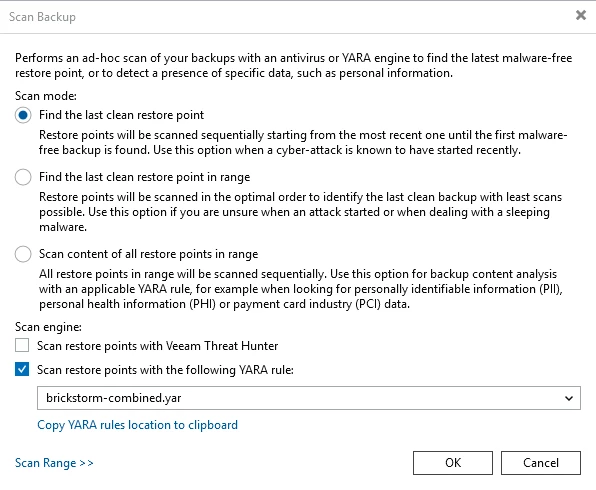
Now it’s just a few clicks to start your scan. It’s vCenter we want to scan, as the malware has it’s home base here.
Pick the correct YARA rule and select “Find the last clean restore point”. Hopefully, already the first one scanned will be clean. Otherwise, you’re in a bit of a trouble and have some work ahead. But at least you know.
Currently, I’m still working on mount errors I occasionally get with stale mount points when using the VSA itself as a mount server:

I’ll follow up on how to circumvent those, once I could clarify the root cause. Stay tuned.
*** EDIT 12/08/2025 ***
Using an independent Linux mount server with my VSA test environment worked fine. It’s just the internal mount server of the VSA VBR server that produces those mount errors for me.
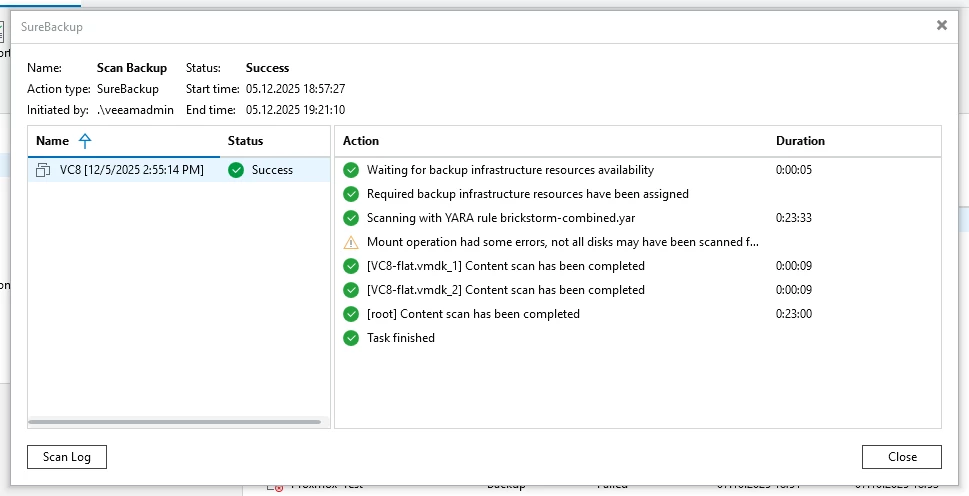
I used a Rocky Linux (minimal, V9.6) in a VM as a dedicated mount server for my test.
Also note that even the Windows edition of VBR V13 can now use Linux mount servers next to Windows mount servers. So, even when you’re still running Veeam on Windows, you can make use of the method described here.
*** EDIT END ***
Final Thoughts
BRICKSTORM is yet another wake-up call for everyone managing IT environments. The days of relying solely on perimeter defenses are over - malware like this targets the heart of your infrastructure and can persist for months undetected.
Stay vigilant, keep your systems patched, and make malware scanning with Veeam a routine part of your backup and recovery strategy.