



One of the biggest challenges in AWS data protection projects is the time required to provision all the necessary infrastructure. This timeline can vary significantly depending on the customer’s existing environment, cross-team dependencies, and the level of customization required for each deployment.
With the goal of accelerating this process and bringing greater consistency across environments, I started developing a CloudFormation-based approach that leverages Infrastructure as Code (IaC) to automate the deployment of the required resources.
The solution delivers a fully operational Veeam Data Platform 13.1 server within a VPC that is completely isolated from the internet. Administrative access is provided exclusively through AWS Systems Manager (SSM) Session Manager, eliminating the need for public IP addresses, bastion hosts, or open inbound ports. All management and operational traffic remains securely within the AWS network.
My intention is to share this initiative with the community, helping architects, engineers, and Veeam professionals reduce deployment complexity, improve consistency, and adopt cloud-native security best practices from day one. I hope this can serve as a foundation that others can learn from, enhance, and adapt to their own AWS data protection journeys.
This is the big-picture idea behind the project:
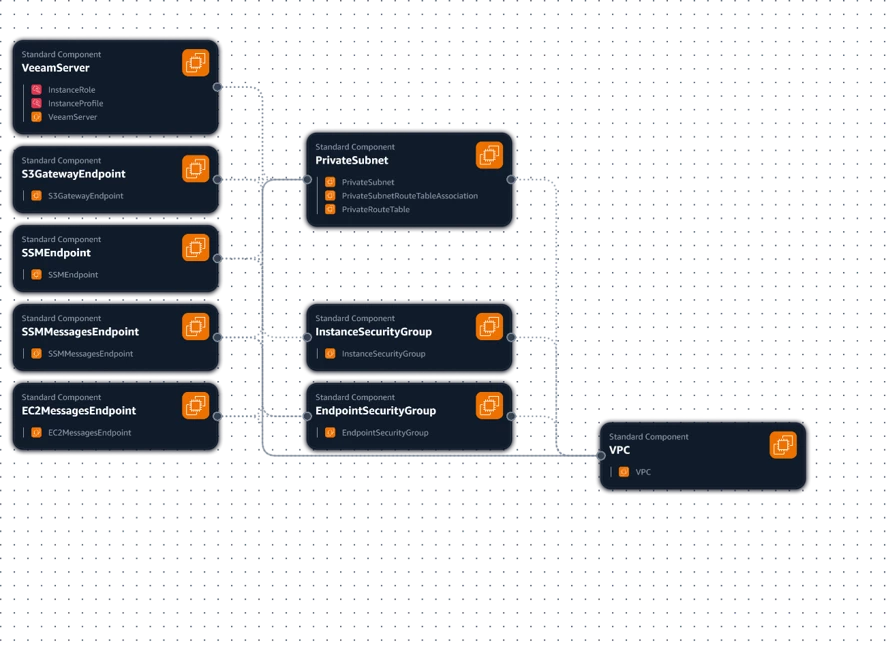
Here’s the GitHub repository, my friends! 🚀
Feel free to explore, test, and share your feedback. If you run into any issues, have suggestions, or spot opportunities for improvement, please let me know. Your contributions are more than welcome!
📍 https://github.com/jeanSczepanski/Wizaard
Solution Highlights
✅ Fully automated deployment using AWS CloudFormation
✅ Veeam Data Platform Premium v13 on Windows Server 2025
✅ Internet-isolated architecture
✅ No Internet Gateway (IGW)
✅ No NAT Gateway
✅ No public IP addresses
✅ No RDP or SSH exposure
✅ Administrative access via AWS Systems Manager Session Manager
✅ Download of installation media and licenses through Amazon S3 Gateway Endpoints
✅ Infrastructure designed following least-privilege security principles
✅ Infrastructure as Code approach for repeatable deployments
Architecture Overview
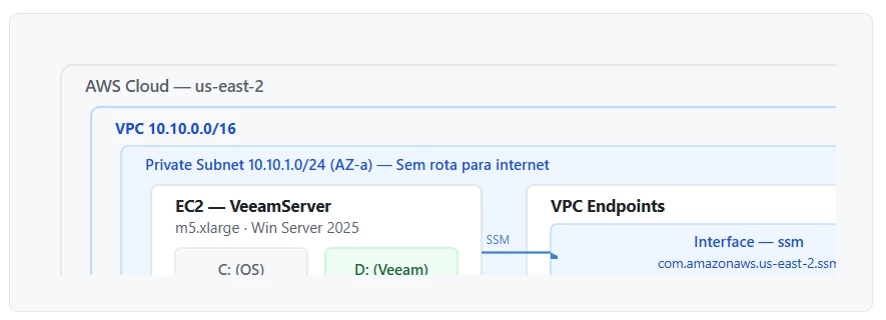
The solution deploys the following components in the AWS Ohio Region (us-east-2)
Networking
- Dedicated VPC:
10.10.0.0/16 - Private subnet:
10.10.1.0/24 - DNS resolution enabled
- No default route to the internet
- No Internet Gateway
- No NAT Gateway
- No public IP assignment on instances
Compute
A single EC2 instance hosts the Veeam components:
| Component | Specification |
|---|---|
| Instance Type | m5.xlarge |
| vCPU | 4 |
| Memory | 16 GB |
| Operating System | Windows Server 2025 |
| OS Volume | 120 GB gp3 |
| Data Volume | 450 GB gp3 |
| Encryption | Enabled on all EBS volumes |
Private Management Access
One of the key design goals was eliminating traditional management access methods.
Instead of exposing RDP or deploying a bastion server, the instance is managed entirely through AWS Systems Manager Session Manager. This approach offers:
- No inbound firewall rules
- No exposed management ports
- No public connectivity requirements
- Centralized session auditing through AWS services
- Simplified operational model
The instance security group contains no inbound rules at all
Private Service Connectivity
To maintain complete network isolation while still enabling management and software downloads, the architecture deploys the following VPC Endpoints
Interface Endpoints
| Service | Purpose |
|---|---|
| SSM | Systems Manager control channel |
| SSMMessages | Session Manager messaging |
| EC2Messages | Run Command communication |
Gateway Endpoint
| Service | Purpose |
|---|---|
| Amazon S3 | Download Veeam ISO, licenses, and AWS CLI packages |
We will have something similar to:
Security Model
The design prioritizes reducing the attack surface and minimizing operational risk.
Key Security Decisions
No Internet Gateway or NAT Gateway
The environment has no direct internet access, significantly reducing exposure to external threats.
Session Manager Instead of RDP
Administrative access is performed through AWS Systems Manager, removing the need to expose management ports.
IAM Roles Instead of Access Keys
The EC2 instance uses an IAM Role with temporary credentials automatically managed by AWS. No access keys are stored in templates or on the server.
Private Access to Amazon S3
All software downloads are performed through an S3 Gateway Endpoint without requiring internet connectivity.
Encrypted Storage
Both operating system and data volumes are encrypted using AWS-managed KMS encryption.
Automated Bootstrap Process
During the first boot, a PowerShell-based bootstrap process runs automatically and performs the following tasks:
1. Prepare the Data Volume
Detects and initializes the 450 GB EBS volume
Creates GPT partitioning
Formats the volume with NTFS
Assigns drive letter D:
Validates availability of the new volume
2. Create Veeam Working Directories
Creates:
Plain Text
1 D:\Veeam\ISO
2 D:\Veeam\License
3 D:\Veeam\Logs
3. Install AWS CLI v2
Validates existing installation
Downloads installer from Amazon S3
Performs silent installation
4. Download Installation Media
Using the instance IAM Role:
Downloads the Veeam installation ISO
Downloads the Veeam license file
Stores artifacts locally on drive D:
5. Generate Installation Instructions
A desktop README file is created containing installation guidance and artifact locations.
Why This Matters for Veeam Data Platform 13.1
By combining Veeam Data Platform 13.1 with Infrastructure as Code and AWS-native security services, organizations can accelerate deployments, reduce configuration drift, and establish a secure-by-design foundation from day one.
Why should customers upgrade to Veeam Data Platform 13.1 now?
Customers should upgrade to Veeam Data Platform 13.1 to take advantage of the latest advancements in cyber resilience, platform coverage, operational efficiency, and security. When combined with Infrastructure as Code approaches such as the AWS CloudFormation deployment presented in this article, organizations can standardize deployments, accelerate implementation timelines, and build a more secure and resilient data protection platform capable of meeting modern business requirements.
#VeeamCommunityChallenge
Disclaimer
⚠️ Community Project Disclaimer
This CloudFormation template was created primarily for learning, testing, and community collaboration purposes and is currently in Version 1.
While the solution demonstrates a secure-by-design approach for deploying Veeam Data Platform on AWS, it should be considered a proof of concept (PoC) and not a production-ready reference architecture.
Before being adopted in production environments, several areas still require further development, validation, and hardening, including but not limited to:
- High availability and resilience design
- Backup repository scalability
- Enterprise security controls and compliance requirements
- Monitoring and observability
- Automated patching and lifecycle management
- Disaster recovery validation
- Cost optimization
- Multi-account and multi-region architectures
The template is being shared with the community to encourage knowledge exchange, collect feedback, and foster collaboration. Contributions, suggestions, improvements, and constructive criticism are highly welcome.
If you are a Veeam professional, AWS architect, cloud engineer, or simply someone passionate about automation and data protection, I would love to hear your ideas and experiences.
Let's build something better together. Feel free to test it, break it, improve it, and contribute back to the community. 🚀