

Hello Community!
I have another fun script to share. I have been working on integrating VeeamONE with BigPanda and have created a sample script to explain some of the details to make this work.
This is mostly a piggy-back on the work
This script is different in that it is:
- Fine tuned to BigPanda:
- BigPanda requires specific inputs for the Alarm Status; the script translates Veeam ONE’s status to something recognized by BigPanda
- Timestamp is required to be in Unix time (seconds); time is converted and adjusted to local time instead of UTC
- Script contains extensive logging with adjustable path to help the user understand any issues with implementation:
- It takes BigPanda a few minutes to process the data to show the results of testing, the logs show the API server response for a more streamlined troubleshooting without having to wait for BigPanda every time.
The setup:
- Download the script to your Veeam ONE Server
- Configure environment variables with your BigPanda App Key & Auth Token
- Environment variables are used to prevent accidental uploading to GitHub while developing the script AND it helps to prevent accidental leaking of keys in other ways such as screen sharing.
- Configure Veeam ONE:
- Select the Alert(s) you wish to tie to this script
- For testing & development, I used the Backup Job State
- Edit the Alert:
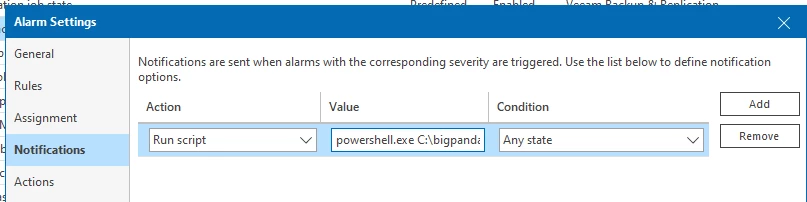
- On the Notifications page, configure the alert to Run Script
- Set the value of the script to:
- powershell.exe C:\bigpanda\VeeamBigPandaAlerting.ps1 '%1' '%2' '%3' '%4' '%5' '%6' '%7' '%8'
- Important! - The single quotes are important here. If you use double quotes, the variables will break on the space character and fail the script.
- powershell.exe C:\bigpanda\VeeamBigPandaAlerting.ps1 '%1' '%2' '%3' '%4' '%5' '%6' '%7' '%8'
- Set the Condition to Any State. This will help to ensure that, when the alert is acknowledged or resolved, BigPanda will mark the alert accordingly and close the incident in the BigPanda system.
- Save the alert and watch the magic happen as your Veeam ONE console starts picking up alerts and sending them to BigPanda
- Select the Alert(s) you wish to tie to this script

