

Hi all,
Before I start this post I humbly request that if you like this project and want me to continue to develop this and other projects, to please share, give it a star on GitHub. It really helps with the motivation.
I’ve been wanting an easy way to monitor logs from Veeam products in real-time.
https://github.com/shapedthought/logwatch
Binary download:
https://github.com/shapedthought/logwatch/releases
So I’ve put together just that, logwatch can monitoring all the files in a folder for changes and you can also recursively monitor all the files in sub-directories.
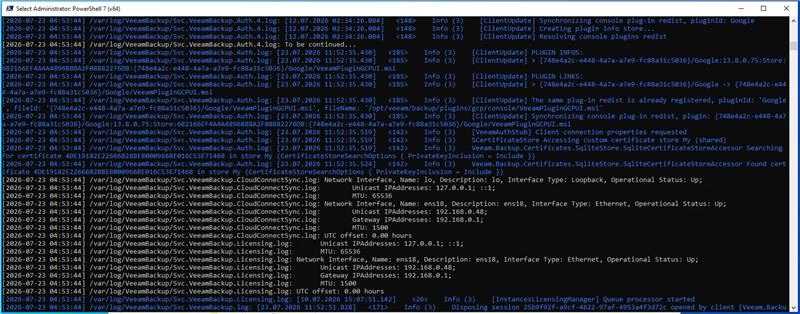
If you enable ssh on your VSA v13 (do carefully!), you can then run the following to get all the first level directories:
ssh -n user@server "tail -f /var/log/VeeamBackup/*.log" | logwatch --stdinTo monitor recursively:
ssh -n user@server "while true; do find /var/log/VeeamBackup -type f -name '*.log' -print0 | xargs -0 -r tail -n0 -F 2>/dev/null; sleep 1; done" | logwatch --stdin -P
You can also use this with the cloud products such as Veeam Backup for Azure of which in a previous post I pointed out the log location was in:
/var/log/veeam
Note that as the logs are streamed in realtime it means that if you use the -o output option you can, with permission and proper sanitisation, pass it to an LLM for analysis to see how things unfolded operationally.
Though I’ve not tested it yet it might be good to combine with this project:
There are also bunch of different commands to filter the outputs as well a way to find strings during streaming output. Here are all the commands:
Usage: logwatch [OPTIONS]
Options:
-d, --directory <DIR> Directory to watch (can be specified multiple times)
-c, --config <FILE> Configuration file path
-P, --full-paths Use full absolute paths instead of relative
-i, --include <PATTERN> Include pattern (regex, can be specified multiple times)
-e, --exclude <PATTERN> Exclude pattern (regex, can be specified multiple times)
-B, --before-context <NUM> Show NUM lines of leading context before each match [default: 0]
-A, --after-context <NUM> Show NUM lines of trailing context after each match [default: 0]
-C, --context <NUM> Show NUM lines of output context around each match
-f, --file-pattern <PATTERN> File pattern to watch (e.g., "*.log") [default: *.log]
--stdin Read from stdin instead of watching files (for remote streaming)
-o, --output <FILE> Also write displayed lines to FILE (plain text, no color)
--append Append to the output file instead of overwriting it
--history <NUM> Lines to retain for '/' search [default: 10000]
--stats-interval <SECS> Time-bucket size for activity stats [default: 60]
--stats-out <FILE> Write an activity-stats report at exit (.json = JSON, else CSV)
--no-color Disable colored output
-h, --help Print help
-V, --version Print version
Again please be careful when using SSH and ensure you are using it carefully and securely.
If you like this, please remember to share and give the project a GitHub star, it really helps motivate me to keep making these things!
Ed



