Question

Get what backup jobs and tape jobs are running using PowerShell

  • February 13, 2026
  • 6 comments
  • 37 views

Support recommended restarting the service to improve high memory usage caused by Veeam.Backup.CatalogDataService.exe.

I would like to run PowerShell using Task Scheduler to periodically restart the service.

To prevent job errors, I would like to output backup jobs and tape jobs when the running service is restarted, but I don't know how to do this.

Get-VBRBackupSession | Where-Object {$_.Result -eq 'None'} seems to output running backup jobs, but I don't know how to output tape jobs.

Please tell me the following:
・ Is there a way to output appropriate running backup jobs other than those listed above?
(Get-VBRBackupSession -Name $job does not work because it does not output when differences are being merged.)
・ How can I output running tape jobs and GFS tape jobs?


6 comments

Chris.Childerhose
Forum|alt.badge.img+21
  • Veeam Legend, Veeam Vanguard
  • February 13, 2026

Try this PS and see -

# Load Veeam snap-in
Add-PSSnapin VeeamPSSnapin -ErrorAction SilentlyContinue

# Running backup jobs
Get-VBRJob | Where-Object { $_.IsRunning } |
Select-Object Name, JobType, @{N="State";E={$_.GetLastState()}}

# Running tape jobs
Get-VBRTapeJob | Where-Object { $_.IsRunning } |
Select-Object Name, Type, @{N="State";E={$_.GetLastState()}}


coolsport00
Forum|alt.badge.img+21
  • Veeam Legend
  • February 13, 2026

Good one Chris!

@kamo - if you need further guidance beyond what Chris shared...make sure to give the Veea PS Reference Guide a look too:

https://helpcenter.veeam.com/docs/vbr/powershell/tape_jobs.html?ver=13


  • Author
  • New Here
  • February 16, 2026

ありがとうございます。試してみます


  • Author
  • New Here
  • February 16, 2026

Thank you for your kind reply.


I tried running all the commands you instructed while the tape job was running, but nothing was output.
I'm using Veeam version 12.

I'm new to both Veeam and PowerShell, so I'd like some advice.
W

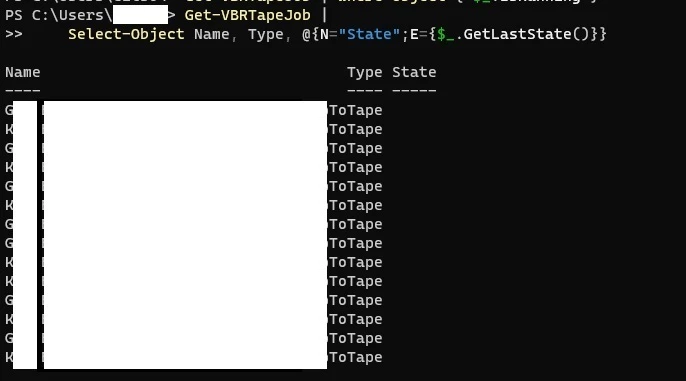
When I ran the commands without "Where-Object { $_.IsRunning } |", the State field was blank.
Is this related?


Get-VBRTapeJob |

Select-Object Name, Type, @{N="State";E={$_.GetLastState()}}


The white areas indicate the names of tape jobs and my username.


  • Author
  • New Here
  • February 16, 2026
$CHKT = $Get-VBRTapeJob | Where-Object { $_.LastState -eq "Working"}


I'm thinking of determining whether or not to restart the service based on whether or not the above command outputs anything, but could you please let me know any concerns you might have?
(For example, are there any statuses other than Working that shouldn't be restarted?)


Chris.Childerhose
Forum|alt.badge.img+21
  • Veeam Legend, Veeam Vanguard
  • February 16, 2026
$CHKT = $Get-VBRTapeJob | Where-Object { $_.LastState -eq "Working"}


I'm thinking of determining whether or not to restart the service based on whether or not the above command outputs anything, but could you please let me know any concerns you might have?
(For example, are there any statuses other than Working that shouldn't be restarted?)

Working or running would be the state of jobs.