


Question

Veeam MS SQL Plugin backup Retention policy

  • October 31, 2025
  • 9 comments
  • 121 views

Venkata Sai Kumar

Dear Veeam Experts,

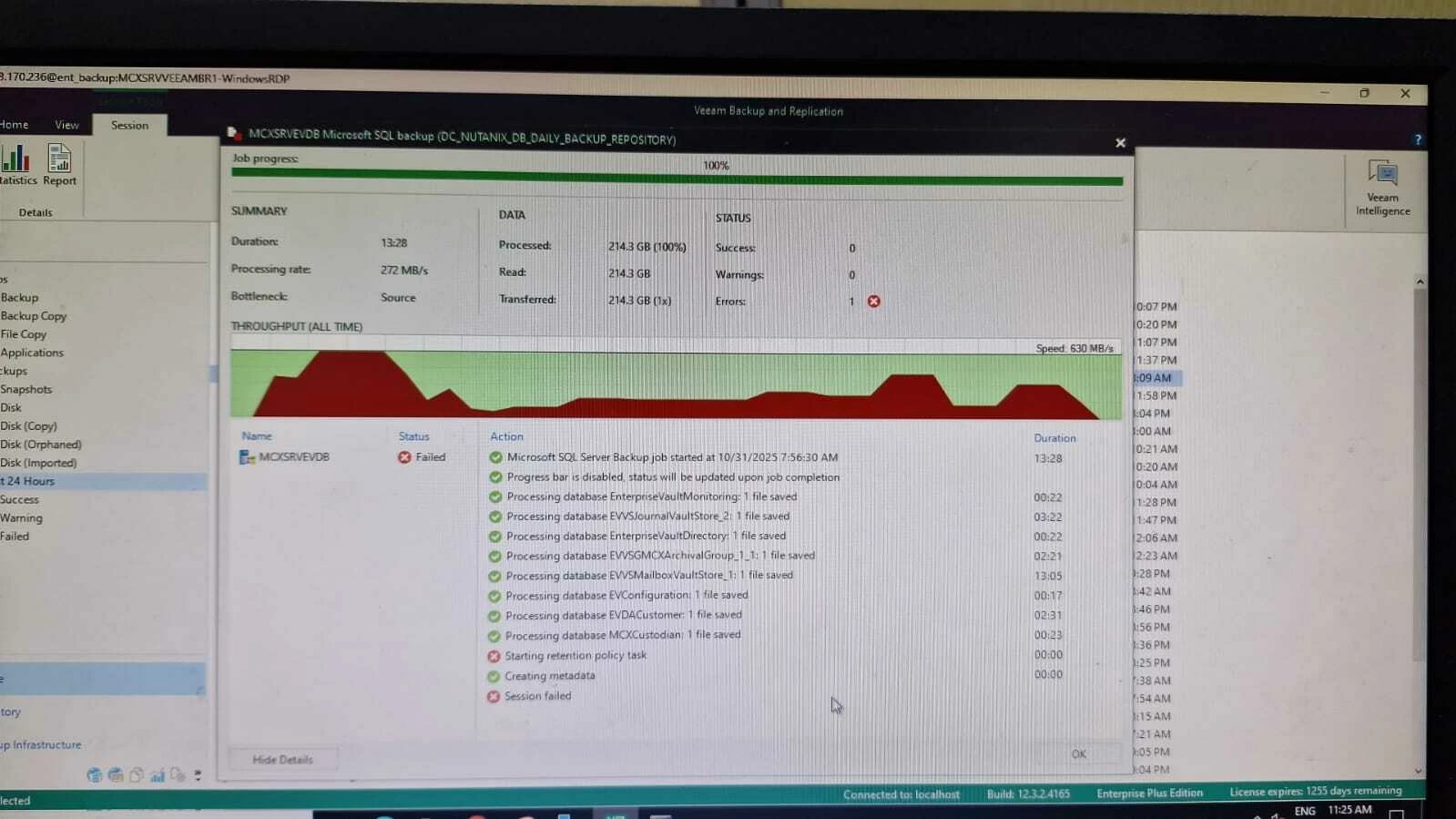
One of our customers is facing an issue with the MSSQL plugin backup failing. Upon verification, I noticed that the backup data is being written successfully, but the job fails with the error “Starting Retention Policy Task.”

In this setup, the retention policy is configured for 6 days per backup file. However, I observed that some files are not expiring as per the defined retention policy.

Kindly help us with the steps or guidance to resolve this issue.

Best regards,
G Venkata Sai Kumar
9 comments

Venkata Sai Kumar
Error


PF the error screenshot


  • Not a newbie anymore
  • October 31, 2025

Dear Veeam Experts,

One of our customers is facing an issue with the MSSQL plugin backup failing. Upon verification, I noticed that the backup data is being written successfully, but the job fails with the error “Starting Retention Policy Task.”

In this setup, the retention policy is configured for 6 days per backup file. However, I observed that some files are not expiring as per the defined retention policy.

Kindly help us with the steps or guidance to resolve this issue.

Best regards,
G Venkata Sai Kumar

The retention policy is applied only to the inactive part of the backup chain. If any part of the chain (e.g., log or differential backups) is still active or dependent on a full backup, deletion is deferred. Also Check immutability settings on your backup repository.

Ref- Retention Policy - Veeam Plug-ins for Enterprise Applications


Venkata Sai Kumar

Hi,

Thanks for the update.

More details: In this case, we have created two backup jobs for the same database — one differential backup with a 6-day retention and one full backup with a 6-day retention policy. These backups run on different days of the week.

As per my understanding, we can delete the older restore points from the repository side, and this issue should not occur during the next scheduled backup.

or any other way is there to resolve this issue.


Marcel.K
Forum|alt.badge.img+9
  • Veeam Legend
  • October 31, 2025

Hi, please share log from job for more information


Venkata Sai Kumar

Hi, 

Customer is raising the support ticket for this error, once its create i will update.


Thanks


  • New Here
  • November 6, 2025

Hi there,

Is there a solution yet? We have a client having the same error.


Venkata Sai Kumar

Hi,

We have found the solution and resolved the issue.

Root cause: The Veeam Backup & Replication version is currently 12.3.2.4165, while the plug-in version is 12.2.0.334. Similar issues have been reported when using an older plug-in version with the latest Veeam Backup & Replication release.

Once you upgrade the MS SQL plug-in to the latest version matching the VBR, this issue will no longer occur.


waqasali
Forum|alt.badge.img+4
  • On the path to Greatness
  • November 9, 2025

Quick Troubleshooting Checklist:

  1. Check plugin logs in C:\ProgramData\Veeam\Backup\ for retention errors.
  2. Verify the service account has delete permissions on the backup folder.
  3. Ensure no process (SQL service, antivirus) is locking backup files.
  4. If old files remain, manually delete them and rerun the job.
  5. Confirm you are on the latest Veeam Agent and MSSQL plugin version.

Marcel.K
Forum|alt.badge.img+9
  • Veeam Legend
  • November 9, 2025

Generally is valid, that if you want to upgrade VBR to new release version "N", backup components have to be on latest previous version "N-1".

So your plugins have to be on latest version of 12.2 and then you can upgrade VBR to 12.3.

Same happened to me, when i have upgraded VBR to 12.0 and plugins were not on latest 11a version.


