Question

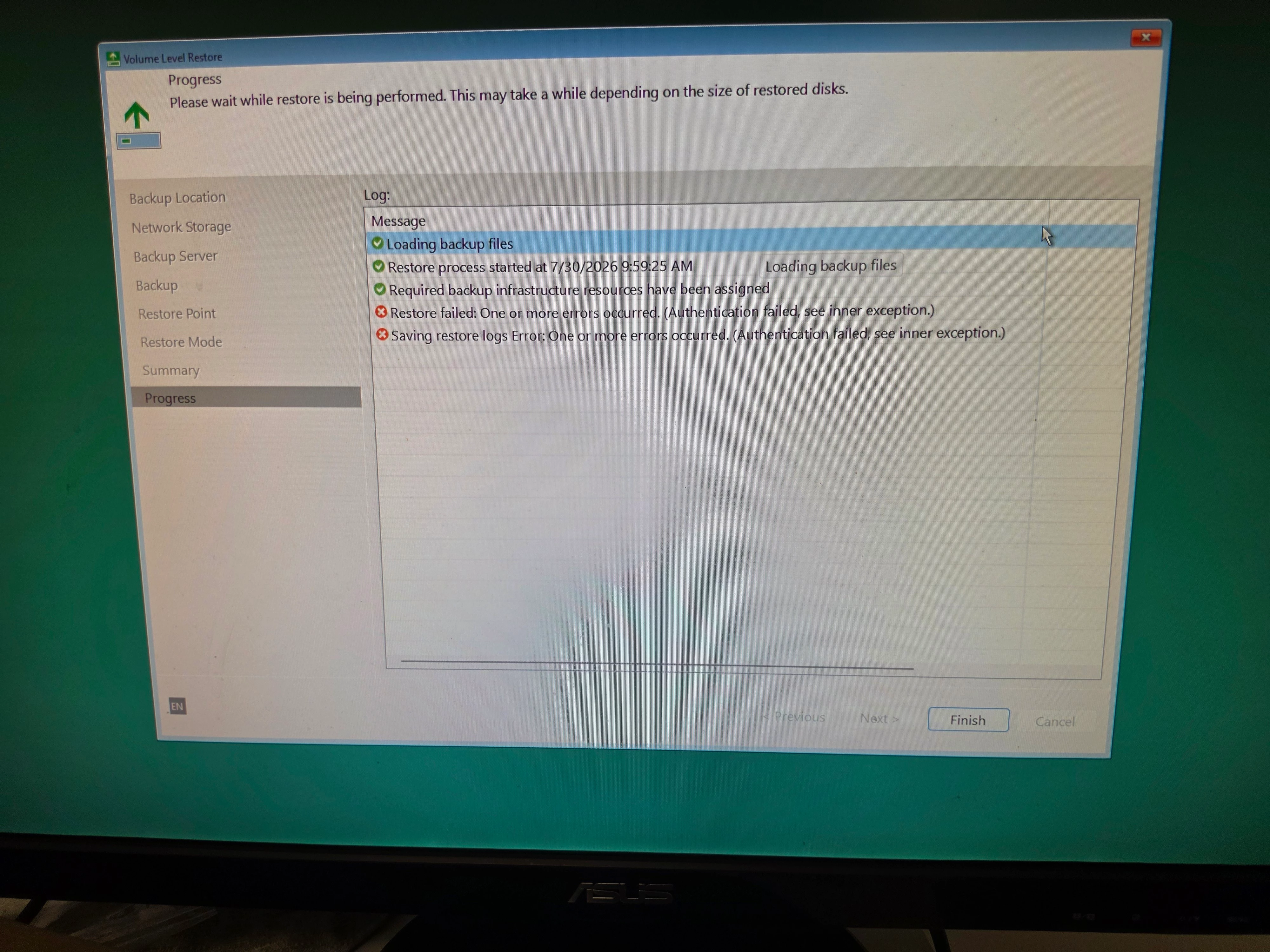
"Authentication failed, see inner exception" when doing a Bare Metal Restore from USB Recovery Media.

  • July 17, 2026
  • 5 comments
  • 62 views

I'm running the latest version of Windows 25H2 version, and Veeam version 13.0.3.1220.  I installed Veeam Agent for Microsoft Windows Free version, and created the USB Recovery Media. I then did a test Bare Metal Restore. 


I immediately get the error: Authentication failed, see inner exception.

If I use old Recovery media created on an different PC, that is running an older Windows version with an older version of Veeam, the restore process works just fine. I don’t get the Authentication error.


I found a post on Reddit, where everyone was having this same problem. One poster said he opened a support ticket with Veeam, and they acknowledged the problem. But I can’t find any information on what Veeam is doing about this very significant bug.


Does anyone have an update on this bug? Is Veeam planning a fix, and where can I find a timeline? I’m not updating my Veeam version on the older PC, as I don’t want to introduce the bug on that PC.
 

Thank you.

5 comments

coolsport00
Forum|alt.badge.img+23
  • Veeam Legend
  • July 17, 2026

This is the 1st I’ve seen of this ​@Scooch . My suggestion is open a case with Veeam to log the bug (yes, still allowed to do so with Free Edition); I’d also maybe create a post over on the Veeam Forums and see if 1. it has been seen by the Veeam Product Managers there, and 2. If they have a resolution in the works.

Best.


Chris.Childerhose
Forum|alt.badge.img+22

I have not seen any updates regarding this bug; however, there could be changes that address it when Veeam 13.1 releases later this month, as they tend to update the Agents as well.  Maybe hold off until then; otherwise you will need to open a case, as Shane suggested getting more details from support on the issue.


  • Author
  • Not a newbie anymore
  • July 17, 2026

Thanks Shane and Chris.

I did try and open a case, but must have been doing it wrong. I think I’ll wait until Veeam 13.1 before pushing harder. Clearly I’m a rookie on Veeam’s website, as I missed the Forum option all together. 

Before I retired, I was in IT, and played a role in supporting Veeam for a large University in Canada. We used Veeam to backup a LOT of VMware virtual machines on Campus. When there was an issue, Veeam was all over us with support help. Mind you, the boss did write a big cheque. 

If the problem is still there in 13.1, I’ll give opening a Support case another shot, and figure out the forums as well. I’ve cloned my USB Recovery media just in case😉

Thanks for the help!

Mark


coolsport00
Forum|alt.badge.img+23
  • Veeam Legend
  • July 18, 2026

Sounds good ​@Scooch . Keep us posted. 


Chris.Childerhose
Forum|alt.badge.img+22

Sounds good and here is to 13.1 hopefully fixing it.  🤞