

Veeam Recovery Orchestrator v13.1, part of Veeam Data Platform Premium Edition, is here with quality-of-life improvements that make data orchestration simpler and more flexible. Here’s the quick takeaway: stand-alone Hyper-V host support and direct restore to Azure make tested, orchestrated recovery accessible to more environments. Read-only repository access keeps cleanroom recovery plans current, so there’s no manual refresh before you run one. Day 2 operations take less effort, thanks to the Updater plug-in, unified installer, and Scheduled Tasks page. Now let’s get into the details.
Microsoft Hyper-V updates you have been asking for
First up: stand-alone Hyper-V host as a recovery target. Up until now, Hyper-V recovery meant targeting a cluster, which is a tough ask if you're a branch office running a handful of VMs, an edge site with a couple of point-of-sale or inventory systems, or a service provider trying to right-size DR for a smaller customer. Standing up a whole second cluster just to have somewhere to fail over to was often the reason a DR plan stayed a document instead of something you tested. Now you can target a single Hyper-V host instead, with support for both local and shared storage. Cross-platform restore from vSphere VM backups to that stand-alone Hyper-V host is supported too, so even vSphere shops curious about platform migrations can use a lower-cost Hyper-V DR site to pilot the idea on a single host.
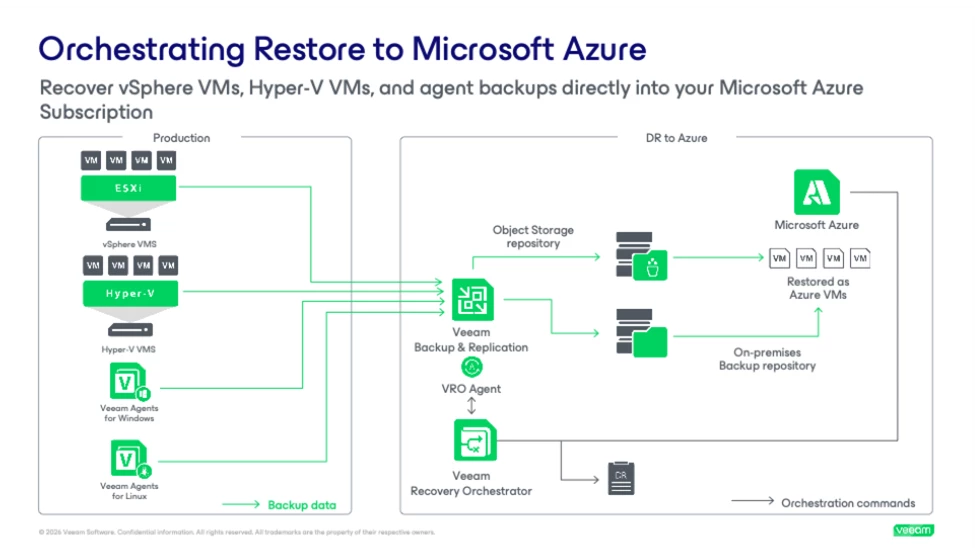
Next, restore Hyper-V backups to Azure, and can I say I have been waiting for this feature since we first announced Hyper-V support. Cloud Plans already supported restoring vSphere VM and Veeam Agent backups to Azure, and Hyper-V shops have been stuck watching from the sidelines ever since, having to rely on a secondary physical site for DR while everyone else got to use the cloud as a recovery target with no hardware to manage. Now Hyper-V VM backups can join them, with script injection to restored VMs supported as well. If Hyper-V is part of your environment, your cloud DR options just got a lot less limited.
Keep cleanroom recovery plans up to date
This is something we can all get behind. You write the documentation, build the runbook, or set up the plan, and within days it's already out of sync with whatever changed in the environment since the last backup. Cleanroom recovery plans have the same problem. Building on new Veeam Backup & Replication v13.1 repository features, object storage repositories can now be connected to Orchestrator's embedded Veeam backup server in read-only mode. That gives you continuous access to the latest restore points, so you can test recovery against them.That matters for compliance-driven organizations running quarterly or monthly DR tests. This also improves the confidence from security teams that need to be able to scan the most recent restore points during an active cyber investigation, especially when every second counts during an incident.
It’s not just about persistent access. Read-only is critical for any form of cleanroom. This allows your cleanroom to pull current data without creating a pathway back to production. Isolation stays intact instead of being traded away for current backups. Orchestrator's embedded backup server has long been able to take over failover if your production Veeam Backup & Replication server goes down. This update means the data behind that handoff now stays current automatically, rather than depending on someone to refresh the connection.
More control over where recovery lands
Recovery locations get two upgrades that add precision without losing the convenience of automation. First, specific server and repository selection. Automatic selection is still there if you want it, but now you can target recovery to a specific Veeam backup server and the repositories it manages. Useful anywhere you need tighter control over exactly which infrastructure a recovery plan touches. Also, simplified network mappings. The new "map from any source network" option is a catch-all for network mapping configuration. Set up your recovery locations ahead of time and they can recover VMs from source networks you haven't explicitly mapped, instead of hitting a wall when an unexpected network shows up.
Staying patched just got easier: the Veeam Updater plug-in
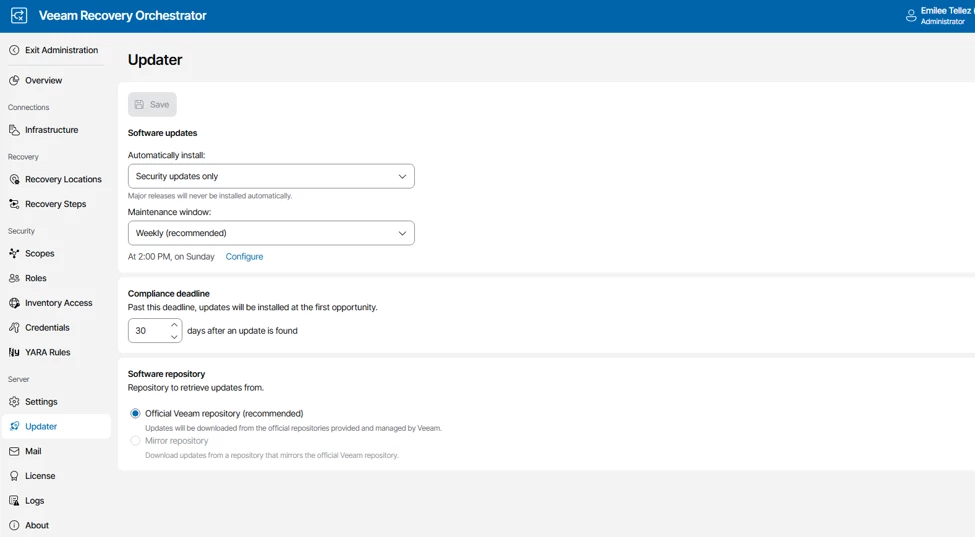
Orchestrator v13.1 introduces the Veeam Updater plug-in, launchable right from the About page in the Orchestrator web UI. It flags critical patches and updates, and it brings three capabilities worth knowing about:
- Update scheduling and automation, so you can define maintenance windows and control when updates install.
- Mandatory updates, so you can enforce required patch levels across all managed Veeam Backup & Replication components.
- Bulk update management, so you can update multiple infrastructure components at once and streamline maintenance.
If keeping a distributed Veeam environment patched has ever felt like a part-time job, this is aimed squarely at you.
Everything else worth knowing
A handful of smaller changes round out the release, and they add up:
- New Scheduled Tasks page gives you full visibility into upcoming plan executions, tests, scans, readiness checks, and audits in one filterable view, with the scheduling editor right there, so you can spot a gap in DR test coverage before an auditor does.
- Failback proxy selection for replica plans. If automatic proxy selection from Veeam Backup & Replication doesn’t fit your network configuration, you can now specify failback proxy servers for both production and DR sites via a .json configuration file.
- Modern email support. Cloud email services from Microsoft and Google are now supported for Orchestrator report distribution, in addition to standard SMTP.
- Reporting improvements, including aligned controls across the Reports, Subscriptions, and Templates tabs, plus more space-efficient recovery location tables that support the new server and repository selection options.
- Simplified deployment. The setup wizard now manages the entire Orchestrator server (Veeam Backup & Replication, Veeam ONE, and Orchestrator) as a single install or upgrade, so an upgrade window that used to mean three separate runs is now one.
- Microsoft SQL Server 2025 support for hosting the Orchestrator database.
- Proactive support option in the setup wizard and in the Administration > Licensing section of the UI. Enabling it shares anonymized backup infrastructure telemetry with Veeam and asks that you also enable automatic license updates.
Before you upgrade, check the Veeam Recovery Orchestrator 13.1 Release Notes for system requirements and known issues, and grab the full What's New document for the complete picture.
As always, if you're testing any of this in the field, especially the Hyper-V stand-alone host target or the new cleanroom read-only repository access, drop your findings in the comments below.

