VMCE Practice Question - 9 July 2024

  • July 9, 2024
  • 9 comments
  • 375 views

coolsport00
Forum|alt.badge.img+21

Another week, another set of VMCE practice questions. This week’s first question is below. Again, please remember to hide your responses. Good luck!

After thoroughly reviewing Veeam Upgrade documentation, you confirm your environment meets upgrade specifications and upgrade your Backup server and relevant Veeam components. You implement no other changes, modifications, or configurations on the server or in the Console. Two days after your upgrade, you receive a Malware Detection event notification even though you did not enable this feature. Why did Veeam perform a Malware scan?

  1. Because one of the VMs in a File Copy Job has Malware
  2. Guest File System Analysis is enabled by default after upgrade
  3. Your Veeam Edition is Enterprise Plus which performs automatic Malware scans
  4. Inline Entropy scans are enabled by default

9 comments

Forum|alt.badge.img
  • New Here
  • July 9, 2024

Guest File System Analysis is enabled by default after upgrade


Dynamic
Forum|alt.badge.img+13
  • Veeam Vanguard
  • July 9, 2024


nice one..
i would go for B: Guest File System Analysis is enabled by default after upgrade.
for this also “guest file indexing and malware detection” in the Job settings has to be enabled.

Couldn’t be D: because this is not enabled by default after install/upgrade.


Chris.Childerhose
Forum|alt.badge.img+21

B. Guest File System Analysis is enabled by default after upgrade


DavideAbrigo
Forum|alt.badge.img+2
  • Experienced User
  • July 11, 2024
  1. Guest File System Analysis is enabled by default after upgrade


coolsport00
Forum|alt.badge.img+21
  • Author
  • Veeam Legend
  • July 12, 2024

Ok...it’s answer day. Let’s get to it…

Key info in the question is 1. VBR upgrade, and 2. no additional configs/changes were made afterwards. So, everything is Veeam default post ugrade. A. isn’t correct cuz Veeam doesn’t scan FC Jobs; c. Malware Detection is available for all VDP versions Foundation thru Premium; and d. Inline Entropy isn’t enabled by default...but FSA is. So, b. Guest File System Analysis is enabled by default after upgrade is the answer. 

https://helpcenter.veeam.com/docs/backup/vsphere/malware_detection_guest_index_enable.html?ver=120


Chris.Childerhose
Forum|alt.badge.img+21

Woohoo got it right.  😜😂


  • Comes here often
  • January 28, 2025

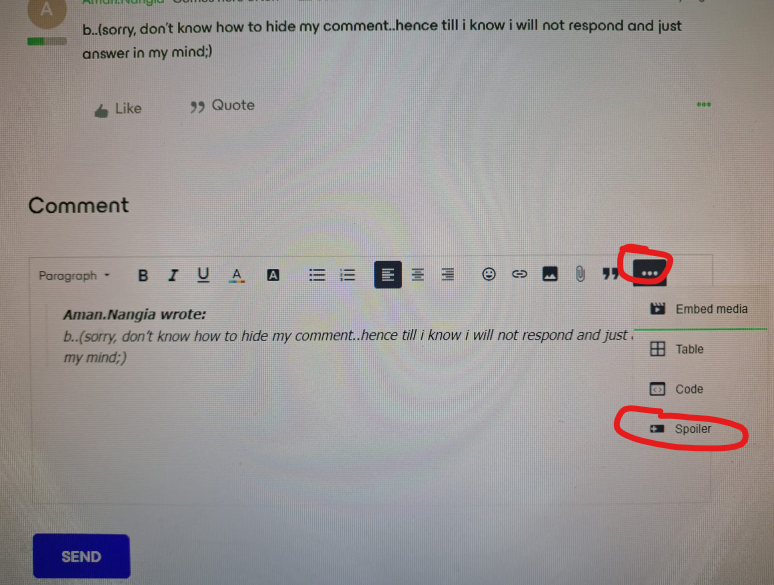
b..(sorry, don’t know how to hide my comment..hence till i know i will not respond and just answer in my mind;)


AndrePulia
Forum|alt.badge.img+9
  • Veeam Vanguard
  • January 31, 2025

b..(sorry, don’t know how to hide my comment..hence till i know i will not respond and just answer in my mind;)

You need to click on (...) and select spoiler


AndrePulia
Forum|alt.badge.img+9
  • Veeam Vanguard
  • January 31, 2025

Ok...it’s answer day. Let’s get to it…

Key info in the question is 1. VBR upgrade, and 2. no additional configs/changes were made afterwards. So, everything is Veeam default post ugrade. A. isn’t correct cuz Veeam doesn’t scan FC Jobs; c. Malware Detection is available for all VDP versions Foundation thru Premium; and d. Inline Entropy isn’t enabled by default...but FSA is. So, b. Guest File System Analysis is enabled by default after upgrade is the answer. 

https://helpcenter.veeam.com/docs/backup/vsphere/malware_detection_guest_index_enable.html?ver=120


Really good question, I didn’t know this one!!! thank you Shane