VMCE Practice Question - 18 July 2024

  • July 18, 2024
  • 8 comments
  • 225 views

coolsport00
Forum|alt.badge.img+22

Ok everyone...here’s the 2nd question for this week. Please remember to hide your comments. You got this! 😊

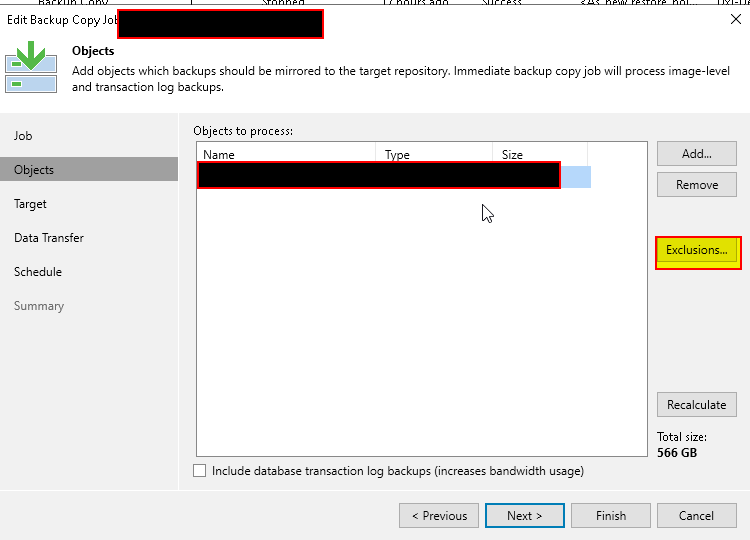
You're wanting to exclude VM Templates from being copied to your target storage for a highly critical Backup Copy Job, but are unable to locate the setting. Where can you configure this exclusion?

  1. In the Copy Job > Objects selection area, Exclusions button
  2. Ask your junior Backup Admin
  3. Log into the Console as the Backup Admin instead of Backup Operator
  4. It's not a configurable option for Copy Jobs

8 comments

Chris.Childerhose
Forum|alt.badge.img+21
  1. In the Copy Job > Objects selection area, Exclusions button


DavideAbrigo
Forum|alt.badge.img+2
  • Experienced User
  • July 18, 2024

Option A. could be used, if you put templates in a folder or tag and select it for exclusion.


TylerJurgens
Forum|alt.badge.img+6
  1. Set an exclusion.


Link State
Forum|alt.badge.img+12
  • Veeam Legend
  • July 18, 2024
  1. In the Copy Job > Objects selection area, Exclusions button
  2.  


Dynamic
Forum|alt.badge.img+13
  • Veeam Vanguard
  • July 18, 2024

A: In the Copy Job > Objects selection area, Exclusions button


coolsport00
Forum|alt.badge.img+22
  • Author
  • Veeam Legend
  • July 19, 2024

And, the answer to the 2nd question for the week is…

d. It's not a configurable option for Copy Jobs . Why is it this? Because Veeam says it’s configurable only for Backups 😊 (see what Veeam states next to the VM Templates link at the following URL). B & C are just “fluff” options, so those aren’t correct. There is the ability to add exclusions for Copy Jobs, so “A” is possible, but you’re just not able to add Templates there. That process can only be used for VM’s and VM Disks.​

https://helpcenter.veeam.com/docs/backup/vsphere/data_exclusion.html?ver=120


Chris.Childerhose
Forum|alt.badge.img+21

And, the answer to the 2nd question for the week is…

b. t's not a configurable option for Copy Jobs . Why is it this? Because Veeam says it’s configurable only for Backups 😊 (see what Veeam states next to the VM Templates link at the following URL). B & C are just “fluff” options, so those aren’t correct. There is the ability to add exclusions for Copy Jobs, so “A” is possible, but you just not able to add Templates there. That process can only be used for VM’s and VM Disks.​

https://helpcenter.veeam.com/docs/backup/vsphere/data_exclusion.html?ver=120


Might want to change this to the answer - d

You have b there now.  😋


coolsport00
Forum|alt.badge.img+22
  • Author
  • Veeam Legend
  • July 19, 2024

Thanks for the catch Chris! 😊