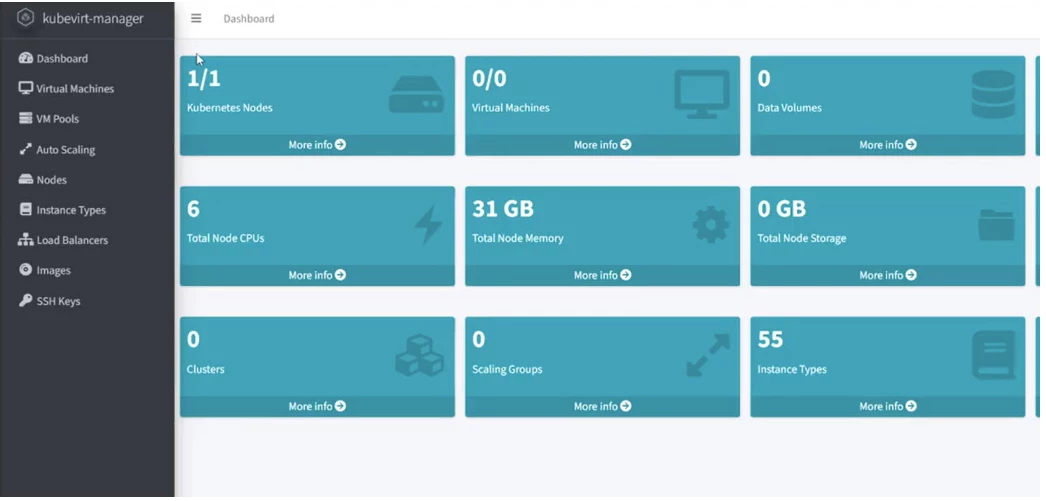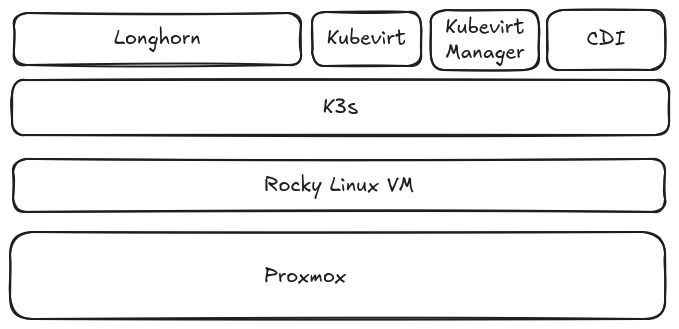

It’s me on day three!!
We created a Proxmox VM with Host processor so virtualization is enabled
Let’s install Kubevirt so that we can run vms in Kubernetes!
export KUBEVIRT_VERSION=$(curl -s https://api.github.com/repos/kubevirt/kubevirt/releases/latest | grep tag_name | grep -o -E 'v[0-9]\.[0-9]+\.[0-9]+')

kubectl create -f https://github.com/kubevirt/kubevirt/releases/download/${KUBEVIRT_VERSION}/kubevirt-operator.yaml


kubectl wait --for=condition=Available deployment/virt-operator -n kubevirt --timeout=300s


kubectl create -f https://github.com/kubevirt/kubevirt/releases/download/${KUBEVIRT_VERSION}/kubevirt-cr.yaml


kubectl wait --for=condition=Available kubevirt/kubevirt -n kubevirt --timeout=600s
Verify everything is running:
kubectl get pods -n kubevirt
To be able to import iso files we need to install CDI (Containerized Data Importer):
export CDI_VERSION=v1.62.0

# Verify the version is set
echo "CDI Version: $CDI_VERSION"

# Alternative method for latest version (more reliable):
# export CDI_VERSION=$(curl -s https://api.github.com/repos/kubevirt/containerized-data-importer/releases/latest | grep -Po '"tag_name": "\K.*?(?=")')

# Install CDI operator
kubectl create -f https://github.com/kubevirt/containerized-data-importer/releases/download/$CDI_VERSION/cdi-operator.yaml

# Install CDI CR
kubectl create -f https://github.com/kubevirt/containerized-data-importer/releases/download/$CDI_VERSION/cdi-cr.yaml

# Wait for CDI to be ready
kubectl wait --for=condition=Available cdi/cdi -n cdi --timeout=300s
I will install wget which is also not present in Rocky by default:
sudo dnf install wget -yYou might know virtctl from KVM, we will install that as well to control our vms:
export VERSION=$(curl https://storage.googleapis.com/kubevirt-prow/release/kubevirt/kubevirt/stable.txt)
wget https://github.com/kubevirt/kubevirt/releases/download/${VERSION}/virtctl-${VERSION}-linux-amd64


mv virtcl-v1.7.0-linux-amd64 virtctl

chmod +x virtctl

sudo mv virtctl /usr/local/bin
We also would like to have a webui to use with our Kubevirt setup and kubevirt-manager does just that:
wget https://github.com/kubevirt-manager/kubevirt-manager/releases/download/v1.5.3/bundled-v1.5.3.yaml
I want to have kubevirt-manager accessible from outsite the cluster and since this is non production will use a simple nodeport. Edit the bundled-v1.5.3.yaml (or what ever your version is) and change the Service type from ClusterIP to Nodeport: vi or nano bundled-v1.5.3.yaml
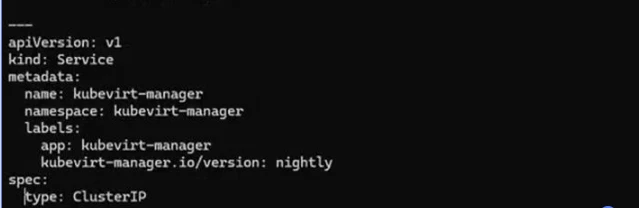
Also add a nodePort value so that it will always remain the same one
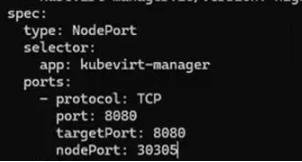
I don’t want to be wondering what that bundled.yaml is so I will change the name to kubevirt-manager.yaml and then apply it:
mv bundled-v1.5.3.yaml kubevirt-manager.yaml

K apply -f kubevirt-manager.yaml
Finally type in the url of your Proxmox VM adding the port number that you assigned to the nodeport: http://yourvmipordnsname:30305