


Question

veeam vmware cloud director inaccessible from tenant side


Forum|alt.badge.img

hi,

we have upgraded vbr and vem from version 13.0.x to 13.1.x. however after upgrade we got error accessing veeam backup infra 

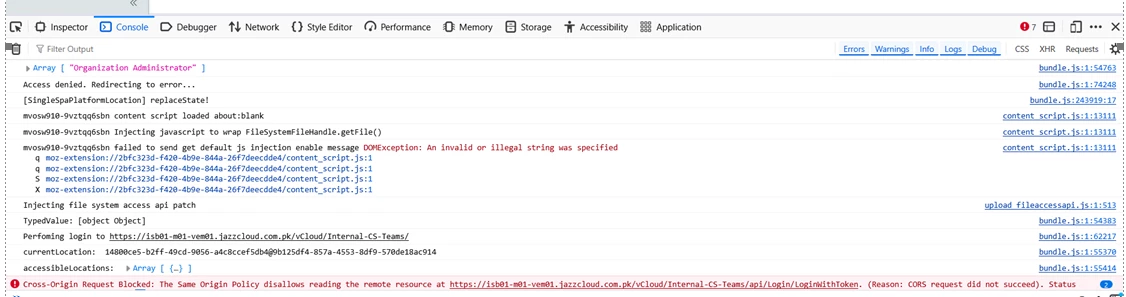
{unable to connect to backup infastructure,please contact your service provider}

follwoing error while connecting using tenat veeam data protection.

note: we are using vsa based vbr and vem
 

4 comments

Chris.Childerhose
Forum|alt.badge.img+23

Did you also update the vCloud Plugin to the latest release also?  And something to note port 9443 is no more just use 443 for connecting to VEM.


Link State
Forum|alt.badge.img+12

​@rajasohaib I would suggest updating the Veeam plug-in for VMware Cloud Director to a version compatible with VBR/VEM 13.1, and testing network connectivity from each VCD cell to the Veeam endpoint (TCP port 9443, if configured). The browser console shows a failed LoginWithToke request with a CORS error, which could indicate a connectivity or integration issue.


Forum|alt.badge.img
  • Author
  • Comes here often
  • October 26, 2026

i have just used hostname in plugin configuration with https,no port mentioned.

i have also deleted and uploaded new plugin v13.0.50 and published it to tenants,which is compatible with 13.1.1.18


Chris.Childerhose
Forum|alt.badge.img+23

i have just used hostname in plugin configuration with https,no port mentioned.

i have also deleted and uploaded new plugin v13.0.50 and published it to tenants,which is compatible with 13.1.1.18

In order for the vCloud Plugin to work you need an external URL to work.  Also port 443 at the end of the URL.  I have done this at many sites and the only way it works.  Check the document for the plugin.



