Answer

Veeam Storage Integration with IBM SVC

  • January 26, 2022
  • 9 comments
  • 329 views

victorwu
Forum|alt.badge.img+7

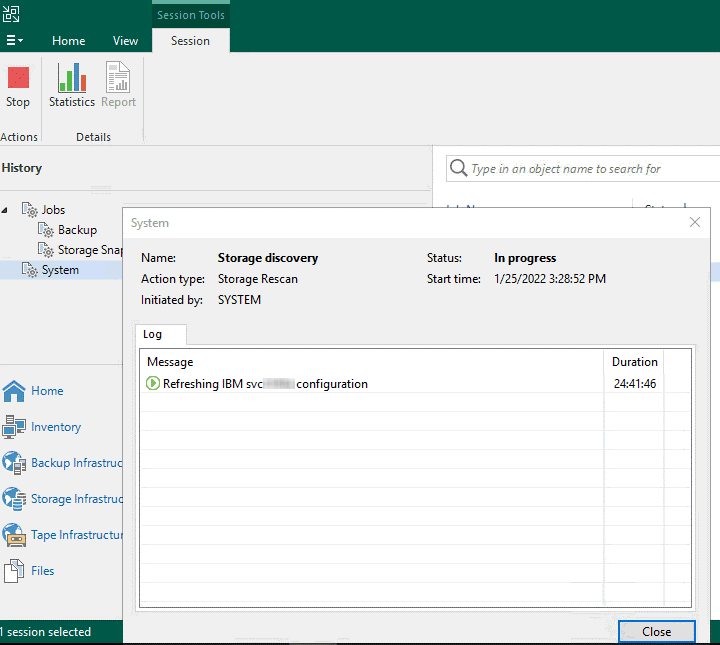
I have an issue on Veeam Storage Integration with IBM SVC. It hold the storage discovery for a long time. Anyone can help me?

Veeam B&R: v11a

IBM SVC OS: firmware 8.3.1.6

Troubleshooting: Already restarted the VBR
 

Best answer by victorwu

I found out the root cause, the issue may be related to the compatibility of IBM SVC and VBR v11a. I try to configure another IBM SVC (firmware: 7.8.1.6) with VBR v11a. The storage discovery is fine.

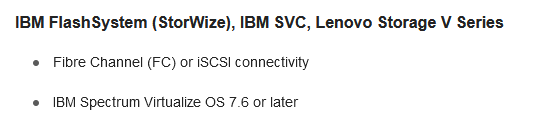
According to Veeam doc, it requires the followings. All requirements are passed.

  • IBM SVC OS is 7.6 or later
  • IBM FlashCopy license enabled
  • Veeam Backup & Replication Enterprise Plus.

The original IBM SVC is running in 8.3.1.x. Now I am waiting for the confirmation from Veeam support team.
 

Got an update from Veeam support team. According to logs, they found the issue should be related to the SSH connection of VBR and IBM SVC, the ssh connection is not stable on IBM SVC storage.

Not stable in your case or per design by ssh?

Yes. The ssh service of IBM SVC is not stable. The root cause is investigated by me, not the Veeam support team.

9 comments

JMeixner
Forum|alt.badge.img+16
  • On the path to Greatness
  • January 26, 2022

The prerequisites say:

Before you add this storage system to the backup infrastructure, make sure that a license for the IBM Spectrum Virtualize storage system supports IBM FlashCopy.


Do you have a FlashCopy license installed on your system?


victorwu
Forum|alt.badge.img+7
  • Author
  • Veeam Vanguard
  • January 26, 2022

The prerequisites say:

Before you add this storage system to the backup infrastructure, make sure that a license for the IBM Spectrum Virtualize storage system supports IBM FlashCopy.


Do you have a FlashCopy license installed on your system?

Yes. FlashCopy license is enabled.


marcofabbri
Forum|alt.badge.img+12
  • On the path to Greatness
  • January 26, 2022

Idk if IBM integration work as others (never used before), but maybe this storage rescan process can put some light on this issue:

https://helpcenter.veeam.com/docs/backup/vsphere/storage_discovery_process.html?ver=110


victorwu
Forum|alt.badge.img+7
  • Author
  • Veeam Vanguard
  • January 27, 2022

I found out the root cause, the issue may be related to the compatibility of IBM SVC and VBR v11a. I try to configure another IBM SVC (firmware: 7.8.1.6) with VBR v11a. The storage discovery is fine.

According to Veeam doc, it requires the followings. All requirements are passed.

  • IBM SVC OS is 7.6 or later
  • IBM FlashCopy license enabled
  • Veeam Backup & Replication Enterprise Plus.

The original IBM SVC is running in 8.3.1.x. Now I am waiting for the confirmation from Veeam support team.


marcofabbri
Forum|alt.badge.img+12
  • On the path to Greatness
  • January 27, 2022

Nice to know, thanks for sharing!


victorwu
Forum|alt.badge.img+7
  • Author
  • Veeam Vanguard
  • January 29, 2022

I found out the root cause, the issue may be related to the compatibility of IBM SVC and VBR v11a. I try to configure another IBM SVC (firmware: 7.8.1.6) with VBR v11a. The storage discovery is fine.

According to Veeam doc, it requires the followings. All requirements are passed.

  • IBM SVC OS is 7.6 or later
  • IBM FlashCopy license enabled
  • Veeam Backup & Replication Enterprise Plus.

The original IBM SVC is running in 8.3.1.x. Now I am waiting for the confirmation from Veeam support team.


Got an update from Veeam support team. According to logs, they found the issue should be related to the SSH connection of VBR and IBM SVC, the ssh connection is not stable on IBM SVC storage.


marcofabbri
Forum|alt.badge.img+12
  • On the path to Greatness
  • February 1, 2022

I found out the root cause, the issue may be related to the compatibility of IBM SVC and VBR v11a. I try to configure another IBM SVC (firmware: 7.8.1.6) with VBR v11a. The storage discovery is fine.

According to Veeam doc, it requires the followings. All requirements are passed.

  • IBM SVC OS is 7.6 or later
  • IBM FlashCopy license enabled
  • Veeam Backup & Replication Enterprise Plus.

The original IBM SVC is running in 8.3.1.x. Now I am waiting for the confirmation from Veeam support team.


Got an update from Veeam support team. According to logs, they found the issue should be related to the SSH connection of VBR and IBM SVC, the ssh connection is not stable on IBM SVC storage.

Not stable in your case or per design by ssh?


victorwu
Forum|alt.badge.img+7
  • Author
  • Veeam Vanguard
  • Answer
  • February 1, 2022

I found out the root cause, the issue may be related to the compatibility of IBM SVC and VBR v11a. I try to configure another IBM SVC (firmware: 7.8.1.6) with VBR v11a. The storage discovery is fine.

According to Veeam doc, it requires the followings. All requirements are passed.

  • IBM SVC OS is 7.6 or later
  • IBM FlashCopy license enabled
  • Veeam Backup & Replication Enterprise Plus.

The original IBM SVC is running in 8.3.1.x. Now I am waiting for the confirmation from Veeam support team.


Got an update from Veeam support team. According to logs, they found the issue should be related to the SSH connection of VBR and IBM SVC, the ssh connection is not stable on IBM SVC storage.

Not stable in your case or per design by ssh?

Yes. The ssh service of IBM SVC is not stable. The root cause is investigated by me, not the Veeam support team.


Forum|alt.badge.img+3
  • Experienced User
  • February 1, 2022

Thanks for sharing !