


Veeam SQL Plugin (Changing Veeam SQL Plugin Communication Port (6791) via veeam_common_config.xml)

  • February 28, 2026
  • 3 comments
  • 56 views

Ahmed.Shetiwi
Forum|alt.badge.img+1

Hi All,

I would like to share a scenario i encountered related to the Veeam SQL Plugin communication port and gather feedback from the community.

By default, the Veeam SQL Plugin uses port 6791 for communication. In one of our customer environments, this port was already in use by another component (Elastic Agent), which caused a port conflict.
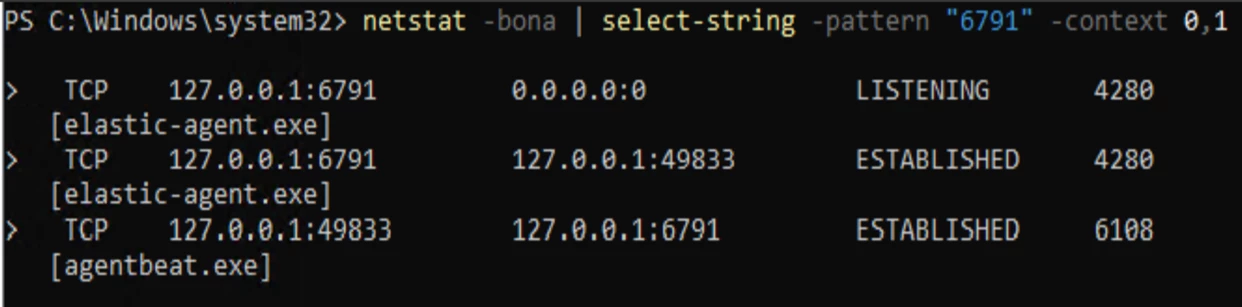
 

As a workaround, we were able to change the SQL Plugin communication port by creating a custom configuration XML file.

Workaround Implemented

We created the following XML file:

File name:
veeam_common_config.xml

Location:

C:\Program Files\Veeam\Plugins\Microsoft SQL

Content of the XML file:

XML

<Config>

<PluginParameters minPluginManagerPort="6792">

</PluginParameters>

</Config>

Show more lines

This allowed us to move the SQL Plugin communication to a different port (in this case 6792) and avoid the conflict with the Elastic Agent already using port 6791.

Discussion Points / Questions

  • Are there any known limitations or upgrade considerations when using veeam_common_config.xml for this purpose?

Appreciate it if you could share your experiences or best practices around this scenario.

3 comments

coolsport00
Forum|alt.badge.img+21
  • Veeam Legend
  • February 28, 2026

Hi ​@Ahmed.Shetiwi -

Honestly...as the Community Hub is not Veeam Support but rather simply Veeam product users, I recommend contacting Veeam Support to verify the supported method for making the port change for the SQL Plugin tool. If you’re able, share what info they provide as the best method to better help those in the Community who may experience the same issue.

Best.


Ahmed.Shetiwi
Forum|alt.badge.img+1
  • Author
  • Not a newbie anymore
  • February 28, 2026

Hi ​@Ahmed.Shetiwi -

Honestly...as the Community Hub is not Veeam Support but rather simply Veeam product users, I recommend contacting Veeam Support to verify the supported method for making the port change for the SQL Plugin tool. If you’re able, share what info they provide as the best method to better help those in the Community who may experience the same issue.

Best.

Hi ​@coolsport00 

Many thanks for your reply and advice — much appreciated.

I would like to highlight that the same workaround was suggested by the Veeam Support team. We have already tested the Backup/restore after changing the SQL Plugin communication port using the XML configuration, and it is working normally without any issues.

I will keep this post open mainly to help the community, in case anyone encounters a similar scenario where the default SQL Plugin communication port (6791) is already in use and needs to be modified to a custom port.

Hopefully, this discussion can serve as a useful reference for others facing the same situation where they have Elastic Agent running on same port 6791.

I will also validate this configuration during the next Veeam Backup & Replication build/upgrade to ensure that the custom SQL Plugin communication port continues to function as expected.


coolsport00
Forum|alt.badge.img+21
  • Veeam Legend
  • February 28, 2026

Ok great. Thanks for sharing ​@Ahmed.Shetiwi .
