Veeam Service Provider Console - v7 Cumulative Patch

  • April 17, 2023
  • 8 comments
  • 185 views

marco_s
Forum|alt.badge.img+8

Hi all,

patch search day today šŸ˜…

Missed this one, it came out a few weeks ago and I still haven't installed it:

https://www.veeam.com/kb4441

I share with you..enjoy! šŸ’š

8 comments

Chris.Childerhose
Forum|alt.badge.img+21

Already knew about this a week or more ago and applied it to our VSPC.Ā  Thanks for sharing for the rest of the audience.


dloseke
Forum|alt.badge.img+8
  • Veeam Vanguard
  • April 17, 2023

Thanks….saw this was available but haven’t applied it yet as I haven’t gathered the info around it yet.Ā  Thanks for posting for awareness though!


  • New Here
  • April 18, 2023

I tried the v7 Cumulative Patch today, to upgrade from v6 (this is a fresh install of VSP Console v6 from the Azure Marketplace, pre-installed with SQL Server 2016 64-bit).

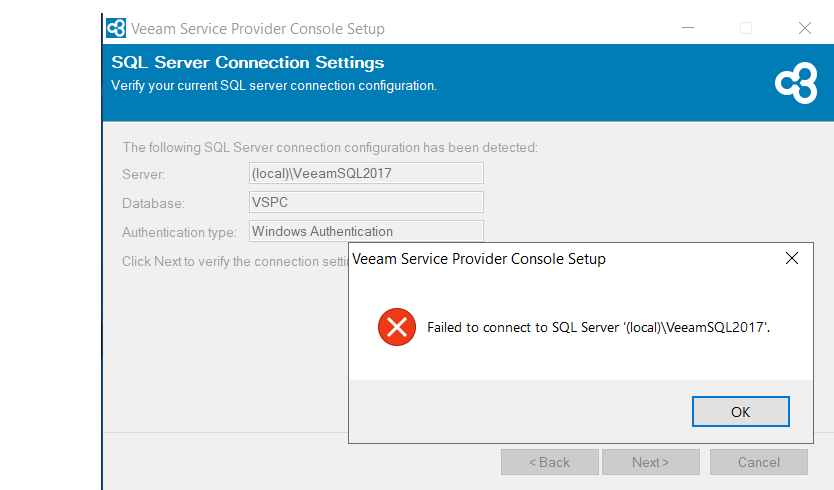
The setup verified all the prerequisites, but errored out when trying to verify the SQL connection:

I can connect using SSMS with Windows authentication, and see that my SQL server is named VEEAMSQL2016, rather than the server it’s looking for (VeeamSQL2017). The upgrade wizard doesn’t allow me to choose a different SQL Server instance.

Has anyone seen and overcome this yet?


Chris.Childerhose
Forum|alt.badge.img+21

I tried the v7 Cumulative Patch today, to upgrade from v6 (this is a fresh install of VSP Console v6 from the Azure Marketplace, pre-installed with SQL Server 2016 64-bit).

The setup verified all the prerequisites, but errored out when trying to verify the SQL connection:

I can connect using SSMS with Windows authentication, and see that my SQL server is named VEEAMSQL2016, rather than the server it’s looking for (VeeamSQL2017). The upgrade wizard doesn’t allow me to choose a different SQL Server instance.

Has anyone seen and overcome this yet?

Are you not able to change the Server path that is there?Ā  It seems like it is looking in the wrong place for the instance.


  • New Here
  • April 18, 2023

I tried the v7 Cumulative Patch today, to upgrade from v6 (this is a fresh install of VSP Console v6 from the Azure Marketplace, pre-installed with SQL Server 2016 64-bit).

The setup verified all the prerequisites, but errored out when trying to verify the SQL connection:

I can connect using SSMS with Windows authentication, and see that my SQL server is named VEEAMSQL2016, rather than the server it’s looking for (VeeamSQL2017). The upgrade wizard doesn’t allow me to choose a different SQL Server instance.

Has anyone seen and overcome this yet?

Are you not able to change the Server path that is there?Ā  It seems like it is looking in the wrong place for the instance.

Exactly! I’m not able to change the Server path, as it’s greyed out.


Chris.Childerhose
Forum|alt.badge.img+21

I tried the v7 Cumulative Patch today, to upgrade from v6 (this is a fresh install of VSP Console v6 from the Azure Marketplace, pre-installed with SQL Server 2016 64-bit).

The setup verified all the prerequisites, but errored out when trying to verify the SQL connection:

I can connect using SSMS with Windows authentication, and see that my SQL server is named VEEAMSQL2016, rather than the server it’s looking for (VeeamSQL2017). The upgrade wizard doesn’t allow me to choose a different SQL Server instance.

Has anyone seen and overcome this yet?

Are you not able to change the Server path that is there?Ā  It seems like it is looking in the wrong place for the instance.

Exactly! I’m not able to change the Server path, as it’s greyed out.

Hmmm that is weird.Ā  Maybe check the forums as well for answers or open a support case.Ā  Forum - https://forums.veeam.comĀ 


  • New Here
  • April 18, 2023

Hmmm that is weird.Ā  Maybe check the forums as well for answers or open a support case.Ā  Forum - https://forums.veeam.comĀ 

Sorry, first timer here and thought I was on the forums 😁 I’ll try there and open a caseĀ 


Chris.Childerhose
Forum|alt.badge.img+21

Hmmm that is weird.Ā  Maybe check the forums as well for answers or open a support case.Ā  Forum - https://forums.veeam.comĀ 

Sorry, first timer here and thought I was on the forums 😁 I’ll try there and open a caseĀ 

No worries at all.Ā  We have many technical folks here but sometimes we are unable to help with things where the forums have more visibility with Product Management and support cases.