

Veeam Oxford Style Debate #4

Veeam Oxford Style Debate – Episode 4 -Who Should Detect Malware?

  • Oct 5, 2026 10:07 AM UTC
  • 27 comments
  • 366 views
Show first post

27 comments

Scott
Forum|alt.badge.img+10
  • Veeam Legend
  • Nov 18, 2026 5:51 PM UTC

AGAINST. 

I have had Veeam Malware detection discover dormant files (last access around 2008) in backups where the files had their name changed, were encrypted, and marked as hidden / system.


Files like this won’t show, but when someone does a RoboCopy on a file share during a migration or mounts a disk to a server, Veeam detects malware. Technically it’s correct. No other tools seemed to notice when this issue was happening.  Defender didn’t care either, even with full scans etc.


I am not a fan of alert fatigue, or getting my email spammed, however, being able to have a backup admin notify security, who may have missed something is an amazing feature. This also will allow us to find the last clean backup in our environment if we ever need to restore. 


Iams3le
Forum|alt.badge.img+15
  • Nov 23, 2026 2:57 PM UTC

Many customers are telling me that they disabled it to not cause issues. Another reason is that they don’t trust that “tool” at all and have a “mature” EDV / AV / FW solution. Although I get the point, why not have that additional layer of security, even if that means only catching 5-10%? Why not take this with them and use it in addition to what’s already there (“mature tools”)?

Cheers!

Lukas

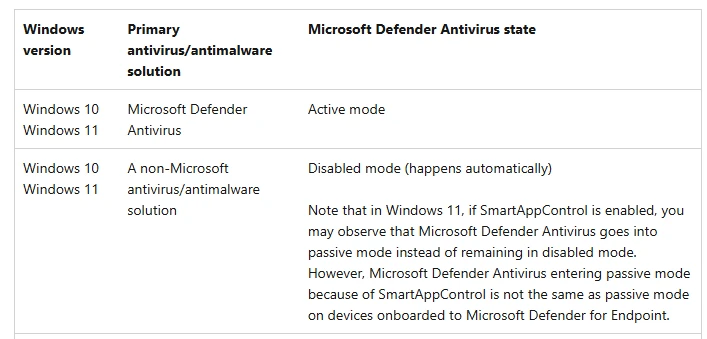
Thanks Lukas for your vital point. Before adding my points, I was reading through the comments so I do not repeat what someone else has said. I know this is from a customer and should in case someone else is has this disabled. I personally do not recommend disabling Microsoft Defender entirely. Having a mature 3rd endpoint protection solution doesn't automatically mean that the built-in Windows security capabilities should be completely disabled. Microsoft Defender can coexist with third-party security solutions in a passive mode. This allows organisations to benefit from additional Microsoft Defender for Endpoint capabilities which can help detect and remediate threats that might have bypassed the primary antivirus solution.


Ref(s):


For the table discussing Windows Server, I will recommend checking the links referenced above.