Solved

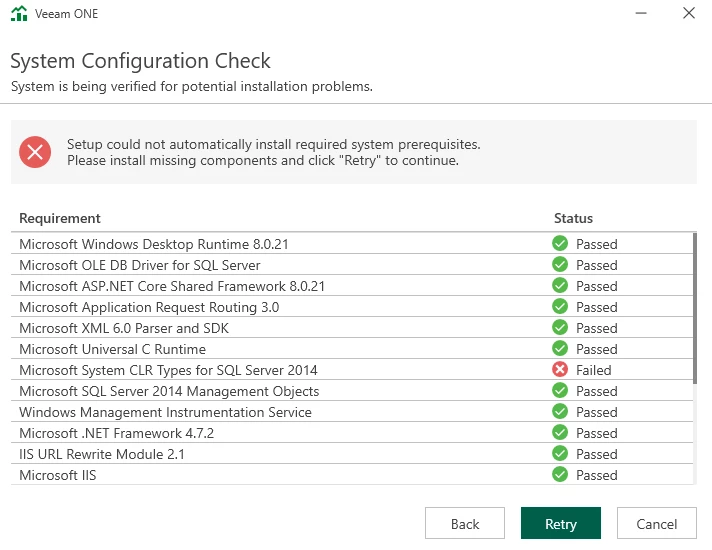
Veeam One Reporting Server System Configuration Check

  • January 15, 2026
  • 15 comments
  • 74 views

waqasali
Forum|alt.badge.img+4

how to avoid this step?



Best answer by waqasali


Thank you all for your support.


I followed the steps below to resolve the issue successfully:

  1. Rebooted the server.
  2. Installed the latest OS updates.
  3. Copied the installer file to local media, which bypassed the issue.

Finally, I was able to install the new Veeam ONE (VONE) application, and it is now working as expected. The new version also comes with an updated interface and additional features, which look quite good so far.


Thanks again to everyone who helped and shared suggestions. Much appreciated.


15 comments

waqasali
Forum|alt.badge.img+4
  • Author
  • On the path to Greatness
  • January 15, 2026

i bypass this, and no more at the end following the windows. Click here to open the logs folder under the logs folder. There are too many files 


C:\ProgramData\Veeam\Setup\Temp


which logs file exactly needs to review?


Andanet
Forum|alt.badge.img+12
  • Veeam Legend
  • January 15, 2026

Hi ​@waqasali is a very strange error only for CLR Types. I don’t know which logs you need to use for inspection but I’m thinking about somethings block installation as Antivirus or Firewall. Can you temporary disable AV and FW and retry the installation? 

Let me know what happens. 


Chris.Childerhose
Forum|alt.badge.img+21
  • Veeam Legend, Veeam Vanguard
  • January 15, 2026

Check the most recently updated file or files in the logs folder.  Also did you try searching for that CLR message to see if you can download and install prior to the Veeam ONE install?  This is an easy thing to get past but if it keeps happening I would contact support.


coolsport00
Forum|alt.badge.img+21
  • Veeam Legend
  • January 15, 2026

@waqasali - you’re installing VONE? There should be an installation log in the VONE install directory which should have a bit more detail on the cause of the error in this step. If not...I would do as Chris suggests and contact Support.

Keep us posted.


lukas.k
Forum|alt.badge.img+13
  • Influencer
  • January 15, 2026

Have you tried to reboot the server prior to installing VONE? I only read “bypass” in your comment. In case you bypass any of those steps manually or edit / manipulate the setup routine you should be aware that you might lose support on that and there likely be errors.


In case the server has internet access you should run Windows Update (and reboot) prior installing and see if that works.


Chris.Childerhose
Forum|alt.badge.img+21
  • Veeam Legend, Veeam Vanguard
  • January 15, 2026

You could also check the Prerequisites folder on the mounted ISO file to see if this MSI for CLR is there and install it.


Marcel.K
Forum|alt.badge.img+11
  • Veeam Legend
  • January 19, 2026

do you see failed package that is already installed on windows?

if, yes, i would uninstall it from windows and then after reboot to install via Veeam installer wizard


waqasali
Forum|alt.badge.img+4
  • Author
  • On the path to Greatness
  • January 22, 2026

Check the most recently updated file or files in the logs folder.  Also did you try searching for that CLR message to see if you can download and install prior to the Veeam ONE install?  This is an easy thing to get past but if it keeps happening I would contact support.


thank you ​@Chris.Childerhose i have contacted support. 


waqasali
Forum|alt.badge.img+4
  • Author
  • On the path to Greatness
  • January 22, 2026

Hi ​@waqasali is a very strange error only for CLR Types. I don’t know which logs you need to use for inspection but I’m thinking about somethings block installation as Antivirus or Firewall. Can you temporary disable AV and FW and retry the installation? 

Let me know what happens. 


thank you for your words. 


waqasali
Forum|alt.badge.img+4
  • Author
  • On the path to Greatness
  • January 22, 2026

@waqasali - you’re installing VONE? There should be an installation log in the VONE install directory which should have a bit more detail on the cause of the error in this step. If not...I would do as Chris suggests and contact Support.

Keep us posted.


right 


waqasali
Forum|alt.badge.img+4
  • Author
  • On the path to Greatness
  • January 22, 2026

Have you tried to reboot the server prior to installing VONE? I only read “bypass” in your comment. In case you bypass any of those steps manually or edit / manipulate the setup routine you should be aware that you might lose support on that and there likely be errors.


In case the server has internet access you should run Windows Update (and reboot) prior installing and see if that works.


i push some updated manual and reboot several times. 


waqasali
Forum|alt.badge.img+4
  • Author
  • On the path to Greatness
  • January 22, 2026

do you see failed package that is already installed on windows?

if, yes, i would uninstall it from windows and then after reboot to install via Veeam installer wizard


i check some article and new installer file i have copy to local media and try to run this almost fix the issue 


waqasali
Forum|alt.badge.img+4
  • Author
  • On the path to Greatness
  • Answer
  • January 22, 2026


Thank you all for your support.


I followed the steps below to resolve the issue successfully:

  1. Rebooted the server.
  2. Installed the latest OS updates.
  3. Copied the installer file to local media, which bypassed the issue.

Finally, I was able to install the new Veeam ONE (VONE) application, and it is now working as expected. The new version also comes with an updated interface and additional features, which look quite good so far.


Thanks again to everyone who helped and shared suggestions. Much appreciated.


Chris.Childerhose
Forum|alt.badge.img+21
  • Veeam Legend, Veeam Vanguard
  • January 22, 2026

Great to hear you got it working and it was fairly easy.


coolsport00
Forum|alt.badge.img+21
  • Veeam Legend
  • January 22, 2026

Glad you got it resolved, and thank you for sharing your resolution.

Best.