Answer

Veeam O465 Backup Accounts Manager Password Issue

  • August 31, 2022
  • 14 comments
  • 87 views

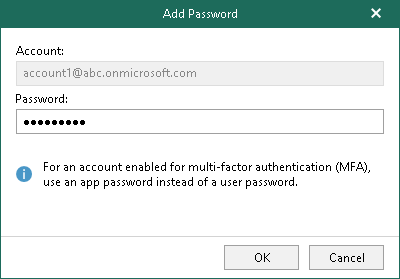
I’m trying to add an account that does not have MFA using the Veeam O365 Backup Accounts Manager. Password validation using the account password fails. Is an application password now required?

Best answer by marcofabbri

Just so we are on the same page, here where I am in the Verson 6 VBM. So after 1 October an application password will be required?
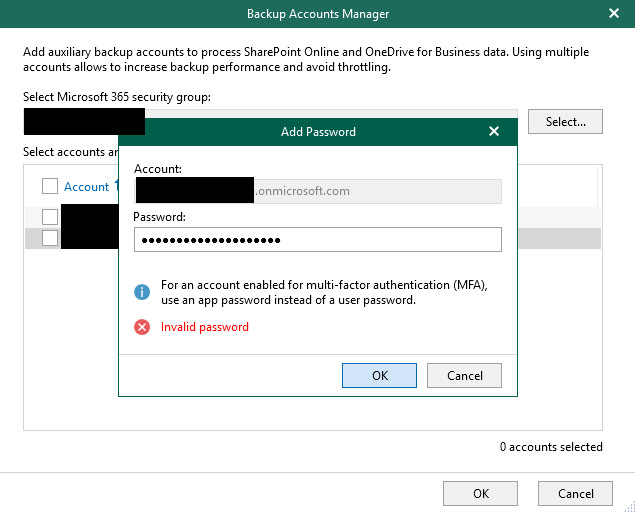


Exactly. It's a new Microsoft policy.

14 comments

marcofabbri
Forum|alt.badge.img+12
  • On the path to Greatness
  • August 31, 2022

Application password is needed only when MFA is enabled as reported here:
https://helpcenter.veeam.com/docs/vbo365/guide/adding_backup_accounts.html?ver=60


Chris.Childerhose
Forum|alt.badge.img+21
  • Veeam Legend, Veeam Vanguard
  • August 31, 2022

As noted by Marco only when MFA is enabled.  Did you select Basic or Modern authentication when adding the account in VBM365?  You need to select Basic for what you are trying to do.


  • Author
  • New Here
  • August 31, 2022

@marcofabbri Thank you for the confirmation


marcofabbri
Forum|alt.badge.img+12
  • On the path to Greatness
  • August 31, 2022

As noted by Marco only when MFA is enabled.  Did you select Basic or Modern authentication when adding the account in VBM365?  You need to select Basic for what you are trying to do.

And basic auth will work until 1 October 2022 @johnc22 


Chris.Childerhose
Forum|alt.badge.img+21
  • Veeam Legend, Veeam Vanguard
  • August 31, 2022

As noted by Marco only when MFA is enabled.  Did you select Basic or Modern authentication when adding the account in VBM365?  You need to select Basic for what you are trying to do.

And basic auth will work until 1 October 2022 @johnc22 

Yes forgot to add that part, thanks. 👍🏼


marcofabbri
Forum|alt.badge.img+12
  • On the path to Greatness
  • August 31, 2022

As noted by Marco only when MFA is enabled.  Did you select Basic or Modern authentication when adding the account in VBM365?  You need to select Basic for what you are trying to do.

And basic auth will work until 1 October 2022 @johnc22 

Yes forgot to add that part, thanks. 👍🏼

:)


marcofabbri
Forum|alt.badge.img+12
  • On the path to Greatness
  • August 31, 2022

@johnc22 give a double check about password typo and then please close this case if we answered to you :)


  • Author
  • New Here
  • August 31, 2022

@Chris.Childerhose Thank you for the additional information. So basic authentication will not work after 1 October 2022?


Chris.Childerhose
Forum|alt.badge.img+21
  • Veeam Legend, Veeam Vanguard
  • August 31, 2022

@Chris.ChilderhoseThank you for the additional information. So basic authentication will not work after 1 October 2022?

Yes that is correct so you need to start planning for MFA now.  😁


  • Author
  • New Here
  • August 31, 2022

Just so we are on the same page, here where I am in the Verson 6 VBM. So after 1 October an application password will be required?


marcofabbri
Forum|alt.badge.img+12
  • On the path to Greatness
  • Answer
  • August 31, 2022

Just so we are on the same page, here where I am in the Verson 6 VBM. So after 1 October an application password will be required?


Exactly. It's a new Microsoft policy.


marcofabbri
Forum|alt.badge.img+12
  • On the path to Greatness
  • August 31, 2022

This is the article: https://docs.microsoft.com/en-us/exchange/clients-and-mobile-in-exchange-online/deprecation-of-basic-authentication-exchange-online


Chris.Childerhose
Forum|alt.badge.img+21
  • Veeam Legend, Veeam Vanguard
  • August 31, 2022

Just so we are on the same page, here where I am in the Verson 6 VBM. So after 1 October an application password will be required?


Yes that is correct.


MicoolPaul
Forum|alt.badge.img+23
  • August 31, 2022

@Chris.ChilderhoseThank you for the additional information. So basic authentication will not work after 1 October 2022?

Yes that is correct so you need to start planning for MFA now.  😁

I’m gonna sound pedantic here, but just to clarify, it’s Modern Authentication you’ve got to start planning for, which enables the use of features such as MFA, Conditional access, client certificate-based authentication etc. Thought I’d point this out as it’s a good excuse to share this link for more info:

https://docs.microsoft.com/en-us/microsoft-365/enterprise/hybrid-modern-auth-overview?view=o365-worldwide#what-is-modern-authentication