Question

Veeam Hyper-V Integration Installer... Error on Win 2016


Hi all

When I try to install the hyper v component for veeam on a hyper v windows 2016 virtual machine I get the following error.

I turned off UAC. Other things I can do? It doesn't recognize it as a hyper v machine
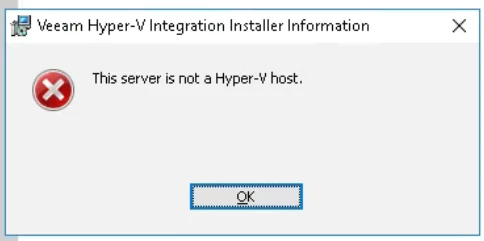


5 comments

coolsport00
Forum|alt.badge.img+23

Are you attempting to install the Veeam Installer Service on the HV VM? Can you be more specific? Where\What is the VM installed on? If the VM is on a HV Host, is HV Integration Services enabled for the VM? Can you share your setup to help us try to help you better?

Best.


Hi

I'm installing this 


on a hyper-v virtual machine with windows 2016 operating system.

On this machine veeam is installed correctly but the hyper-v related module does not install due to that error


If the VM is on a HV Host, is HV Integration Services enabled for the VM?

This is an interesting question... what do I need to do to install them? From PowerShell?


Chris.Childerhose
Forum|alt.badge.img+23

Add the host as a managed server in the VBR console.  That will install the required components for you automatically.


dloseke
Forum|alt.badge.img+8
  • Veeam Vanguard
  • February 18, 2025

Yeah, I’ve never had to manually install that integration.  I’ve always as Chris suggested added the Hyper-V host as a managed Windows Server and Veeam took care of the rest.  After that, it should be able to install any required components and then setup a backup job for any VM’s running on that host.


Forum|alt.badge.img+3
  • Veeam Product Management
  • February 19, 2025

Manual installation won’t work for HyperV hosts, go through this process to add hosts. Veeam needs to be aware of a lot of things that a manual installation simply cannot pass to the Veeam server.

If the installation from VBR console fails, open a Support case, there are many possibilities that can cause this, but with proper log review you can narrow it down pretty fast, which only Veeam Support can help with.








