Solved

Veeam 13 Software Appliance

  • November 6, 2025
  • 8 comments
  • 231 views

  • Comes here often

I have installed Veeam Software Appliance on fresh hardware. My intent is to recreate my backup infrastructure around it and then deprecate my current Windows server that handles the jobs. I am not finding anywhere to download a license key for version 13. It does not show in my account portal as an option for generating a key.

Best answer by CMF

Hi ​@tgx ,

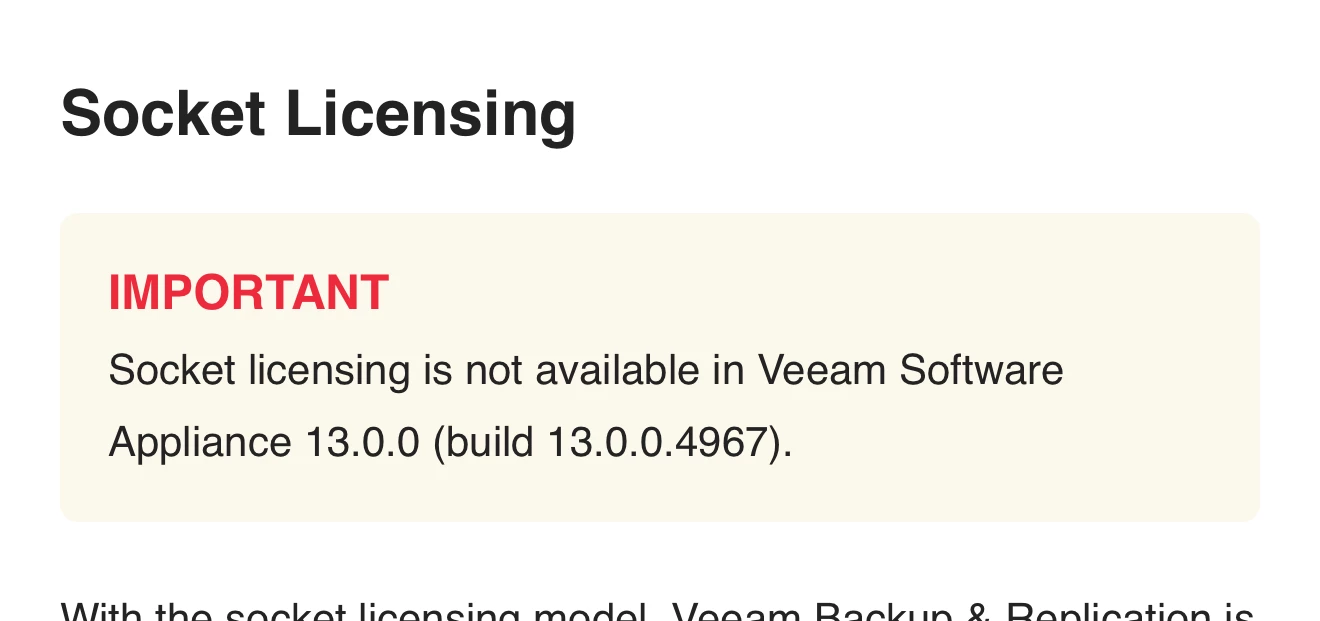
If you have you are using VUL licenses in your current 12.x infrastructure, you should be fine to use them on v13. The VUL licenses don't need to get updated for new versions. if you are currently using socket based licenses you will have to convert them to VUL licenses because v13 doesn't support socket licenses. 



8 comments

Iams3le
Forum|alt.badge.img+11
  • Veeam Legend
  • November 6, 2025

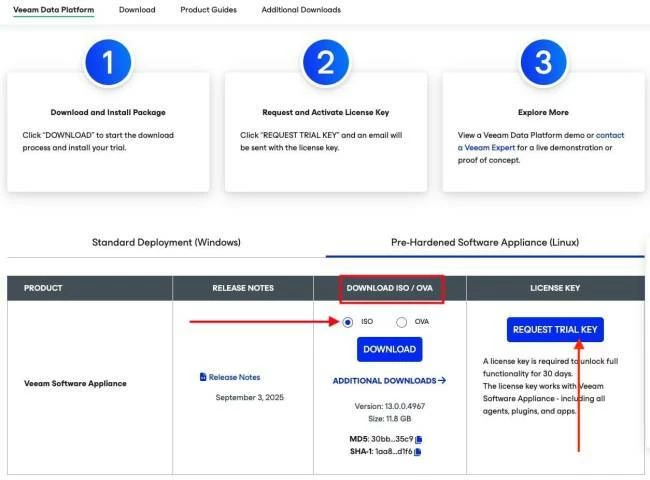
Hi ​@tgx, I assume this is your lab env. I am sure you must have missed the below furing the vsa download 


regnor
Forum|alt.badge.img+14
  • Veeam MVP
  • November 7, 2025

The VSA doesnt require a new license key, so you can just reuse your existing one.


CMF
Forum|alt.badge.img+8
  • Veeam Legend
  • Answer
  • November 7, 2025

Hi ​@tgx ,

If you have you are using VUL licenses in your current 12.x infrastructure, you should be fine to use them on v13. The VUL licenses don't need to get updated for new versions. if you are currently using socket based licenses you will have to convert them to VUL licenses because v13 doesn't support socket licenses. 



  • Author
  • Comes here often
  • November 7, 2025

Hi ​@tgx, I assume this is your lab env. I am sure you must have missed the below furing the vsa download 


I did not miss it. As I have an existing license, I did not request a trial key.


  • Author
  • Comes here often
  • November 7, 2025

Hi ​@tgx ,

If you have you are using VUL licenses in your current 12.x infrastructure, you should be fine to use them on v13. The VUL licenses don't need to get updated for new versions. if you are currently using socket based licenses you will have to convert them to VUL licenses because v13 doesn't support socket licenses. 


I do have VUL. Not an issue. I was able to install the v12 license. Thanks.


Mildur
Forum|alt.badge.img+12
  • Influencer
  • November 7, 2025

because v13 doesn't support socket licenses. 

Just a small note. :)

  • Veeam Software Appliance requires VUL
  • v13.0.1 on Windows can be used with socket license or VUL


Best,

Fabian


Forum|alt.badge.img
  • New Here
  • December 15, 2025

because v13 doesn't support socket licenses. 

Just a small note. :)

  • Veeam Software Appliance requires VUL
  • v13.0.1 on Windows can be used with socket license or VUL


Best,

Fabian


Hello Fabian,

I’m trying to find an official document with this information but not was possible.

Can you please let me know about an official document with that information about licensing?


Thank you!


Mildur
Forum|alt.badge.img+12
  • Influencer
  • December 15, 2025

Sure. It‘s in our help center (ignore the build number please, we will remove it to our documentation team. The note is for all builds of Veeam Software Appliance).

https://helpcenter.veeam.com/docs/vbr/userguide/licensing.html?ver=13#socket-licensing


Or our official licensing policy, where we mention legacy socket licenses only allow deployment as „windows installable software“. Review chapter „1.2. Standalone End User Software Offerings and offerings not using Veeam Universal License.“

https://www.veeam.com/legal/licensing-policy.html
 

Best,

Fabian