Question

Veeam 13 is not being nice.


Forum|alt.badge.img+1

I upgraded to Veeam 13 a few weeks ago.   I finished adding my 2.5G network and VLANs on Thursday.   My Ubuntu 24.04 servers are backing up fine.   Veeam 13 in my workgroup wants certificates now.  I had to spin up a Windows 2022 Standalone CA to create certificates for all Windows 10 and 11 workstations.   I will be creating the workstation certs from it today and installing them.   Any suggestions on getting Windows 11 to backup?  I hope the cert does the trick.  

2.5G network is much faster.  I will post numbers tonight.  

17 comments

coolsport00
Forum|alt.badge.img+23
  • Veeam Legend
  • May 15, 2026

@SCSIraidGURU ...are you saying since upgrading to v13, your Windows devices aren’t backing up? I assume physical devices? (agents) Or, are they VMs?


Chris.Childerhose
Forum|alt.badge.img+22

I am using Veeam 13 in my homelab with Agent backups and did not have to do a CA for certificates.  Now I do have a CA, but that is for other things and never had to do anything with my systems to get backups to work properly.  This is not a hard requirement that I am aware of.


Forum|alt.badge.img+1
  • Author
  • Comes here often
  • May 15, 2026

I had to redo the Veeam certificate and fix the Win10x64i7/Admin$ link.  Options - Security - Regenerate the Veeam Cert.    I upgraded the NICs to 2.5G and everything changed.


Forum|alt.badge.img+1
  • Author
  • Comes here often
  • May 15, 2026

Here are the numbers for the 2.5G upgrade.  I run the VMs, FamilyPics, and Dropbox at the same time. 


  1 Gbps 2.5G
Windows 11 58 min 37 min
Dropbox 66MB/s 162MB/s
FamilyPics 109MB/s 139MB/s
VMs 219MB/s 328MB/s


coolsport00
Forum|alt.badge.img+23
  • Veeam Legend
  • May 15, 2026

I had to redo the Veeam certificate and fix the Win10x64i7/Admin$ link.  Options - Security - Regenerate the Veeam Cert.    I upgraded the NICs to 2.5G and everything changed.


Ah, ok, so more on the VBR side. Interesting changing a nic broke the Veeam Cert. 🤔 


Chris.Childerhose
Forum|alt.badge.img+22

Those are some nice improvements for speed of backups. 😎


coolsport00
Forum|alt.badge.img+23
  • Veeam Legend
  • May 16, 2026

Here are the numbers for the 2.5G upgrade.  I run the VMs, FamilyPics, and Dropbox at the same time. 


  1 Gbps 2.5G
Windows 11 58 min 37 min
Dropbox 66MB/s 162MB/s
FamilyPics 109MB/s 139MB/s
VMs 219MB/s 328MB/s


Oohh...thank you for sharing how your hardware modification impacted your environment. Good for the Community to know about. 👍🏻


Forum|alt.badge.img+1
  • Author
  • Comes here often
  • May 18, 2026

The backup speeds on Dropbox by itself was over 450 MB/s.   I changed my workgroup name to scsiraidguru.   I did this to create the certificate authority on Windows 2022 Standard.   You can’t change the server name once a CA is created.   I had to change the Hyper-V server name in Veeam.   

I enabled the Built-In Administrator to give it rights and privileges to Windows 11 Admin$.  

The $170 2.5G investment was worth it.   I will post more soon.  


Forum|alt.badge.img+1
  • Author
  • Comes here often
  • May 20, 2026

I took Veeam 13 to the woodshed.   I beat on it.   It is now behaving.  I am setting up daily backups. 

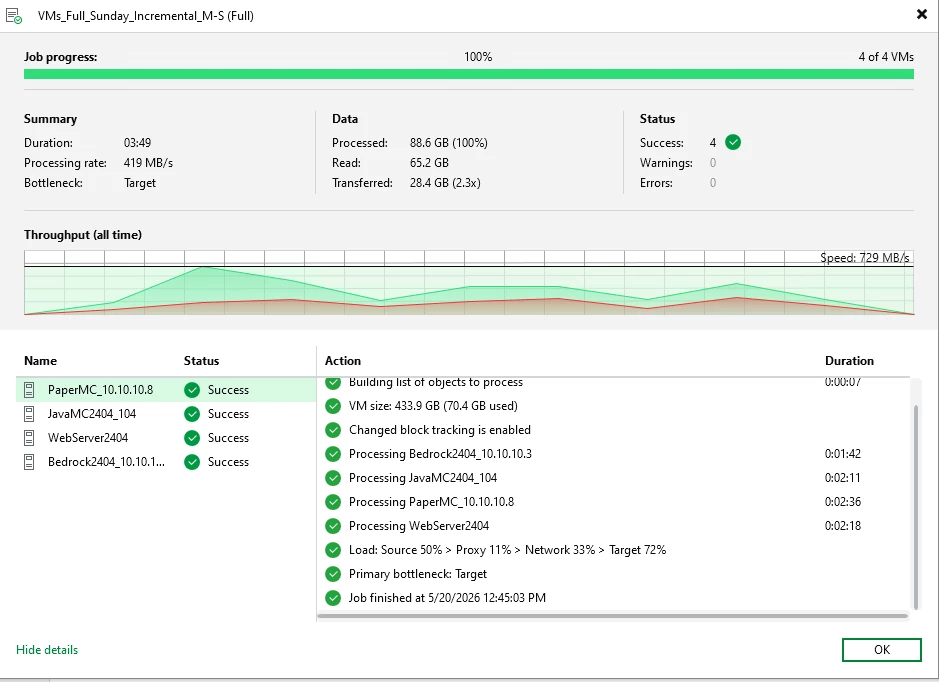
I did my 4 VMs.   Full Active on Sunday.  Incremental M-S.   I don’t see a incremental area.  Here is the first test with just the 4 VMs backing up over 2.5 Gbps networking.   

How can I tell if incrementals are being done in the job?  


Forum|alt.badge.img+1
  • Author
  • Comes here often
  • May 20, 2026

I have three tape drives:  
1.) dropbox
2.) Familypics + VMs 
3.) My Windows 11 workstation

I do three sets of jobs
Drive L:  (8TB) : 
Dropbox_1 , Dropbox_2, and Dropbox_3  (I move them to backups.old when I kick up the next job.  (I have 6 sets of backups)

Drive_M:  (4TB) 
HyperV1,_M,  HyperV2_M, HyperV3_M (I move them to backups.old when I kick up the next job.  (I have 6 sets of backups)  These are the VMs listed above.

Windows 11 workstation.  I backup and keep one backup.old.   It is turned off, when not in use.

Drive_N (4TB) HyperV1,_N,  HyperV2_N, HyperV3_N (I move them to backups.old when I kick up the next job.  (I have 6 sets of backups) 


I rotate the 3 tapes sets for 

1.)  Dropbox_1 , Dropbox_2, and Dropbox_3
2.)  HyperV1,_M + HyperV1,_N,  HyperV2_M + HyperV2,_M, HyperV3_M + HyperV3,_M
3.) My workstation

How can I keep 3 weeks of full backups to point them to tape backups?  Do I set the removal at 21 days?  


coolsport00
Forum|alt.badge.img+23
  • Veeam Legend
  • May 20, 2026

Hi ​@SCSIraidGURU -

You can look for Increment files in 1 of 2 ways → Go into the Home node of VBR > Backups section > then rt-click a Backup job and go into Properties. In the top left window, select a VM or computer. Then, on the bottom, you can view the file types Veeam created during the subsequent backups. A .vbk file is a FULL backup (initial Job run and whenever you have occasional FULLs run for either an Active or Synthetic Full). A .vib file is an incremental.

The task list in the Backup Job doesn’t say if it creates a Full or Incremental. It’s just understood based off your Job config. 

I can’t help with the Tape cuz...well...it’s Tape & nobody uses it anymore 😂 *kidding
I really don’t use it though..so can’t help you there.


Forum|alt.badge.img+1
  • Author
  • Comes here often
  • May 20, 2026

Tapes go in my safe in case of fire, theft or our 8 and 10 year olds play with my home lab.


Forum|alt.badge.img+1
  • Author
  • Comes here often
  • May 20, 2026

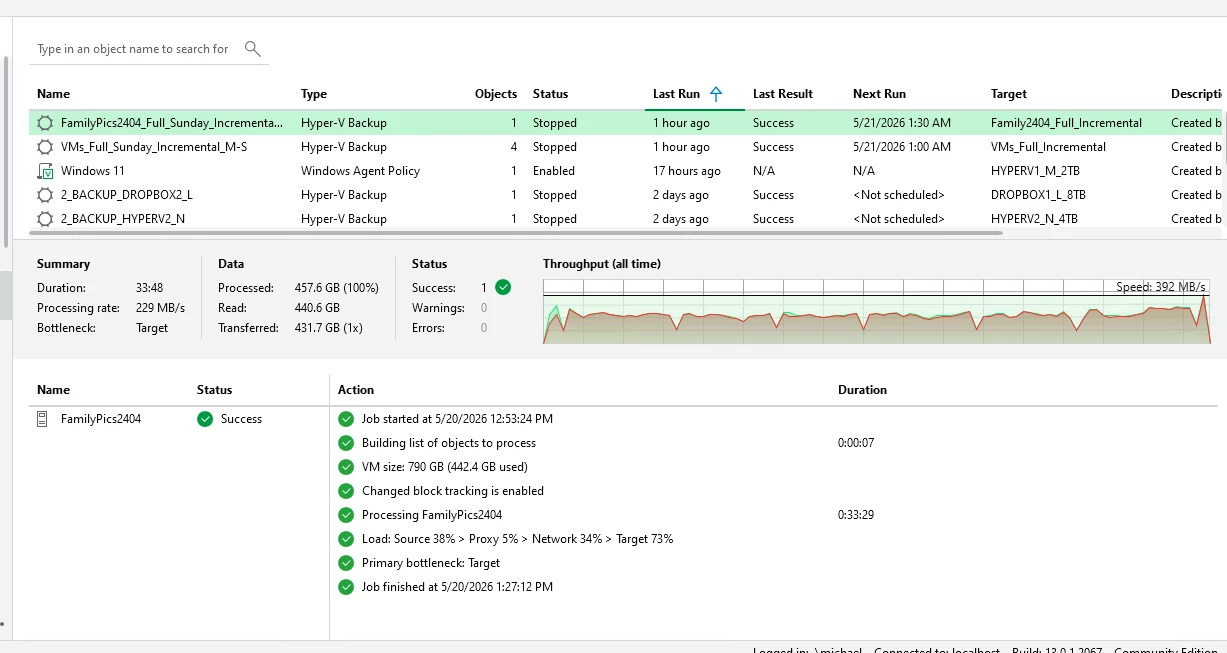
Family2404 Full Active


Forum|alt.badge.img+1
  • Author
  • Comes here often
  • May 20, 2026

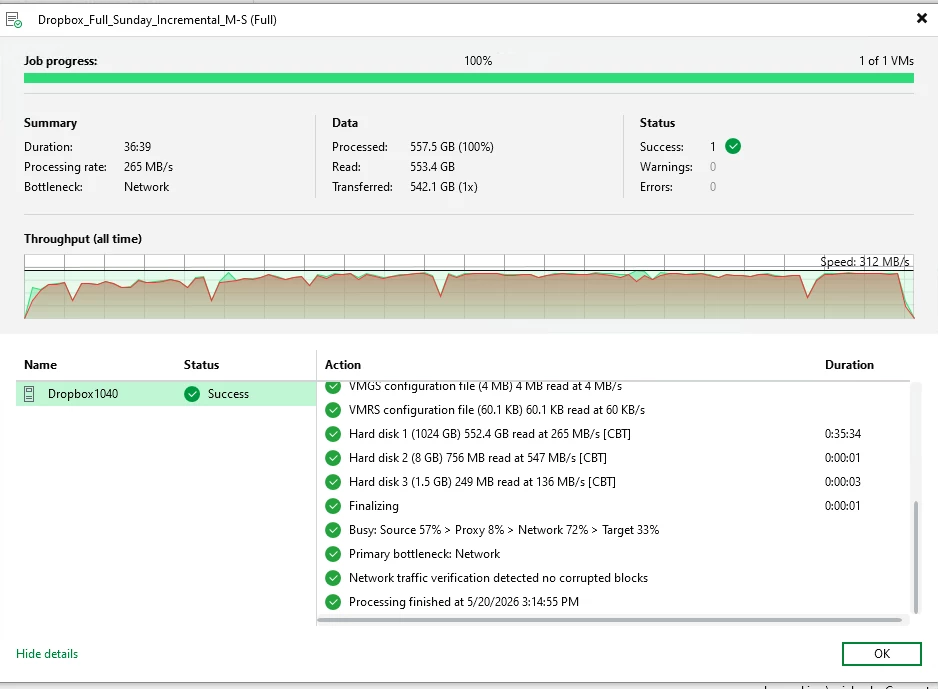
Dropbox Full Active:  The dropbox /home directory with all the files over 500GB was backing up at 547 MB/s.   


Chris.Childerhose
Forum|alt.badge.img+22

@SCSIraidGURU -- Were you able to get an answer to your question?  If so, please help the community by posting the answer and then selecting the best answer that helped you achieve this even if it is your own.


Forum|alt.badge.img+1
  • Author
  • Comes here often
  • June 15, 2026

I recreated every job into Sunday Full and rest incremental.   I have to manually do each tape backup to point to the last full and incremental runs on disk.   

Can’t they get it so I can go directly to tape?  


Chris.Childerhose
Forum|alt.badge.img+22