
Question

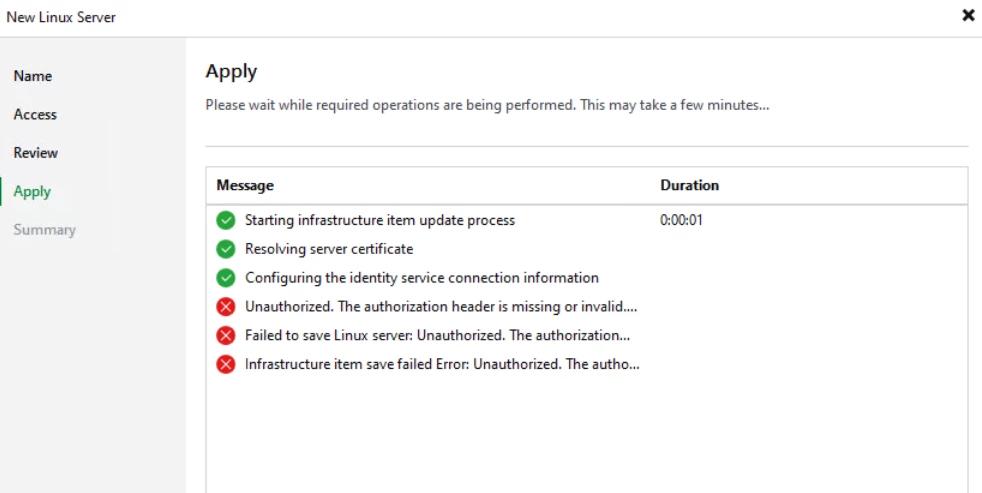
Veeam 13.1.0.411 for Windows add the Veeam Infrastructure Appliance as a handheld repository, it fails

  • September 1, 2026
  • 5 comments
  • 25 views

Hi All,


I want to use Veeam 13.1.0.411 for Windows.

When I try to add the Veeam Infrastructure Appliance as a handheld repository, it fails.
 

5 comments

lukas.k
Forum|alt.badge.img+13
  • Influencer
  • September 1, 2026

Hi ​@nsofl.chen,

This looks like either a firewall or a permission topic. What exactly did you enter in the “Access” tab on the left?

Did you make sure that you are using the matching VIA version?


Since this community cannot provide deep-level technical support, maybe you want to open a Veeam Support case in parallel and keep us posted on the status - whoever’s first I guess. :)


Best regards

Lukas


  • Author
  • Comes here often
  • September 1, 2026

@lukas.k 

Ok thank you


coolsport00
Forum|alt.badge.img+23
  • Veeam Legend
  • September 1, 2026

Yep, I recommend a Support case as Lukas suggested ​@nsofl.chen . Please keep us posted what they find.

Best.


coolsport00
Forum|alt.badge.img+23
  • Veeam Legend
  • September 1, 2026

In the meantime, you could review the Logs to see if they tell something more revealing/concrete:

https://helpcenter.veeam.com/docs/vbr/userguide/logging.html?ver=13


Chris.Childerhose
Forum|alt.badge.img+22
  • Veeam Legend, Veeam Vanguard
  • September 1, 2026

If you are adding a Veeam VIA deployed from the OVA or ISO on the Access screen select certificate based authentication not credentials.  If that does not work then open a support case as noted.






