
Solved

VBO365 Catch-All Job Warning "Nothing to process"

  • Feb 15, 2025 6:26 PM UTC
  • 6 comments
  • 545 views

Dynamic
Forum|alt.badge.img+16

Hi all,

i have currently an environment with multiple jobs in VBO365 (latest version).
All regular jobs are running fine.

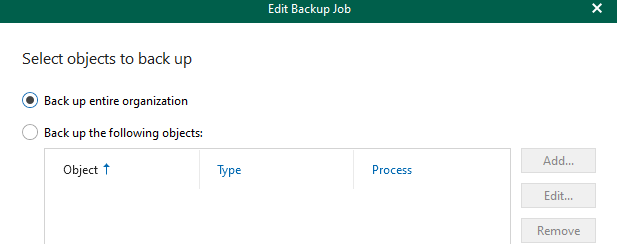
As a fallback, we have defined a catch-all job. Under normal circumstances, there shouldn’t be an object in it…
And that’s our case - if the job has nothing to backup (as it’s processed in other jobs), the state will trigger a warning message → this will create an alert in the customers Monitoring Solution.
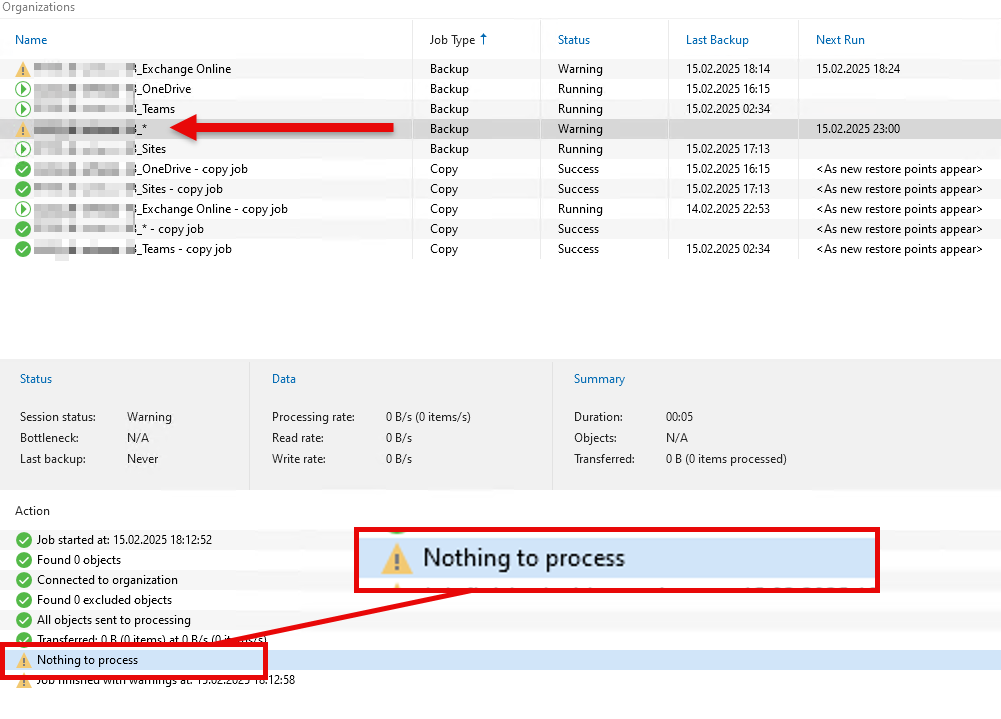


Is there any option to disable it? Or do you have some suggestions for me?

Thanks and best regards, Markus



Best answer by regnor

The easiest solution which comes to my mind is adding an object to that job 😉 The job would run without the warning and still work as a catch all job.

View original

6 comments

Chris.Childerhose
Forum|alt.badge.img+23

I don't think there is unless support has some registry keys or XML config changes would be the only way.  May need to contact support.


Dynamic
Forum|alt.badge.img+16
  • Author
  • Veeam Vanguard
  • Feb 15, 2025 8:03 PM UTC

Thanks Chris, i thought it would end up with a case 😅
Just created one, will keep you posted...


lukas.k
Forum|alt.badge.img+12
  • Influencer
  • Feb 16, 2025 9:50 AM UTC

Would it be an option to try the monitoring solution’s approach and customize it to ignore warnings from exactly that job? Don’t know how deep the integration goes on that...


Dynamic
Forum|alt.badge.img+16
  • Author
  • Veeam Vanguard
  • Feb 16, 2025 9:57 AM UTC

Thanks Lukas, but unfortunately it’s not possible on this environment and monitoring solution. 


regnor
Forum|alt.badge.img+14
  • Veeam MVP
  • Answer
  • Feb 16, 2025 8:57 PM UTC

The easiest solution which comes to my mind is adding an object to that job 😉 The job would run without the warning and still work as a catch all job.


Dynamic
Forum|alt.badge.img+16
  • Author
  • Veeam Vanguard
  • Feb 17, 2025 9:58 AM UTC

Thanks Max, sometimes the simplest solution is the best solution. Didn’t even think about it 😂


Edit: i will exclude an Exchange Online User within the regular Exchange job - to process him within the Catch-All. Because adding additional ressources isn’t possible when “entire organization” is selected.