Solved

VBO Exclude Viruss

  • January 26, 2026
  • 15 comments
  • 44 views

hs08
Forum|alt.badge.img+1
  • Comes here often

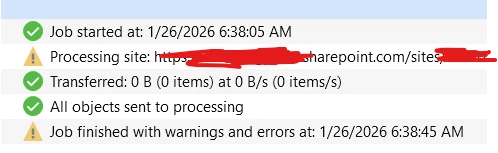
How we can make exclusion for virus warning when backup m365 using VBO?

 

Best answer by Mildur

Hi ​@hs08,
There is a way to exclude the message from job reports.
However, you’ll need to reach out to our Customer Support team to configure the exclusion, as it requires configuration changes that should be performed by Support.

Before doing so, I strongly recommend reviewing affected items on SharePoint/OneDrive. If they are indeed infected, please delete them from the source.

@coolsport00 
This KBs are important, but won’t help to solve this particular message coming from Microsofts 365 built-in virus/malware protection. 


Best,
Fabian

15 comments

Andanet
Forum|alt.badge.img+12
  • Veeam Legend
  • January 26, 2026

Hi ​@hs08 what is the complete warning message? 

Thanks 


hs08
Forum|alt.badge.img+1
  • Author
  • Comes here often
  • January 26, 2026

hi ​@Andanet 

Warning emssage is ‘Item may have a virus reported by the virus scanner plug-in Total count of failed items: 1 :: 0:00:05’


Andanet
Forum|alt.badge.img+12
  • Veeam Legend
  • January 26, 2026

Ah ok. 

This warning is due to internal SP antivirus from Microsoft. VBO cannot exclude this warning messages. These messages are boring or noises and you want to suppress, but they are necessary to understand the healt status of your backups.  

If you really want this you have 2 options (don’t recommended):

  • exclude the entire SP site
  • delete or clear the infected item from the source

These are my 2 cents.


coolsport00
Forum|alt.badge.img+21
  • Veeam Legend
  • January 26, 2026

Hi ​@hs08 -

Did you see the Veeam KB on A/V exclusions?

https://www.veeam.com/kb1999

At the very bottom there are links for other Veeam “services” exclusions as well:

VB M365 A/V Exclusions: https://www.veeam.com/kb3074

That should get you sorted. 

Let us know how it goes.


Chris.Childerhose
Forum|alt.badge.img+21
  • Veeam Legend, Veeam Vanguard
  • January 26, 2026

To me I would ask why you want to exclude this as it is a warning telling you about a potential infection?  To me this is a good thing but check the links shared.


coolsport00
Forum|alt.badge.img+21
  • Veeam Legend
  • January 26, 2026

Yeah..agree. At the very least, would be good to do a “scan backup” operation for potential virus. But VBM365 doesn’t seem to have that feature.


Andanet
Forum|alt.badge.img+12
  • Veeam Legend
  • January 26, 2026

To me I would ask why you want to exclude this as it is a warning telling you about a potential infection?  To me this is a good thing but check the links shared.

Because is annoying 🤣🤣🤣


Chris.Childerhose
Forum|alt.badge.img+21
  • Veeam Legend, Veeam Vanguard
  • January 26, 2026

To me I would ask why you want to exclude this as it is a warning telling you about a potential infection?  To me this is a good thing but check the links shared.

Because is annoying 🤣🤣🤣

To me that isn't annoying at all and shows I need to scan my environment. 🙄


Mildur
Forum|alt.badge.img+12
  • Influencer
  • Answer
  • January 26, 2026

Hi ​@hs08,
There is a way to exclude the message from job reports.
However, you’ll need to reach out to our Customer Support team to configure the exclusion, as it requires configuration changes that should be performed by Support.

Before doing so, I strongly recommend reviewing affected items on SharePoint/OneDrive. If they are indeed infected, please delete them from the source.

@coolsport00 
This KBs are important, but won’t help to solve this particular message coming from Microsofts 365 built-in virus/malware protection. 


Best,
Fabian


Andanet
Forum|alt.badge.img+12
  • Veeam Legend
  • January 26, 2026

To me I would ask why you want to exclude this as it is a warning telling you about a potential infection?  To me this is a good thing but check the links shared.

Because is annoying 🤣🤣🤣

To me that isn't annoying at all and shows I need to scan my environment. 🙄

I fully agree. Is the same for me. 


hs08
Forum|alt.badge.img+1
  • Author
  • Comes here often
  • January 26, 2026

hi ​@coolsport00 

The article say how we can exclude VBO from Antivirus but i asking how/can we exclude file inside SP or Onedrive which indicated as virus.

hi ​@Mildur 

So the we can’t exclude from ourside and need excluded from the backend?


Mildur
Forum|alt.badge.img+12
  • Influencer
  • January 26, 2026

1.) Double‑check in Microsoft 365 whether the file is actually infected. If it’s a virus, delete the file from the source.

2.) If the file is clean, use Microsoft’s tools to resolve the false‑positive report. I believe this link is still valid: https://learn.microsoft.com/en-us/troubleshoot/sharepoint/security/false-positive-malware-detections

3.) Only as a last resort, reach out to Veeam Support if you’re unable to resolve the false‑positive report. We have a configuration parameter that allows you to specify exact files to ignore virus reports from Microsoft. But you should first investigate such files in the source Microsoft 365 tenant. 

Best,
Fabian


hs08
Forum|alt.badge.img+1
  • Author
  • Comes here often
  • January 26, 2026

hi ​@Mildur 

Noted with many thanks


coolsport00
Forum|alt.badge.img+21
  • Veeam Legend
  • January 26, 2026

Hi ​@hs08,
There is a way to exclude the message from job reports.
However, you’ll need to reach out to our Customer Support team to configure the exclusion, as it requires configuration changes that should be performed by Support.

Before doing so, I strongly recommend reviewing affected items on SharePoint/OneDrive. If they are indeed infected, please delete them from the source.

@coolsport00 
This KBs are important, but won’t help to solve this particular message coming from Microsofts 365 built-in virus/malware protection. 


Best,
Fabian

Ok...thanks for clarifying Fabian 👍🏻


coolsport00
Forum|alt.badge.img+21
  • Veeam Legend
  • January 26, 2026

hi ​@coolsport00 

The article say how we can exclude VBO from Antivirus but i asking how/can we exclude file inside SP or Onedrive which indicated as virus.

hi ​@Mildur 

So the we can’t exclude from ourside and need excluded from the backend?

Ok...understood. It seems Fabian took care of your request though.