Question

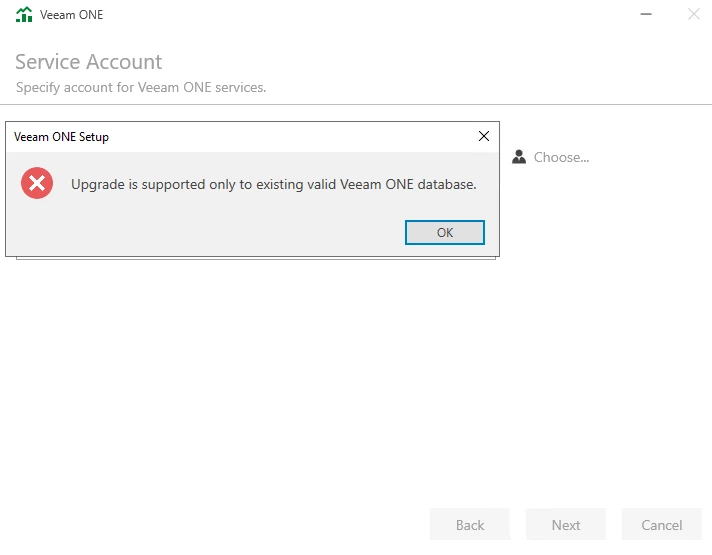
Upgrade is supported only to existing valid Veeam ONE database.

  • December 18, 2025
  • 5 comments
  • 23 views

waqasali
Forum|alt.badge.img+4

Dear Community,


What could be the issue while upgrading VONE to the latest version? 


5 comments

Chris.Childerhose
Forum|alt.badge.img+21
  • Veeam Legend, Veeam Vanguard
  • December 18, 2025

No idea since there is not much detail to the message.  Did you check the installation logs to see what they might say?  Would highly suggest support case for this one.


JMeixner
Forum|alt.badge.img+17
  • On the path to Greatness
  • December 18, 2025

I assume your existing database version is too old for the new VONE version and is not supported. From which VONE version are you upgrading?
Or you have deleted the old database before the upgrade.


waqasali
Forum|alt.badge.img+4
  • Author
  • On the path to Greatness
  • December 18, 2025

I’m not sure this setup generate logs file. 


Chris.Childerhose
Forum|alt.badge.img+21
  • Veeam Legend, Veeam Vanguard
  • December 18, 2025

I’m not sure this setup generate logs file. 

Yes Veeam installs do for all products - C:\ProgramData\Veeam folder.


Andanet
Forum|alt.badge.img+12
  • Veeam Legend
  • December 18, 2025

Mmmmmm Vaqas, if I remember right I received same error time ago. And I’m pretty sure it was a database Compatibility Level issue. 

please check this KB https://www.veeam.com/kb4790

All setup logs are located in C:\ProgramData\Veeam\Setup and in a different subfolder. You can check there








