Question

Unable to write/append to WORM tapes

  • December 11, 2025
  • 7 comments
  • 6 views

Hi everyone,

I’m using the Veeam community edition to backup some data to WORM tapes (I have an HP Ultrium LTO-4 1840 tape drive with HP LTO-4 WORM tapes). Unfortunately, I’m getting the following error when the backup job starts: “There is an old MTF block on tape. Cannot write a new one” after which the job fails before backing up any data.
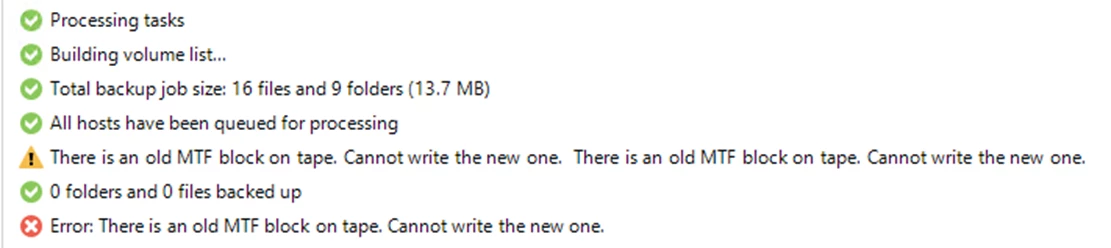


The WORM tapes are all brand new/sealed, so are completely blank and the write-protect toggle/switch on the tapes are all set to off. I created a WORM Media Pool and selected ‘Do not create, always continue using current media set’ for the Media Set.

On first-time insertion, the tapes were inventoried and added to the WORM media pool (Veeam successfully recognizes the tapes as WORM capable) so all looks good.

However I’ve tried 3 brand new tapes so far and they’ve all failed with the same error above, although the same backup job works perfectly on normal RW tapes, so I’m not sure if I need to do anything extra in Veeam to get WORM tapes working?

I’ve run the HP Tape Tools software and confirmed the drive is functioning correctly and firmware is up to date, so I’d be extremely grateful for any advice anyone can offer.

Many thanks in advance.

7 comments

Chris.Childerhose
Forum|alt.badge.img+21
  • Veeam Legend, Veeam Vanguard
  • December 11, 2025

What version of the Veeam CE edition are you using?  That is important as you may need to update.

The other thing I am seeing is getting the tool from the tape drive manufacturer and running an erase with that on the tape to see if that helps.


  • Author
  • New Here
  • December 11, 2025

Hi Chris, thanks for your help. Sorry I should have mentioned that I’m running Veeam CE version 13.0.1 (was previously running 12.3.2 but upgraded hoping that would fix). Good call on doing an erase - I have the HP tape Tools software so will try that and report back.

Appreciate your help! 

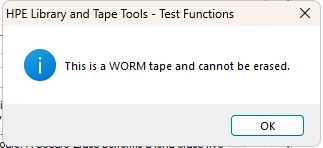
EDIT: Just tried an erase and got the message below which I guess kind of makes sense. 

Was definitely worth trying though. 


Chris.Childerhose
Forum|alt.badge.img+21
  • Veeam Legend, Veeam Vanguard
  • December 11, 2025

Hi Chris, thanks for your help. Sorry I should have mentioned that I’m running Veeam CE version 13.0.1 (was previously running 12.3.2 but upgraded hoping that would fix). Good call on doing an erase - I have the HP tape Tools software so will try that and report back. 

Appreciate your help!

Not a problem.  Let me know how the erase goes as I saw some people with similar issues in the Forums post about this.


  • Author
  • New Here
  • December 11, 2025

Hi Chris, the erase didn’t work unfortunately (please see the error above, which I guess makes sense lol) but I did notice the following warning in the drive health report so I’m going to get hold of a cleaning tape and run that to see if it helps and also run the drive assessment test, so will report back.


Chris.Childerhose
Forum|alt.badge.img+21
  • Veeam Legend, Veeam Vanguard
  • December 11, 2025

Yeah run the cleaning tape and see how it goes after that.  Should things still not work I know you are using the CE Edition but a support ticket would be the next course of action unfortunately.


  • Author
  • New Here
  • December 11, 2025

Thanks Chris - will do. I have a sneaky feeling that its more likely a hardware issue than software, but will raise a ticket with Veeam if I still have no joy and update the thread as I go. Thanks again.


Chris.Childerhose
Forum|alt.badge.img+21
  • Veeam Legend, Veeam Vanguard
  • December 11, 2025

No problem.  Always here to help and give suggestions.  Hopefully it is not software but don’t want to see it be HW either that means new tape drive.  😣