Question

Timeout issue with Proxmox VE backups

  • July 17, 2025
  • 6 comments
  • 215 views

I am experiencing a strange issue with Veeam BR and Proxmox VE.

The Proxmox VE backups have been working successfully for the past 6 Months.

Recently we added an extra network adapter to the Veeam BR host to provide access to another VLAN.

Since the addition of the extra network adapter the Proxmox VE backups have been failing.

When I run a test on the Proxmox Worker it fails because of a timeout after 300000 Milliseconds (5 Mins).

It is not the specific adapter that is the problem I can remove one of the other adapters and the test and backups work.

I have tried to adjust timeouts in the appsettings.json file but no success there.

From what I can see in the logs it is trying to connect to a backup appliance endpoint.

The endpoint it trying to get to is at 192.168.1.161 but when all four adapters are in play that address is the last one in line and it times out before it gets there.

I haven’t raised a support case with Veeam yet, just though I would see if anyone has experienced anything similar.


6 comments

regnor
Forum|alt.badge.img+14
  • Veeam MVP
  • July 17, 2025

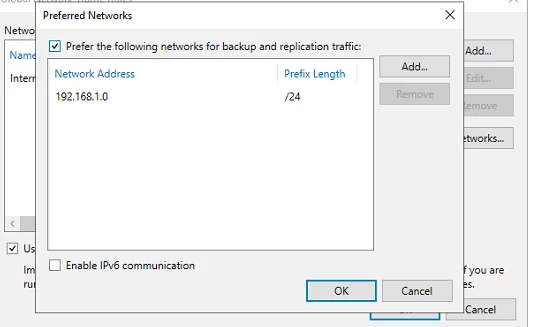
Hi ​@RazorJ58! Have you looked at the preferred network settings so far? If not, I would suggest that add the network there which should be used to connect to the worker VM, and re-run the test afterwards.

https://helpcenter.veeam.com/docs/backup/vsphere/select_backup_network.html?ver=120


  • Author
  • Not a newbie anymore
  • July 18, 2025

Good Morning ​@regnor 

Thanks for your prompt response & suggestion, I will give that a go later today and report back

Regards

John


  • Author
  • Not a newbie anymore
  • July 18, 2025

Hi ​@regnor 

I have checked the preferred network setting and the 192.168.1.0/24 subnet is there.

Thanks 

RazorJ58


regnor
Forum|alt.badge.img+14
  • Veeam MVP
  • July 18, 2025

And the 192.168.1.0/24 is directly connected to the VBR Server?


  • Author
  • Not a newbie anymore
  • July 20, 2025

Yes it is...


regnor
Forum|alt.badge.img+14
  • Veeam MVP
  • July 23, 2025

In that case I would suggest to open a case with our Support and let them check where the connection is failing.