Question

Scan Backup third party additionally xml

  • August 12, 2025
  • 12 comments
  • 107 views

I'm stuck.

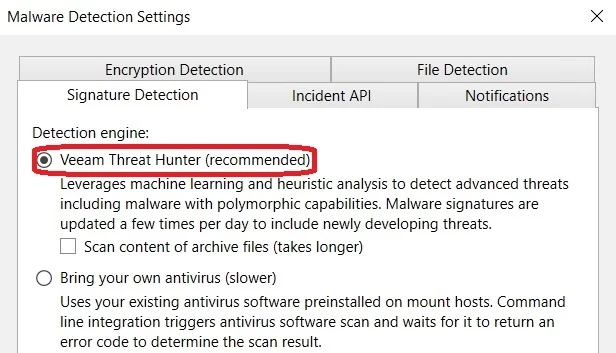
Veeam Threat Hunter is used by default to scan backups. 
I would like to scan my backups with my own software as well.

Why didn't Veeam leave this as an option in the XML file? 😣

 Has anyone tested this yet? So third party + Veeam Threat Hunter.

12 comments

lukas.k
Forum|alt.badge.img+12
  • Veeam Vanguard
  • August 12, 2025

Hi ​@Jan.B.

You can either use Veeam Threat Hunter or your own antivirus (which is Windows Defender by default) but not both at the same time. Here you have the option:


Best

Lukas


Mildur
Forum|alt.badge.img+12
  • Influencer
  • August 12, 2025

You can choose if you want to use Threat Hunter or your own Antivirus.

https://helpcenter.veeam.com/docs/backup/vsphere/malware_detection_signature_detection.html?ver=120


Best,

Fabian


  • Author
  • Not a newbie anymore
  • August 12, 2025

I am familiar with the GUI and documentation.

The Threat Hunter cannot be controlled via CLI (xml)? It is unclear why Veeam does not list this as an option in the XML.


Mildur
Forum|alt.badge.img+12
  • Influencer
  • August 12, 2025

The XML is required for third party antivirus applications. The XML will tell the backup server where to find the binaries and how to run them.

Veeam Threat Hunter is a native feature of Veeam Backup & Replication and does not to be configured with XML.


If you are looking for exclusion settings with Threat Hunter, then you can use registry keys: https://www.veeam.com/kb4688


Best,

Fabian


AndrePulia
Forum|alt.badge.img+9
  • Veeam Vanguard
  • August 12, 2025

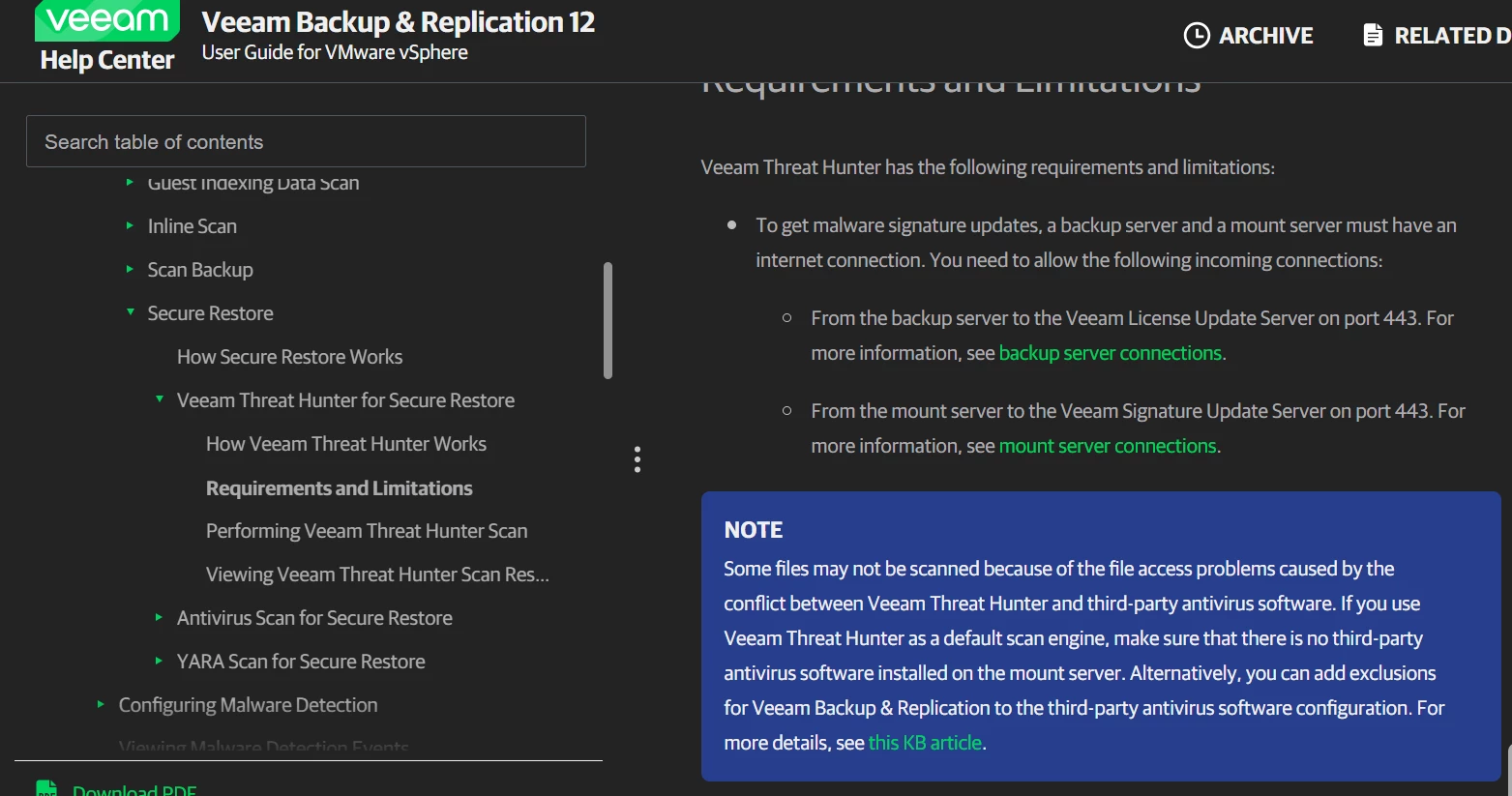
Hi ​@Jan.B. I’m reading the docs, and I think that is possible to use another software, but according to this article, you can use just one, see the note below.
 

Have a look at https://helpcenter.veeam.com/docs/backup/vsphere/av_scan_xml.html?ver=120, I think you can use this configuration to achiee your goal. 


Hope this helps.


coolsport00
Forum|alt.badge.img+21
  • Veeam Legend
  • August 12, 2025

@Jan.B. -

It looks like if you’re wanting to do a scan via CLI/PoSH (I assume that’s what you’re wanting?)...Veeam does provide this option:
https://helpcenter.veeam.com/docs/backup/powershell/start-vbrscanbackup.html?ver=120

...using the “EnableAntivirusScan” parameter. There probably needs to be more clarity with what A/V scanner is used. My assumption is Veeam uses what is configured in the UI (3rd party or Threat Hunter). Probably best to reach out to Support to verify.

Hope that helps.

Best.


  • Author
  • Not a newbie anymore
  • August 12, 2025

The XML is required for third party antivirus applications. The XML will tell the backup server where to find the binaries and how to run them.

Veeam Threat Hunter is a native feature of Veeam Backup & Replication and does not to be configured with XML.


If you are looking for exclusion settings with Threat Hunter, then you can use registry keys: https://www.veeam.com/kb4688


Best,

Fabian

I didn't ask about that.

I know it's a native function, but 
%CommonProgramFiles%\Veeam\Backup and Replication\Mount Service\Veeam.Backup.Antivirus.Scan.exe

comes with the /threathunter option and can be executed via CLI. So why not integrate it via XML? 
Why do you have to choose one or the other, when both would make sense?


coolsport00
Forum|alt.badge.img+21
  • Veeam Legend
  • August 12, 2025

“I know it's a native function, but 
%CommonProgramFiles%\Veeam\Backup and Replication\Mount Service\Veeam.Backup.Antivirus.Scan.exe

comes with the /threathunter option and can be executed via CLI. So why not integrate it via XML? “  ← ah, ok...so using the a/v exe. Hmm..maybe a feature request needed if there isn’t a switch available to use 3rd party a/v?


  • Author
  • Not a newbie anymore
  • August 12, 2025

Thanks guys, i will contact Veeam support :)

Apparently, no one has felt the need to use both Threat Hunter and third-party software.


waqasali
Forum|alt.badge.img+4
  • On the path to Greatness
  • August 12, 2025

Great insights from everyone. We have used XML configs for third party AV successfully. CLI option with PowerShell is a solid workaround when the GUI limits flexibility. Thanks for sharing!


Forum|alt.badge.img+3
  • Comes here often
  • August 14, 2025

The XML is required for third party antivirus applications. The XML will tell the backup server where to find the binaries and how to run them.

Veeam Threat Hunter is a native feature of Veeam Backup & Replication and does not to be configured with XML.


If you are looking for exclusion settings with Threat Hunter, then you can use registry keys: https://www.veeam.com/kb4688


Best,

Fabian

I didn't ask about that.

I know it's a native function, but 
%CommonProgramFiles%\Veeam\Backup and Replication\Mount Service\Veeam.Backup.Antivirus.Scan.exe

comes with the /threathunter option and can be executed via CLI. So why not integrate it via XML? 
Why do you have to choose one or the other, when both would make sense?


@Jan.B. , can you explain your use-case a bit more and why you want to launch scans using this method?

As noted previously, if you want to trigger Veeam Threat Hunter scans on-demand with your own scripted schedule, use Powershell

Threat Hunter is a built-in AV, but it’s not intended to give you a “free anti-virus” so to speak, it’s an integrated feature to ensure that there is always a means of scanning the backups. 

I’ve re-read your posts a few times and I’m not quite getting what workflow you’re trying to accomplish -- it sounds like you’d like to utilize all the cmd-line options for the AV that Threat Hunter is built off of, but this is not possible. (For non-technical reasons I’m assuming)

But I suppose the question remains on what the use case here is?

I’m getting the impression you want to use Threat Hunter to scan the production machines using the /s flag, but this will not be possible with Threat Hunter as noted. But can you confirm what the use case is?


AndrePulia
Forum|alt.badge.img+9
  • Veeam Vanguard
  • August 14, 2025

Thanks guys, i will contact Veeam support :)

Apparently, no one has felt the need to use both Threat Hunter and third-party software.


Hi ​@Jan.B. You could also ask as a feature request on the Veeam Forum like this example: https://forums.veeam.com/veeam-backup-replication-f2/feature-request-restore-point-consolidation-when-disk-is-full-t99576.html.