I am getting ready to deploy VEEAM V12 into my environment (finally - took 8+ months)
I am needing to delve into RBAC controls and granular access rights via AD
anyone have any advice or a direction they could point me in?
thanks in advance
Best answer by coolsport00
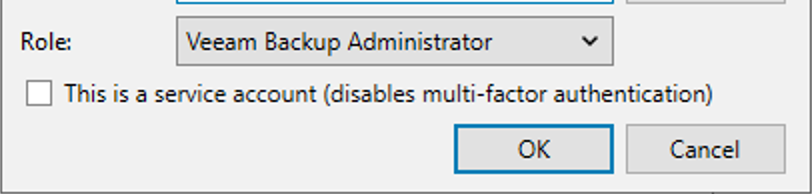
For sure enable MFA to start as Chris shared. Keep in mind, the accounts you use for this must be AD-based accounts..can’t enable for local accounts. Also, it’s not too intuitive to notice, but if you do select to disable MFA for an account, you do so for every account. In other words, if you select an acct in your list and deselect the option for MFA, all accounts no longer use MFA. But, there is a way to deselect for an individual account. Select the account, then the Edit button and tick the ‘This is a service account..’ option.
Also, as far as role permissions, the User Guide provides more details on the different VBR Roles available. They aren’t too granular, meaning, you can’t really add a Role to certain parts of the Console and another Role for a different part of the Console. It’s an all-or-nothing kinda deal.
For sure enable MFA to start as Chris shared. Keep in mind, the accounts you use for this must be AD-based accounts..can’t enable for local accounts. Also, it’s not too intuitive to notice, but if you do select to disable MFA for an account, you do so for every account. In other words, if you select an acct in your list and deselect the option for MFA, all accounts no longer use MFA. But, there is a way to deselect for an individual account. Select the account, then the Edit button and tick the ‘This is a service account..’ option.
Also, as far as role permissions, the User Guide provides more details on the different VBR Roles available. They aren’t too granular, meaning, you can’t really add a Role to certain parts of the Console and another Role for a different part of the Console. It’s an all-or-nothing kinda deal.