Answer

New to Veeam - jobs fail with no error code

  • December 3, 2021
  • 11 comments
  • 1055 views

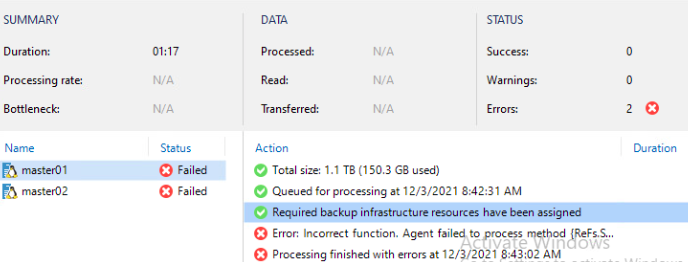
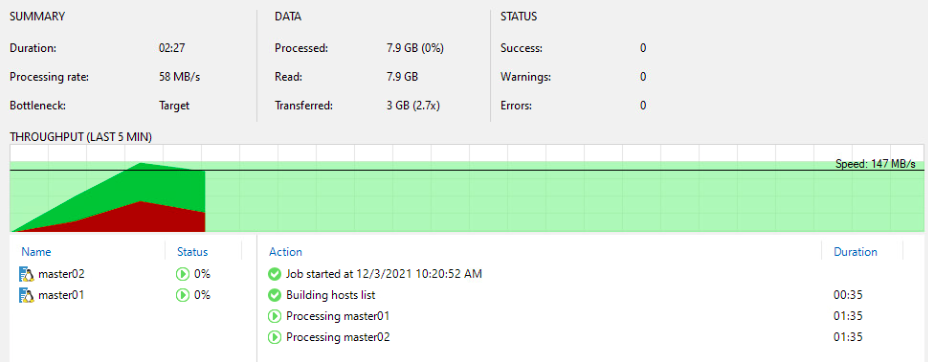
Hi - just testing with community edition. I ran a test backup to C:\backup but I did not have enough space. I’ve added a new repository which is a Synology NAS. I can see a vbm file is created for 2 of my linux hosts, but thats it. Immediately the backup fails. 

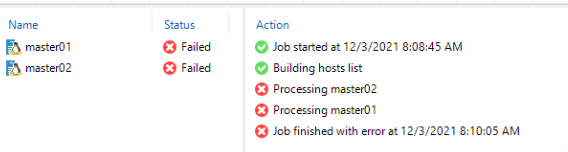
All I get is “finished with error”. Is there a log somewhere thats a tad more verbose than this? 
 

Best answer by Chris.Childerhose

@grcnj88 

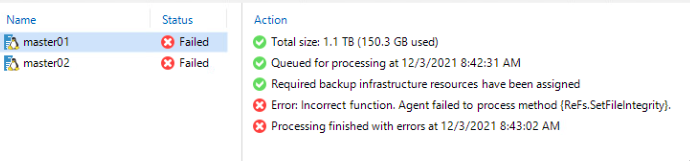
If you follow this article see if that helps this error - Agent failed to process method {ReFs.SetFileIntegrity} with Veeam and Synology DSM 7.0 - Jérémy Verda's IT Blog (jeremyverda.net)

11 comments

Chris.Childerhose
Forum|alt.badge.img+21
  • Veeam Legend, Veeam Vanguard
  • December 3, 2021

Yes you can do two things - 

  1. Highlight each of the servers to get a more detailed description of the error
  2. Check - C:\ProgramData\Veeam for the log files - typically under the Backup folder

If you hightlight one of the servers the right side should show more details.  Post that back here and check the log files.


Andanet
Forum|alt.badge.img+11
  • Veeam Legend
  • December 3, 2021

Hi - just testing with community edition. I ran a test backup to C:\backup but I did not have enough space. I’ve added a new repository which is a Synology NAS. I can see a vbm file is created for 2 of my linux hosts, but thats it. Immediately the backup fails. 

All I get is “finished with error”. Is there a log somewhere thats a tad more verbose than this? 

 

If you click on each server you can see all backup steps and the single error for each one. 

You can show us that messages?  


  • Author
  • New Here
  • December 3, 2021

Thanks Chris. Ok thats better. Here is what I get with that:


Chris.Childerhose
Forum|alt.badge.img+21
  • Veeam Legend, Veeam Vanguard
  • December 3, 2021

Hi - just testing with community edition. I ran a test backup to C:\backup but I did not have enough space. I’ve added a new repository which is a Synology NAS. I can see a vbm file is created for 2 of my linux hosts, but thats it. Immediately the backup fails. 

All I get is “finished with error”. Is there a log somewhere thats a tad more verbose than this? 

 

If you click on each server you can see all backup steps and the single error for each one. 

You can show us that messages?  

No you can in the picture you posted - click on master01 then the window on the right will change to show the specific server messages.  I cannot show anything.

Sorry I see it was posted.  Highlight the ReFS message to see what it says.


Chris.Childerhose
Forum|alt.badge.img+21
  • Veeam Legend, Veeam Vanguard
  • December 3, 2021

Thanks Chris. Ok thats better. Here is what I get with that:


Hightlight the ReFS message to see what it says and post it here.


  • Author
  • New Here
  • December 3, 2021

Sorry - this is better shot:


Chris.Childerhose
Forum|alt.badge.img+21
  • Veeam Legend, Veeam Vanguard
  • Answer
  • December 3, 2021

  • Author
  • New Here
  • December 3, 2021

Chris - I followed this random doc exactly. Everything seemed to check out. Until the backup.

https://xpertstec.com/how-to-add-nas-volume-veeam-backup-repository/


Chris.Childerhose
Forum|alt.badge.img+21
  • Veeam Legend, Veeam Vanguard
  • December 3, 2021

Chris - I followed this random doc exactly. Everything seemed to check out. Until the backup.

https://xpertstec.com/how-to-add-nas-volume-veeam-backup-repository/

Chris - I followed this random doc exactly. Everything seemed to check out. Until the backup.

https://xpertstec.com/how-to-add-nas-volume-veeam-backup-repository/

Check the article I posted about Registry key.


  • Author
  • New Here
  • December 3, 2021

Awesome. That reg key did it. Thanks again Chris!


Chris.Childerhose
Forum|alt.badge.img+21
  • Veeam Legend, Veeam Vanguard
  • December 3, 2021

Awesome. That reg key did it. Thanks again Chris!


No problem at all.  Glad that fixed it. :smiley:

Remember to mark an answer to the thread for others to see.