I’m trying to setup a new Veeam installation with a remote MS SQL 2022 server. I already did it in the past with another version of Veeam but this time I’m facing an issue.
The Database server is in another VLAN, rules are ok on the firewall. On the DB server, I disabled for the moment the Windows Firewall.
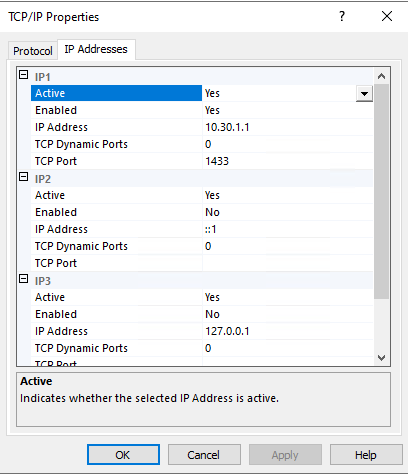
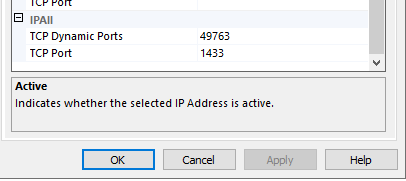
In the SQL Server Network Configuration I set TCP/IP like this:
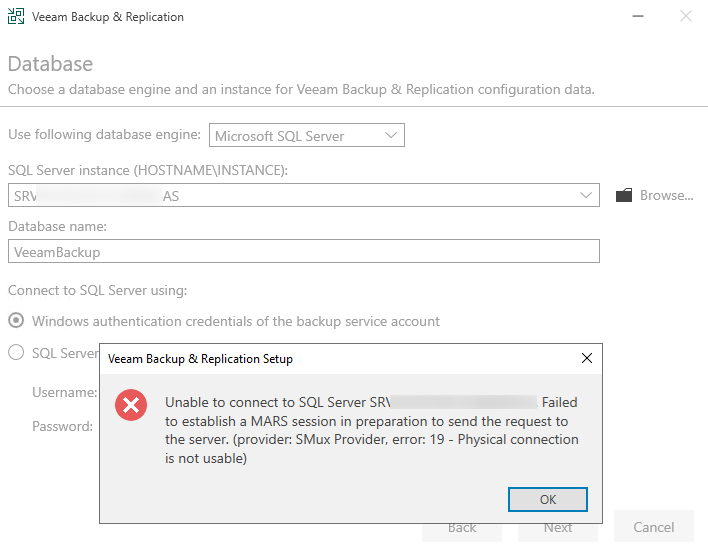
But during the Veeam installation I got the following error:
My service account for the installation is local administrator of the Veeam Server and has sysadmin permission on the SQL Server.
Any idea? 😄 I’m not an expert with MS SQL so I have maybe miss something.
Best answer by Stabz
Hey hey guys! thank you for your involvement ! 😀
Yesterday night I tried to install a SQL Server in the same network as my Veeam and tadam it works without problem … !
So the problem come from the Network for sure after all the tests. So this morning I call my Network engineer, to find the cause, after a quick look the rules are ok to allow the traffic. In the logs we have the match of the connection.
But ! On the rule there is IDS Security Inspection enabled ! And this inspection block a packet !
It’s a false positive, so we changed the inspection to IDS until to create an exception, since the connection between my Veeam and SQL works properly !
After all my tests I m reinstalling a new SQL Server from scratch to have a proper install. @Iams3le as you mentioned I always let the settings by default but for my tests I decided to force the port 😆!