Solved

MFA Exclusion

  • December 23, 2025
  • 5 comments
  • 31 views

hs08
Forum|alt.badge.img+1
  • Comes here often

When we enable MFA, then all users is forced to use MFA. 

In case we need do execute script by powershell, how we can exclude so the powershell script still can operate normally?


Best answer by AndrePulia

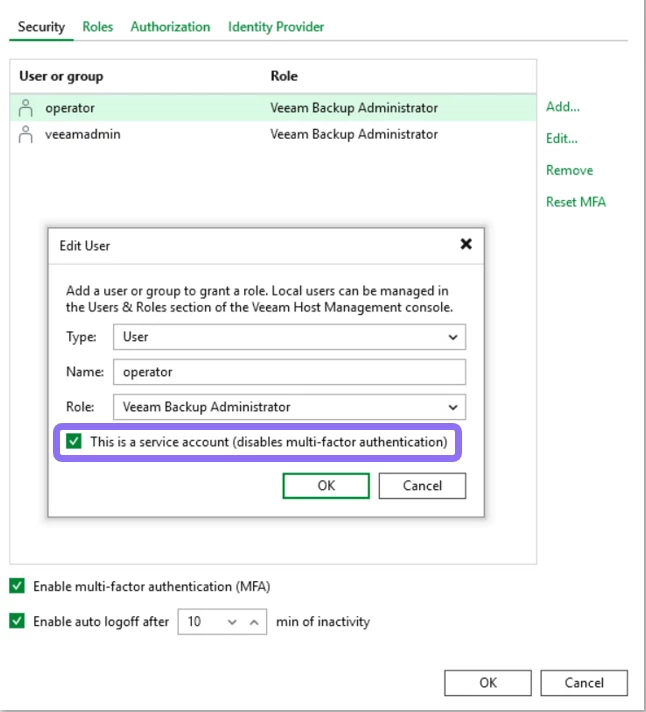
Hi ​@hs08 , you just need to check “this is a service account (disable multi-factor authenticatio) for the selected user. that is very simple.


5 comments

AndrePulia
Forum|alt.badge.img+9
  • Veeam Vanguard
  • Answer
  • December 23, 2025

Hi ​@hs08 , you just need to check “this is a service account (disable multi-factor authenticatio) for the selected user. that is very simple.


Chris.Childerhose
Forum|alt.badge.img+21
  • Veeam Legend, Veeam Vanguard
  • December 23, 2025

You have to make the account a service account.  IT tells you in the help.


AndrePulia
Forum|alt.badge.img+9
  • Veeam Vanguard
  • December 23, 2025

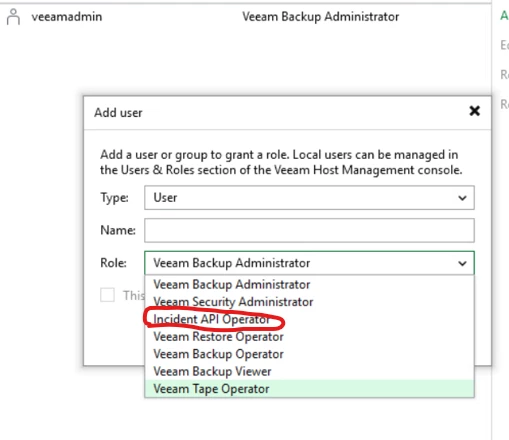
If you want to use REST API to manage malware detection, you can use the “Incident API Operator”


AndrePulia
Forum|alt.badge.img+9
  • Veeam Vanguard
  • December 23, 2025

thank you ​@hs08 for marking as best answer :-)


PeteSteven
Forum|alt.badge.img+5
  • Veeam Vanguard
  • December 23, 2025

Please note that passwords expire for “normal” users due to the DISA STIG policies on the VSA.

If you need a user without a password expiration, you should create a service acccount, this has no MFA.


Users with the Service Account role can be used in Veeam Backup & Replication by applications and backup infrastructure components for non-interactive connections.


Service Account

Has limited permissions to the system without access to the Veeam Host Management console.


Configuring Users - Veeam Backup & Replication User Guide