Question

Instant VM Recovery => Migrate to production Greyed out

  • November 22, 2022
  • 16 comments
  • 3759 views

Stabz
Forum|alt.badge.img+8

Hello guys,

One of my client can’t used the migrate to production feature. Is there some prerequisites? I miss maybe something :D
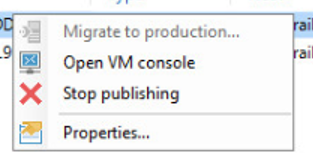
Thanks.

16 comments

Chris.Childerhose
Forum|alt.badge.img+21
  • Veeam Legend, Veeam Vanguard
  • November 22, 2022

Not sure if this helps but the VM you are trying to recover - did it come from a host that is an older version of where you are trying to recover to?  This explains the thing about host versions - Migrating VMware VMs recovered with Instant VM Recovery to Production. - Veeam Cookbook

Only thing I can think of that would prevent this.


MicoolPaul
Forum|alt.badge.img+23
  • November 22, 2022

Hi @Stabz, what is the status of the VM? and is this restored to vSphere/vCloud/Hyper-V etc?


I’d be tempted to try and gleem an error message out by using the PowerShell cmdlets to attempt a migration, see why Veeam says you can’t:

https://helpcenter.veeam.com/docs/backup/powershell/instant_cmdlets.html?ver=110


Stabz
Forum|alt.badge.img+8
  • Author
  • Veeam Legend
  • November 23, 2022

Sorry I was in another projet.
After a quick check, Veeam is in version 11a, I read somewhere maybe in the forum that there is a bug with this feature in this version.

The vm has been restored to the vSphere VxRail production in a new vLan. The VMs are up.

I ll continue to investigate asap


Nico Losschaert
Forum|alt.badge.img+11
  • On the path to Greatness
  • November 23, 2022

Hi @Stabz, are you using VMware hypervisor or Hyper-V hypervisor?


Stabz
Forum|alt.badge.img+8
  • Author
  • Veeam Legend
  • November 24, 2022

Hi @Stabz, are you using VMware hypervisor or Hyper-V hypervisor?

Hi @Nico Losschaert , VMware hypervisor 


coolsport00
Forum|alt.badge.img+21
  • Veeam Legend
  • November 28, 2022

@Stabz I’ve never seen that disabled/greyed out before. Would be curious to know the reason. Have you reached out to Support?

Cheers!


Stabz
Forum|alt.badge.img+8
  • Author
  • Veeam Legend
  • November 30, 2022

@Stabz I’ve never seen that disabled/greyed out before. Would be curious to know the reason. Have you reached out to Support?

Cheers!

Hello sorry for the delay, unfortunately I dont get any feedbackof my client  yet. I keep you in touch :). 


vNote42
Forum|alt.badge.img+12
  • On the path to Greatness
  • December 14, 2022

Any news on this topic, @Stabz ?


Stabz
Forum|alt.badge.img+8
  • Author
  • Veeam Legend
  • December 15, 2022

Any news on this topic, @Stabz ?

Hello, unfortunately not… my customer have move the vms directly from vSphere… so I ll not have the final answer :(


Hello, I had faced the same issue yesterday. Tried to use Migrate to production option but it failed, then it turned greyed out. So I performed a Quick Migration from the inventory page. It worked! If you can use vMotion is an option too, the best path actually.


Rick Vanover
Forum|alt.badge.img+10
  • RICKATRON
  • December 15, 2022

Alternative idea is set up a replication job then do a failover. (Source IVMR VM, Target new cluster)


JonahMay
Forum|alt.badge.img+11
  • Veeam Vanguard
  • December 16, 2022

Did you IR to an individual host on a cluster where DRS is enabled? I believe I’ve seen this happen occasionally if vCenter migrates the VM to a different host in the cluster when an individual host was selected in the IR settings. 


  • New Here
  • December 22, 2022

On the Backup and Replication console, go to Inventory and look at the Virtual Infrastructure. Mine is VMware. Drill down the subtree until you see your Cluster and click on it. In the right pane, right click on the VM that you're having trouble with and click Quick Migration, then follow the prompts. Once it completes it will remove the VM from the Instant Recovery window. Hope this helps other people.


Stabz
Forum|alt.badge.img+8
  • Author
  • Veeam Legend
  • December 23, 2022

Hello, I had faced the same issue yesterday. Tried to use Migrate to production option but it failed, then it turned greyed out. So I performed a Quick Migration from the inventory page. It worked! If you can use vMotion is an option too, the best path actually.

Alternative idea is set up a replication job then do a failover. (Source IVMR VM, Target new cluster)

Hello guys, thanks for the tips, good to know if i encounter the problem again.
 

Did you IR to an individual host on a cluster where DRS is enabled? I believe I’ve seen this happen occasionally if vCenter migrates the VM to a different host in the cluster when an individual host was selected in the IR settings. 

The VM has been IR in a cluster, but I don’t remember if DRS is enabled in this infrastructure, but this could be an explanation ! Thanks 


  • New Here
  • January 7, 2024

The problem is when you pick this option (Move to production), start this process and it break. You can not start it again. VB&R ver. 11.0.1.1261. I think it is a bug , it should be an option to repeat that. Don’t you think?


coolsport00
Forum|alt.badge.img+21
  • Veeam Legend
  • February 12, 2024

Hi @Stabz -

I was just following up on your post here. It appears you weren’t really able to follow up with your customer who had the issue with the IR process migrating to production? Was there a comment provided which you think may have helped if you were able to? If so, could you mark one as ‘Best Answer’ to benefit others who may experience the same issue?

Thank you.