How to make a redundent copy of repository in Veeam Cloud Connect and Service Provider?

  • April 17, 2025
  • 5 comments
  • 37 views

Forum|alt.badge.img

We are a service provider and using VCC and VSPC. We have two repository like NAS and cloud repository. We had connected multiple company with VSPC through VCC and taking backup to VCC NAS repository. We need to make a secondary copy of NAS repository to redunent and highly available the customer data.
How can we do the redundency of repository like NAS to Cloud in Veeam Service Provider?

5 comments

Chris.Childerhose
Forum|alt.badge.img+21
  • Veeam Legend, Veeam Vanguard
  • April 17, 2025

The best way I can think of getting a second copy would be to have the NAS repo as part of a SOBR with capacity tier or archive tier.  Since with VCC the only job you can run is tenant to tape and nothing else.


Tommy O'Shea
Forum|alt.badge.img+5
  • Veeam Legend
  • April 17, 2025

SOBR with an object repository as a capacity tier would meet your needs well. Configure it with at least the copy policy, and that will allow it to keep the backup data on both the performance and capacity tier.

Bonus points if you’re using a hardened repository and immutable object storage 😉


Forum|alt.badge.img
  • Author
  • Comes here often
  • April 17, 2025


@Chris.Childerhose ​@Tommy O'Shea 
Thanks for your reply!

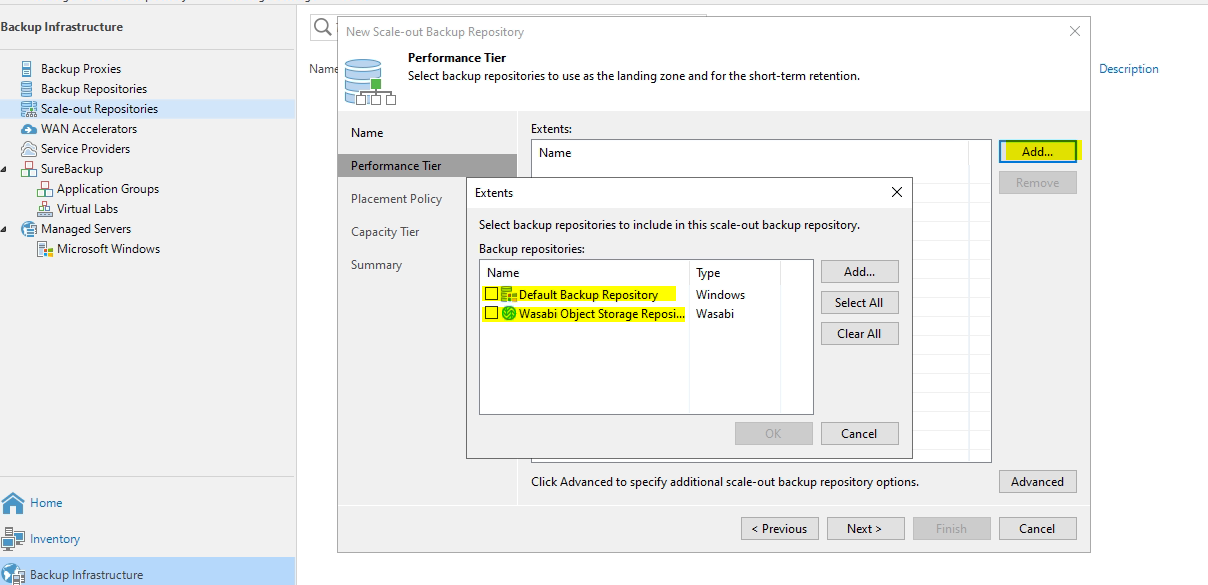
We have NAS repository and Wasabi Object Storge cloud repository.
I’m trying to create SOBR but unable to get NAS repository. Is there anything required to apply. Or should we unassign the NAS repository/policy from clients?


Chris.Childerhose
Forum|alt.badge.img+21
  • Veeam Legend, Veeam Vanguard
  • April 17, 2025


@Chris.Childerhose ​@Tommy O'Shea 
Thanks for your reply!

We have NAS repository and Wasabi Object Storge cloud repository.
I’m trying to create SOBR but unable to get NAS repository. Is there anything required to apply. Or should we unassign the NAS repository/policy from clients?


According to the help guide here - Performance Tier - User Guide for VMware vSphere

You should be able to select this repo in SOBR but might need to unassign it from clients.


Tommy O'Shea
Forum|alt.badge.img+5
  • Veeam Legend
  • April 17, 2025

SMB repositories are definitely supported as SOBR performance tier extents.

What I think is happening here is that you can’t convert a standalone repository being used for cloud connect that has tenant quotas defined on it into a SOBR. The folder structure for tenant backups is different and would break everything.

You could try to create another instance of an SMB repo under another folder (not a subfolder of the original SMB repository), add it to the SOBR, then run the Switch-VBRCloudTenantsQuotaRepositoryToSOBR command to have the folder structure built, then manually copy the tenant data into the new folder.

Once you’ve verified the files are copied over, confirm that in the cmdlet and it will remap the tenant quota for you.

When that is done, you should be able to clean up the old folder/files.