Question

Forever forward incremental backup + ObjectFirst and Full backup for cloud offisite

  • September 18, 2025
  • 6 comments
  • 52 views

Object First storage is used in our main data center.

Regional backups are first stored locally, then copied to Object First at the main site using a forever incremental job (using Scale Out repo and Object First configured as capacity tier)

Now If full backup data needs to be sent to AWS (e.g., when decommissioning a regional application server), it can be done from the main site through a secondary copy—without using the regional office’s primary copy.


6 comments

Chris.Childerhose
Forum|alt.badge.img+21
  • Veeam Legend, Veeam Vanguard
  • September 18, 2025

The answer is it depends based on your configuration but you should be able to accomplish this.  Is there a VBR server in the primary office or just the regional office?  You could use AWS as archive tier as well.


AndrePulia
Forum|alt.badge.img+9
  • Veeam Vanguard
  • September 18, 2025

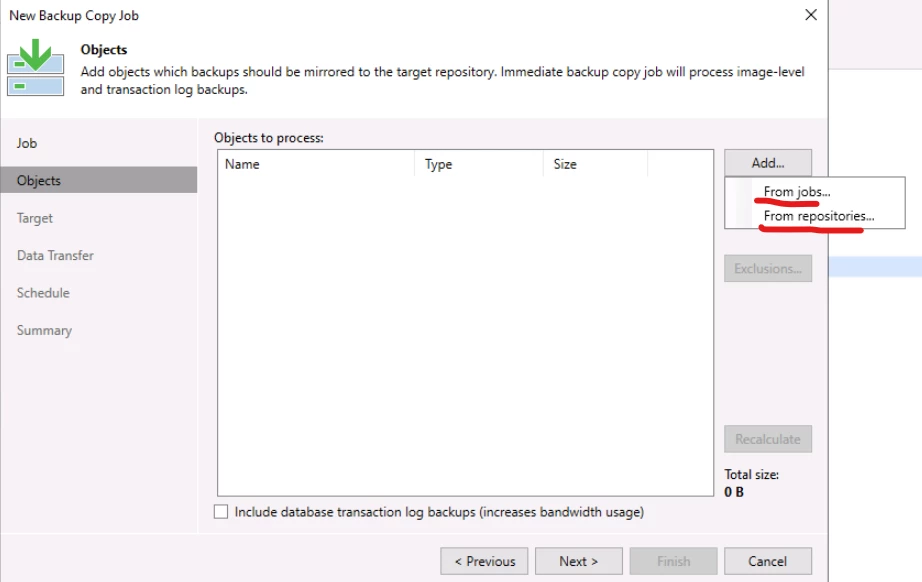
@dlinfrastructureteam If I understood your needs well, I thonk you can use the BCJ for that.

BCJ allows to copy content from Jobs or Reposotories as a source, so you can select one specific repo to create your secondary copy.

see the screensht below.

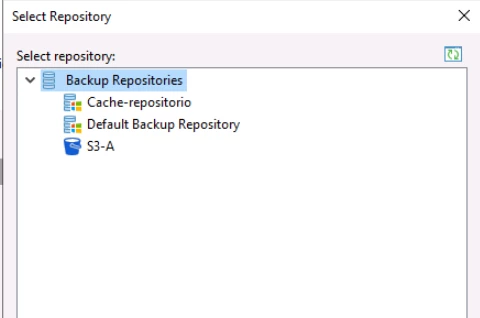
from Repo

Let me know it fits for you.


Tommy O'Shea
Forum|alt.badge.img+5
  • Veeam Legend
  • September 18, 2025

@dlinfrastructureteam If I understood your needs well, I thonk you can use the BCJ for that.

BCJ allows to copy content from Jobs or Reposotories as a source, so you can select one specific repo to create your secondary copy.

see the screensht below.

from Repo

Let me know it fits for you.

If they are using the object storage in a scale-out repository as a capacity tier, only the scale-out will show as an option to select as a source, and it would almost definitely pull from the performance tier when doing a backup copy job.


If their object storage at the main office was added to regional veeam server as a direct-to-object repository and had backup copies being sent to it, then yes it could be used as a source for another backup-copy job.


kira.bezhanova
Forum|alt.badge.img+3
  • Comes here often
  • September 23, 2025

Do you need to offload the entire chain or a specific restore point? If it is the latter, you can use the “Export” function: https://helpcenter.veeam.com/docs/backup/vsphere/exporting_backups.html?ver=120 If the entire chain, it doesn’t look to be doable for me, there is a copy function, but it will move data from capacity tier to performance tier first. 

Is there any particular reason why you are using SOBR instead of standalone repos with backup copy jobs?


Chris.Childerhose
Forum|alt.badge.img+21
  • Veeam Legend, Veeam Vanguard
  • October 22, 2025

@dlinfrastructureteam - just wanted to follow up and see if you were able to get an answer from this thread? If so please mark the best answer or if you figured it out post the answer then mark that one as the best answer.


Chris.Childerhose
Forum|alt.badge.img+21
  • Veeam Legend, Veeam Vanguard
  • November 17, 2025

@dlinfrastructureteam - just wanted to follow up and see if you were able to get an answer from this thread? If so please mark the best answer or if you figured it out post the answer then mark that one as the best answer.